EasyManua.ls Logo

Gewa G9 - Page 104

Gewa G9
180 pages
Print Icon
To Next Page IconTo Next Page
To Previous Page IconTo Previous Page
Loading...
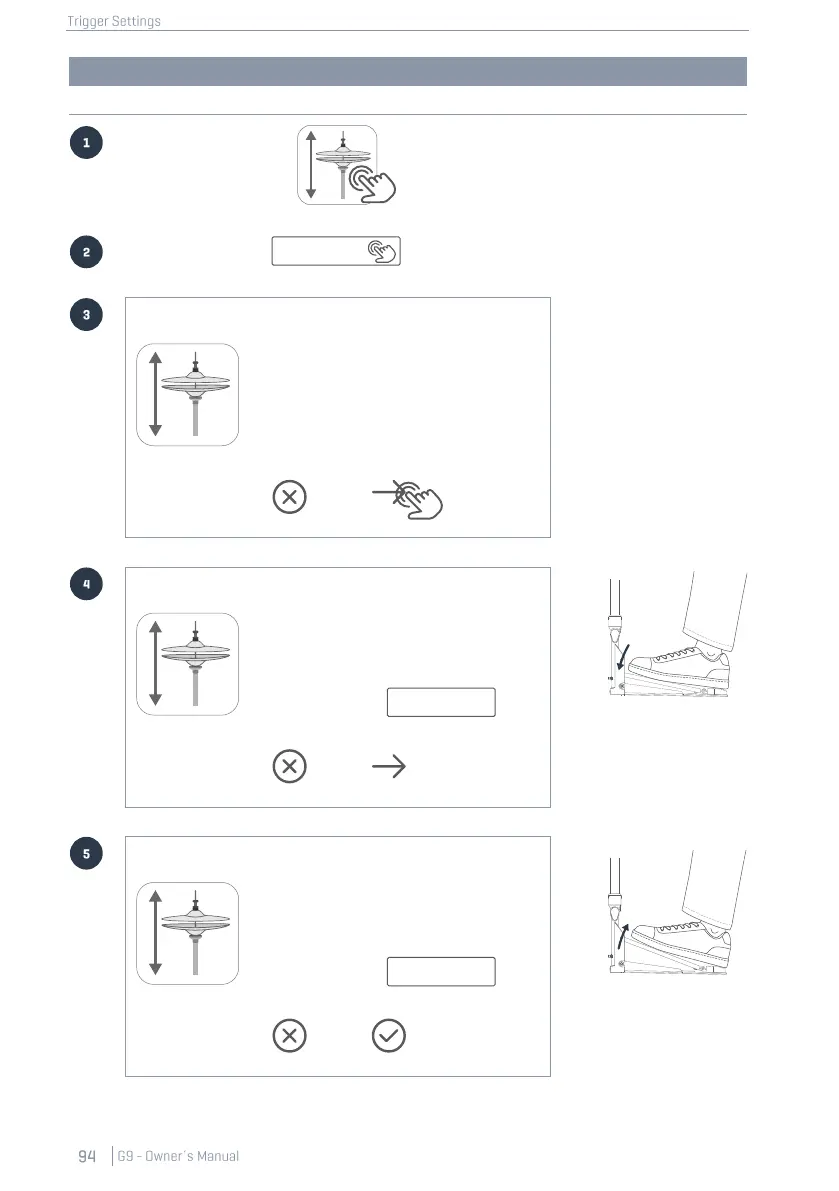
G9 Hi-Hat Calibration
Graphic Elements
Hints
Tap the Hi-Hat Pedal icon
in module 2 to select the
Hi-Hat Controller/Pedal.
Tap the [Calibrate…]
button in module 3
Hi-Hat Calibration
High Position
109
Low position
90
With this dialog you can calibrate
the parameters Low Position and
High Position of your Hi-Hat Pedal.
For best results follow the instruc-
tions step by step.
Tap [Next] to start the calibration.
Cancel
Next
The start screen with a
short explanation
Tap [Next] to start the
calibration.
Hi-Hat Calibration
High Position
109
Low position
90
Low Position
Press the pedal all way down
and tap [Calibrate].
After that tap [Next].
Cancel
Next
Apply STRONG pressure
(as you would do for tight
Hi-Hat sounds) before
tapping
[Calibrate]
Hi-Hat Calibration
High Position
109
Low position
84
High Position
Release the pedal completely
and tap [Calibrate].
After that tap [Finish].
Cancel
Finish
Release the pedal com-
pletely or remove the foot
before tapping
[Calibrate]
Calibrate…
Calibrate
Calibrate

Other manuals for Gewa G9

Related product manuals