9
Preparing to use the handset
S1_SL1 / englisch / A31008-X150-B103-1-7619 / starting.fm / 02.10.2003
Preparing to use the handset
Removing protective film
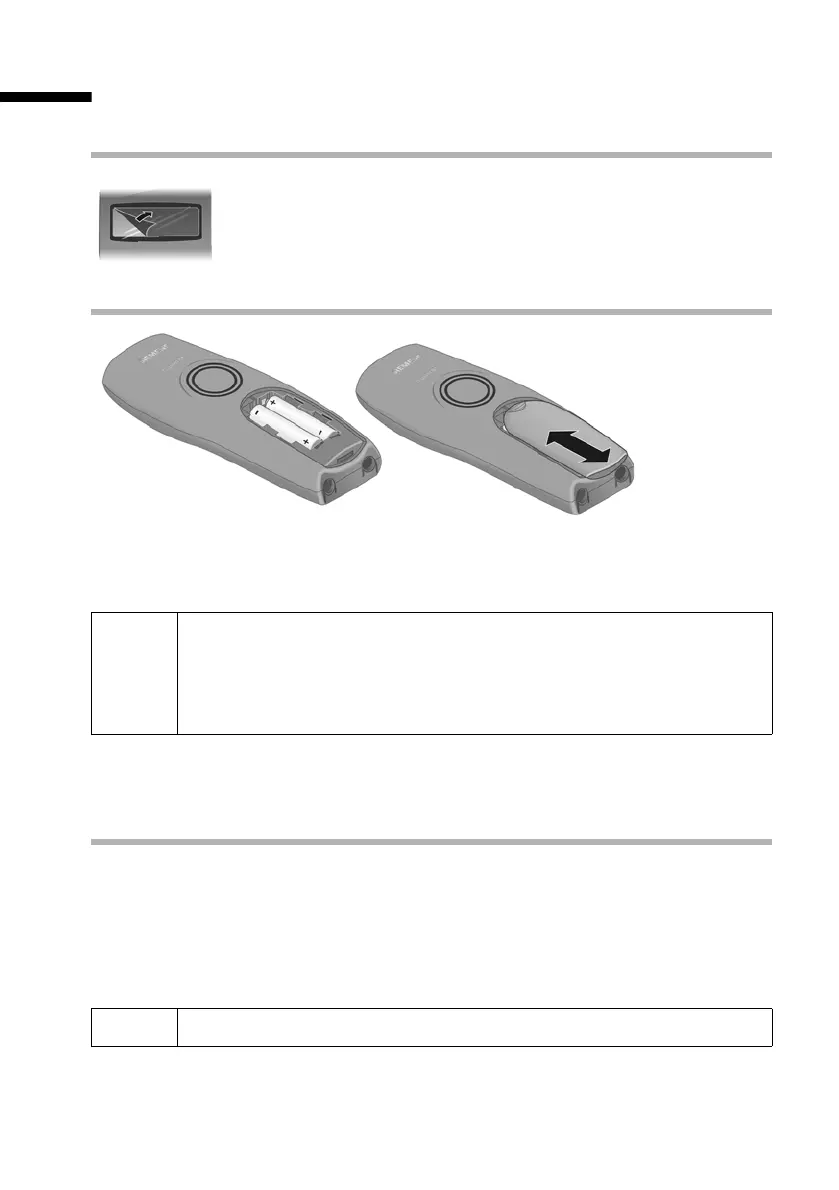
Inserting the batteries
◆ Insert the batteries ensuring correct polarity (see figure on left).
◆ Place the cover on the battery compartment about 3 mm down from the latch and
push it up until it clicks into position.
Opening the battery compartment
Press on the grooved area of the cover and slide back.
Charging batteries
The charging is indicated in the upper right of the display where the charging status V
flashes:
The display is protected by a plastic film.
Please remove the protective film!
W
Use only the rechargeable batteries recommended by Siemens on
page 153! Never use conventional batteries (non-rechargeable) or other
battery types as this may cause significant damage to health and prop-
erty. For example, the jacket of the battery could be destroyed (hazard-
ous). The phone could also malfunction or be damaged.
= Batteries (almost) empty V Batteries
2
/
3
charged
e Batteries
1
/
3
charged U Batt. fully charged
i
To register additional handsets, refer to page 20.



 To Next Page