126
System settings
S1_SL1 / englisch / A31008-X150-B103-1-7619 / settings_bs.fm / 02.10.2003
The answering machine in the network of the Deutschen Telekom is the network mail-
box.
The network mailbox is pre-set for fast access as the factory default for devices without
AM in Germany, i.e., the phone number of the network mailbox is entered. The phone
number of the network-mailbox is 0800 330 2424.
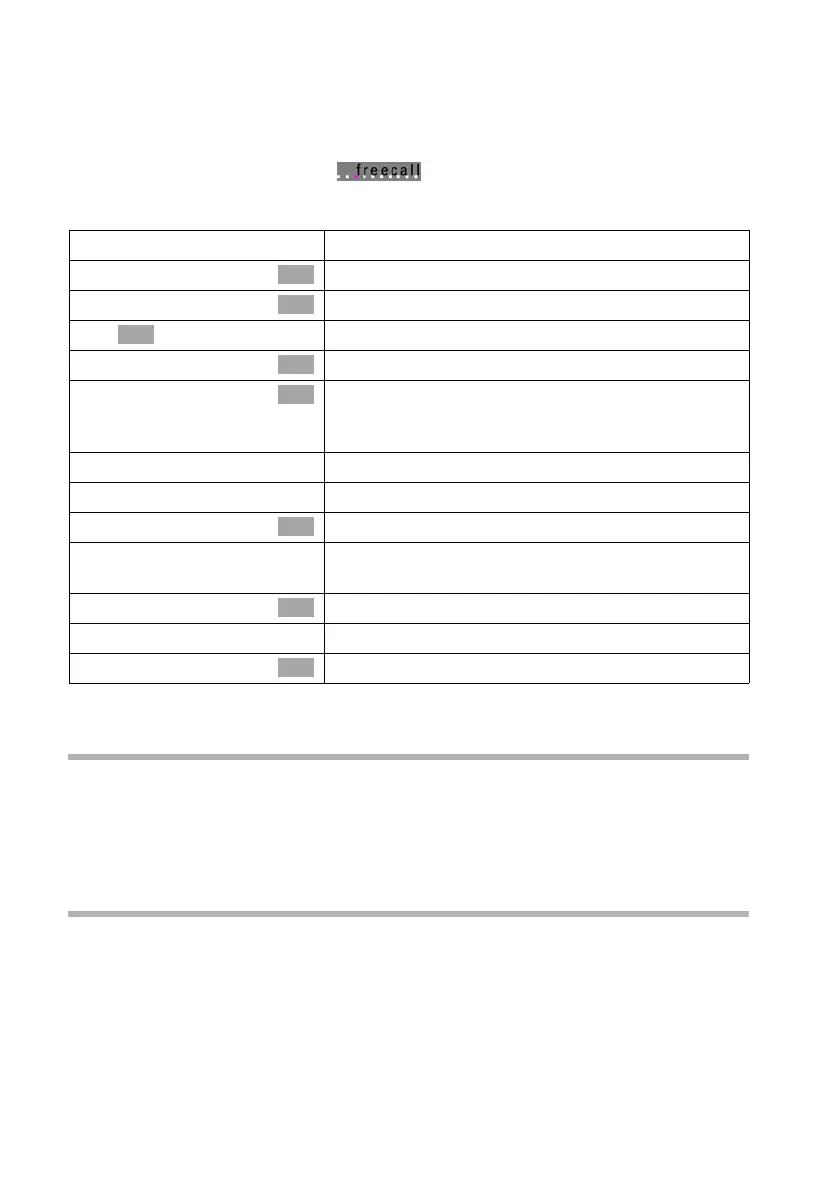
Entering/deleting a phone number in the network.
This setting is now valid for all registered handsets and the base.
Calling an answering machine in the network
Press 1 and hold. This connects you directly to the answering machine in the net-
work. If you now press the d handsfree key, you can 'open listen' to the announcement
of the answering machine in the network and operate the answering machine in the
network easily and conveniently.
Displaying/playing back a message from the answering machine in the
network
When a message arrives for you, you get a call from the answering machine in the net-
work. On the screen, the number, e.g., for the network mailbox 0800 330 2424, is dis-
played if you have applied for Calling Line Identification. If you accept the call, the new
messages are played back. If you do not accept the call, the number of the answering
machine in the network will be stored in the list of missed calls and the message key
flashes.
v
Open the menu.
s Base Settings
Select the menu item and confirm.
s Settings
Select the menu item and confirm.
~
Enter system PIN if required (page 91).
s System settings
Select the menu item and confirm.
s Network Mailb.
Select the menu item and confirm. The phone
number appears in the display if it has already been
stored.
v
Open the submenu.
either ...
Enter or change an entry:
Change number
Confirm.
~ Í
Enter or change the phone number of the answering
machine in the network and open the submenu.
Save entry
Confirm.
or ...
Delete a number:
s Delete number
Select the menu item and confirm.
OK
OK
OK
OK
OK
OK
OK
OK



 To Next Page