84
Configuring the system on the DECT Manager
Gigaset N720 DECT IP Multicell System / engbt / A31008-M2314-L101-2-7619 / web-conf.fm / 06.02.2012
Version 2, 06.08.2010
Additional VoIP settings
On this page you can make settings for sending DTMF signals and for voice quality, set up
call transfer and ringback, and configure settings for the ports for establishing VoIP
connections.
Settings
¢ Tel ephony ¢ Advanced VoIP settings
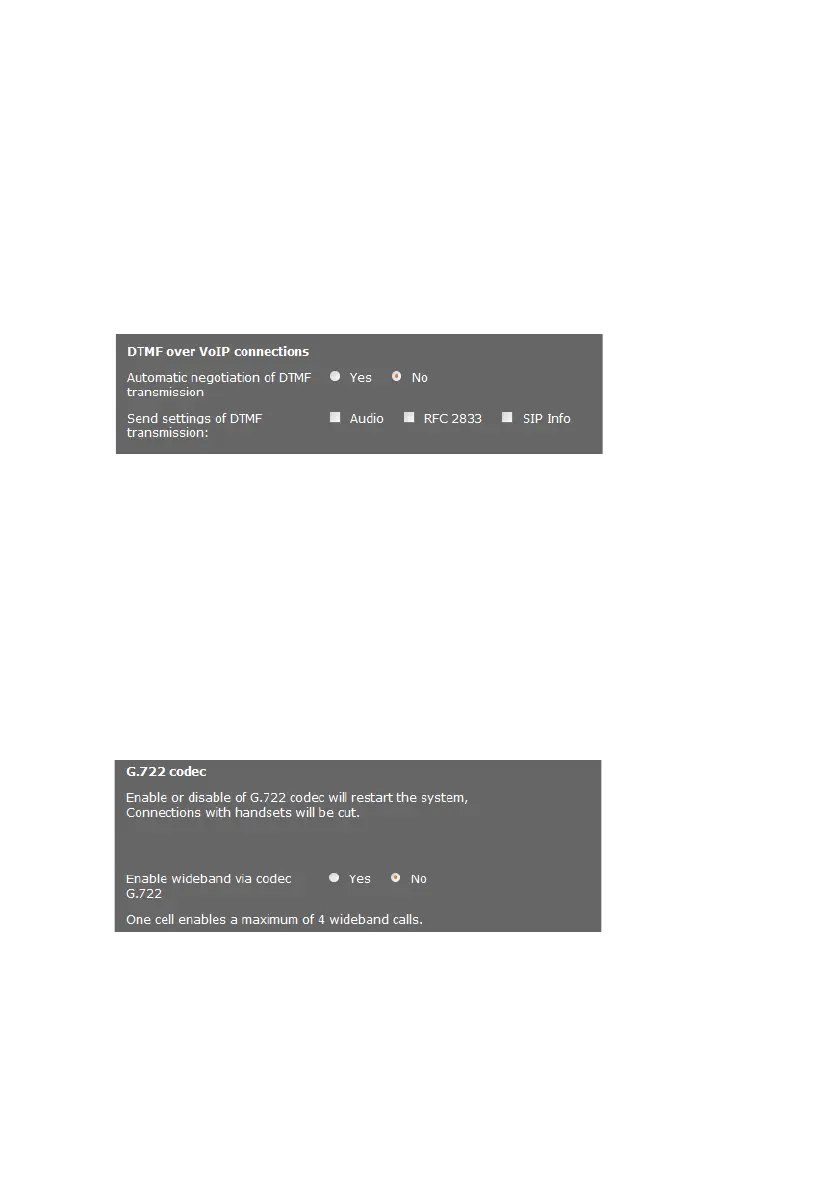
DTMF in VoIP connections
To send DTMF signals via VoIP, you must first define how key codes should be converted
into and sent as DTMF signals: as audible information via the speech channel or as a "SIP
Info" message.
Ask your provider which type of DTMF transmission is supported.
You have the following options:
¤ If you activate the option Ye s, the phone automatically attempts to set the suitable
DTMF signalling type for the current codec for each call.
¤ If you disable the No option, you can use the other options to specify the DTMF
signalling type.
¤ Enable Audio or RFC 2833 if DTMF signals are to be transmitted acoustically (in
voice packets).
¤ Enable SIP Info if DTMF signals are to be transmitted as code.
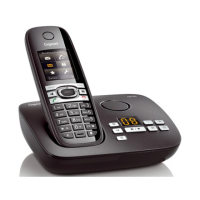
Enabling the G.722 wideband telephony codec on the DECT network
Both parties involved in a phone connection (caller/sender and recipient) must use the
same voice codec. The voice codec is negotiated between the sender and the recipient
when establishing a connection.
The G.722 codec (wideband connection) enables high voice quality, but only a maximum
of four simultaneous connections per base station.
¤ Enable the G.722 codec to permit wideband transmission for all handsets on the DECT
network.


 To Next Page