95
Configuring the system on the DECT Manager
Gigaset N720 DECT IP Multicell System / engbt / A31008-M2314-L101-2-7619 / web-conf.fm / 06.02.2012
Version 2, 06.08.2010
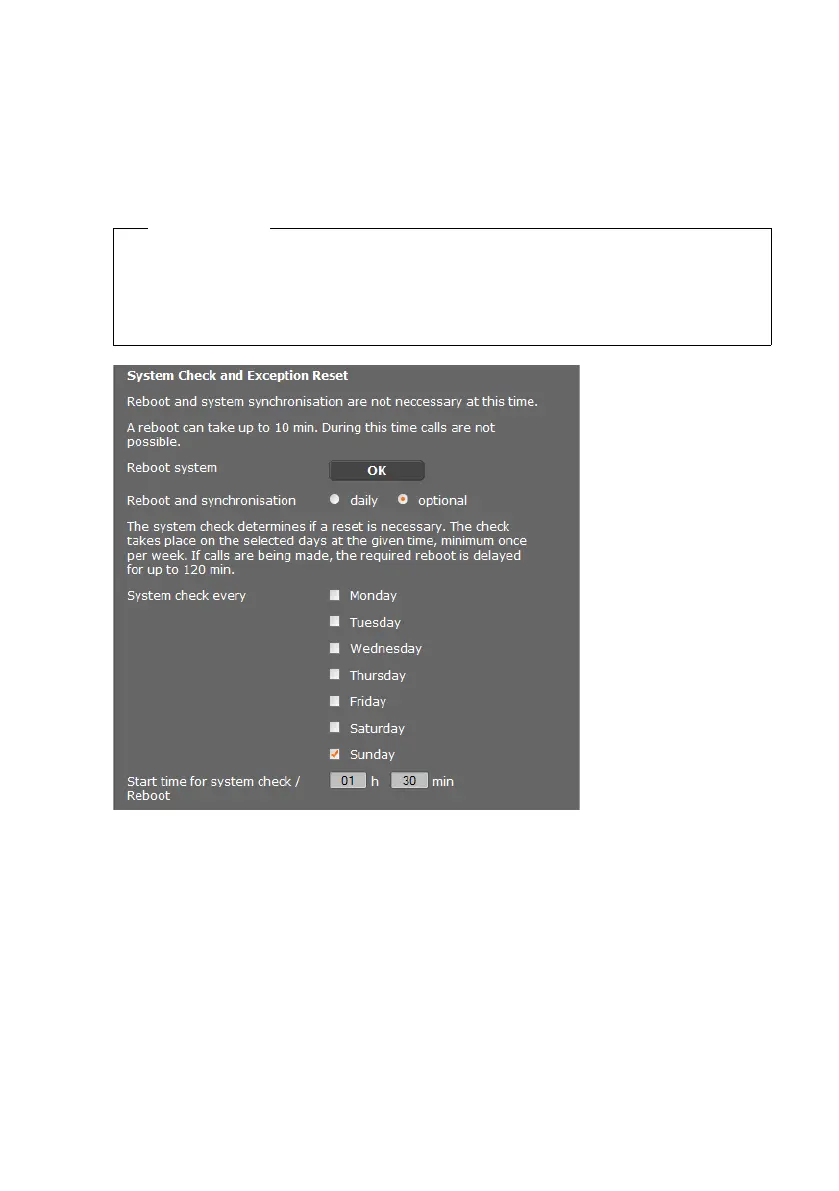
Rebooting the system
Your Gigaset N720 DECT IP Multicell System can be set to automatically reboot regularly
at a convenient time if required as a result of a system check. This does not normally cause
the system to become unstable, but if an unforeseeable system error should occur, you
can reboot the system manually.
Settings
¢ Management ¢ Reboot
Immediate reboot
¤ Click on OK next to Reboot system.
The reboot begins immediately. All existing connections are terminated.
Regular system check
The system regularly checks whether a reboot is necessary. If it determines that a reboot
is required, this operation is performed. If a phone call is in progress, the reboot will be
postponed by up to two hours.
The check will be performed at the specified time on the selected days, at least once per
week.
¤ Select a day (or Daily) and enter a time for the check. The default setting, controlled by
a random generator, is between 12.30 a.m. and 3.30 a.m. on a Sunday.
¤ Click on Set to save your settings on the page.
Caution
Only perform this function if the following message is displayed:
Reboot and system synchronisation are recommended.
No calls can be made while the phone system is rebooting. Rebooting can take up to
a few minutes.


 To Next Page