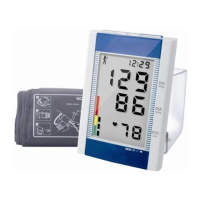
3.3 Measure Result Interface
The measure result includes:
SYS: systolic blood pressure (mmHg/kPa)
DIA: diastolic blood pressure (mmHg/kPa)
PR: pulse rate (bpm)
If there is an error during the measurement, an error message text will appear on the screen. If the
PROMPT SOUND is set to be on, the sound would occur. Press the SILENCE key to stop the sound
and press it once more to continue.
3.4 System Menu
In the main interface, according to the text in the middle bottom of the screen, press
button, then
enter the system menu and execute different option operations by using
and buttons.


 To Next Page