50
Girard Systems © 2005
NOTE: Before moving to the next awning disconnect power to each previously programmed
awing.
1. Turn power ON to the first awning you wish to program.
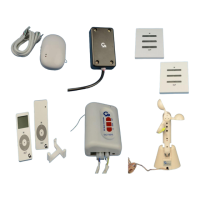
2. Make sure you have both the remote control and wireless switch in hand.
3. Using remote control, press the gray channel selector to set sequence. (i.e., first awning
should be indicated by the first light, second awning by second light etc.). The
corresponding LED light will blink for three (3) seconds indication channel.
4. Press the transmitter UP and DOWN buttons simultaneously until the motor jogs forward
and back.
5. Hold the remote within ten feet of the motor and press the UP button. If the awning moves
in the UP direction move to step 7.
6. If the awning goes down instead of UP, press and hold the stop button until the motor jogs.
Confirm the UP button now makes the awning retracts.
7. Using the remote control confirm you are on the proper channel then press and hold the
program button on the back of the remote. Awning will jog indicating correct
programming.
8. Select the channel you just programmed with the remote control. Press and hold the
program button on the back to the remote control again – until motor jogs. Immediately find
the same channel on your wireless switch using the set button. Then push and hold program
button on the side of the wireless switch. Motor will jog confirming programming.
9. Select the channel you just programmed with the remote control. Again press and hold the
program button on the back of the remote control until the awning jogs.
10. Select the ALL Channel the remote control (all LED’s light up). Press and hold the program
button on the back to the remote control. Awning will jog confirming group operation.
11. Repeat steps 9-10 using the wireless switch.
12. The remote control and wireless switch are now programmed for individual or group
control.



 To Next Page