12
NOTE
● The meter comes with a set of default target range. Please consult
your doctor to determine a target range that works best for you and
customise the target range accordingly.
● This function is applicable to blood glucose testing ONLY.
● The ranges above are fixed between 3.3 – 5.5 mmo/L for low and 5.6
– 12.2 mmo/L for high.
5. Setting the beep
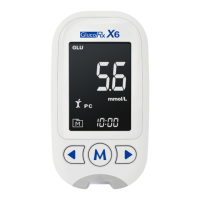
With the beep displays, press ◄ or ► to switch between “On” and “Off”.
Press M.
6. Setting the reminder alarms
Your meter has 4 reminder alarms. The meter will display “On” or
“OFF” and “
”. If you do not want to set an alarm, press M to skip this
step. Or press ◄ or ► to select “On”, then press M. With the HOUR/
MINUTE flashing, press ◄ or ► to select the correct HOUR/ MINUTE.
Press M and go to the next alarm setting.
NOTE
When the alarm beeps, press ► to switch it off. Otherwise, it will beep
for 2 minutes then switch off.
7. Setting the Bluetooth function
With “BLE” on display, press ◄ or ► to select “On” or “OFF”. Press M.
NOTE
This function refers to Bluetooth data transfer. If “On” is selected, your
result will be transferred automatically after the test.
Congratulations! You have completed all settings!
NOTE
● These parameters can ONLY be changed in the settings mode.
● The meter will switch off automatically if it is idle for 1 minute during
the settings mode.


 To Next Page