- 23 -
4.11 Switching off Freepass
Operation
Application
The activated Freepass (factory setting: Freepass deactivated) causes the status to switch between open and
closed each time it is identied.
To deactivate again, the minus card is required.
Description
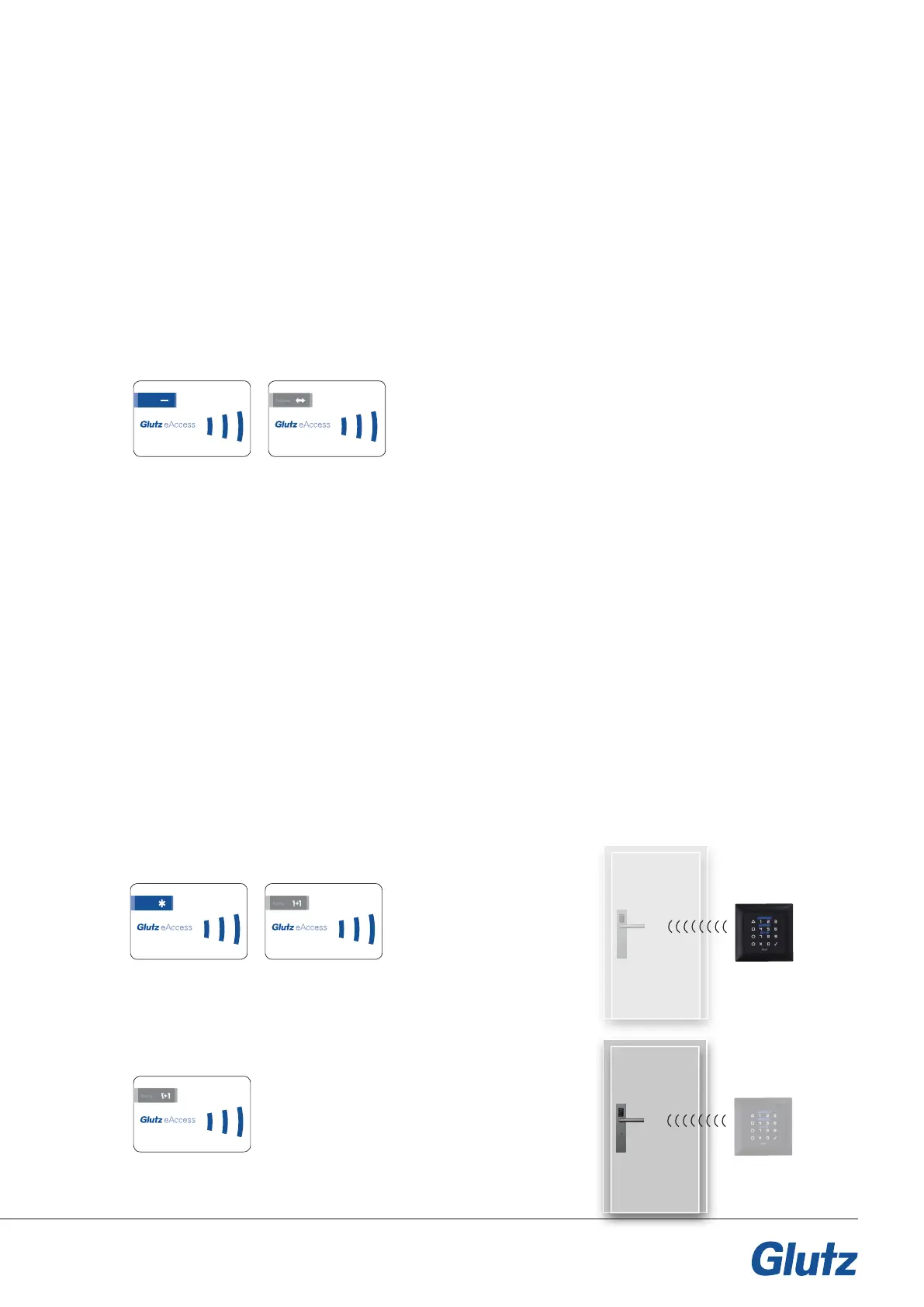
By presenting the minus card, the device switches to programming mode.
Present the Freepass card. The Freepass is now deactivated.
Card order:
4.12 Pairing
Application
The pairing function is used when two devices need to be linked, e.g. an E-tting and an E-reader. One
device is dened as the sender device and the other as the receiver device in order to establish communi-
cation. All of the identication media recognised by the sender device are automatically able to open the
receiver device remotely.
Examples:
f Additional opening option (code) in the event that a user medium is forgotten
f Remote operation of entrance doors from the reception area
Description
f Sender device: presentation of system card (*) and pairing card
f Receiver device: presentation of the pairing card
Both devices must be within wireless range or
connected via a cable.
Sender device card order:
Receiver device card order:
123.456.789.0
123.456.789.0
123.456.789.0
123.456.789.0
123.456.789.0


 To Next Page