51
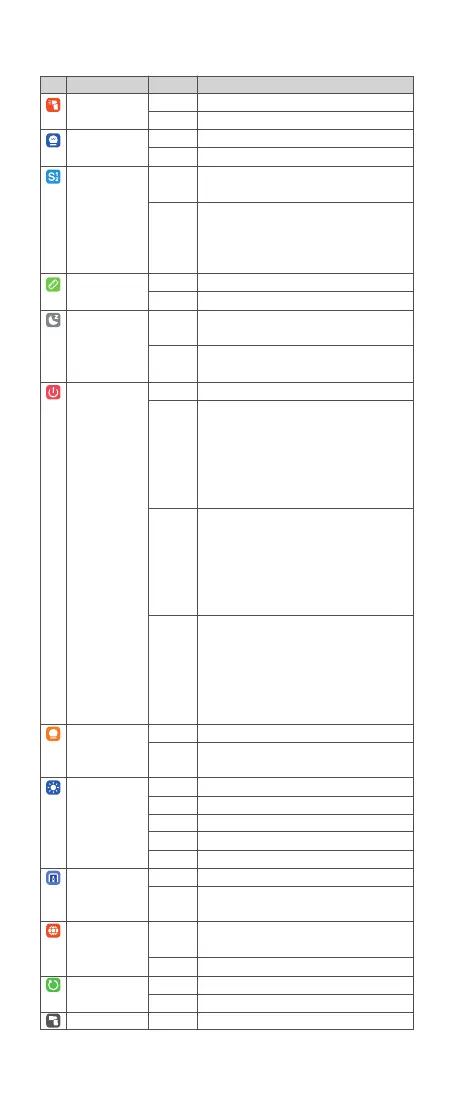
Icon Function
Sender Flash
(unavailable in V100 S)
Power Type
Photocell
m/ft
Standby
Auto Off
Model
Screen
New Agreement
(unavailable in V100 C)
Language
Factory Reset
Device Info
Options
Off
On
1/256
2.0
S1
S2
m
ft
On
Off
Off
30 min
60 min
90 min
Continue
Interrupt
/
30 sec
1 min
2 min
3 min
On
Off
Simplied
Chinese
English
Cancel
Apply
/
Description
Sender flash off
Sender flash on
Minimum power step is 1/256
Minimum power step is 2.0
Only available in M (manual) flash mode, the flash
will re synchronously when the main flash res.
Only available in M (manual) flash mode, the flash
will ignore a single “pre-flash” from the main flash
and will only re in response to the second, actual
flash from the main flash.
Meter
Feet
Automatically standby after the set time (90
seconds) of idle use.
Do not automatically standby after the set time (90
seconds) of idle use.
Turn off auto power off function
1. Setting as wi-off/sender mode when the standby
function is off, the flash will automatically shut down
after 30 minutes of idle use.
2. Setting as receiver mode, the flash will
automatically shut down after 30 minutes of idle
use.
1. Setting as wi-off/sender mode when the standby
function is off, the flash will automatically shut down
after 60 minutes of idle use.
2. Setting as receiver mode, the flash will
automatically shut down after 60 minutes of idle
use.
1. Setting as wi-off/sender mode when the standby
function is off, the flash will automatically shut down
after 90 minutes of idle use.
2. Setting as receiver mode, the flash will
automatically shut down after 90 minutes of idle
use.
The modeling lamp is constant on when flashing.
The modeling lamp automatically turns off when
flashing.
Screen brightness is steplessly adjustable.
Screen standby after 30 seconds of idle use.
Screen standby after 1 minute of idle use.
Screen standby after 2 minutes of idle use.
Screen standby after 3 minutes of idle use.
The new agreement is turned on by default.
Turn off the new agreement in case of incompatibility
of flash and camera.
Simplied Chinese system
English system
Cancel factory reset
Factory reset
Display the device model and rmware version



 To Next Page