-16-
Initializing the Monitor
To Initialize the Device (New Patient):
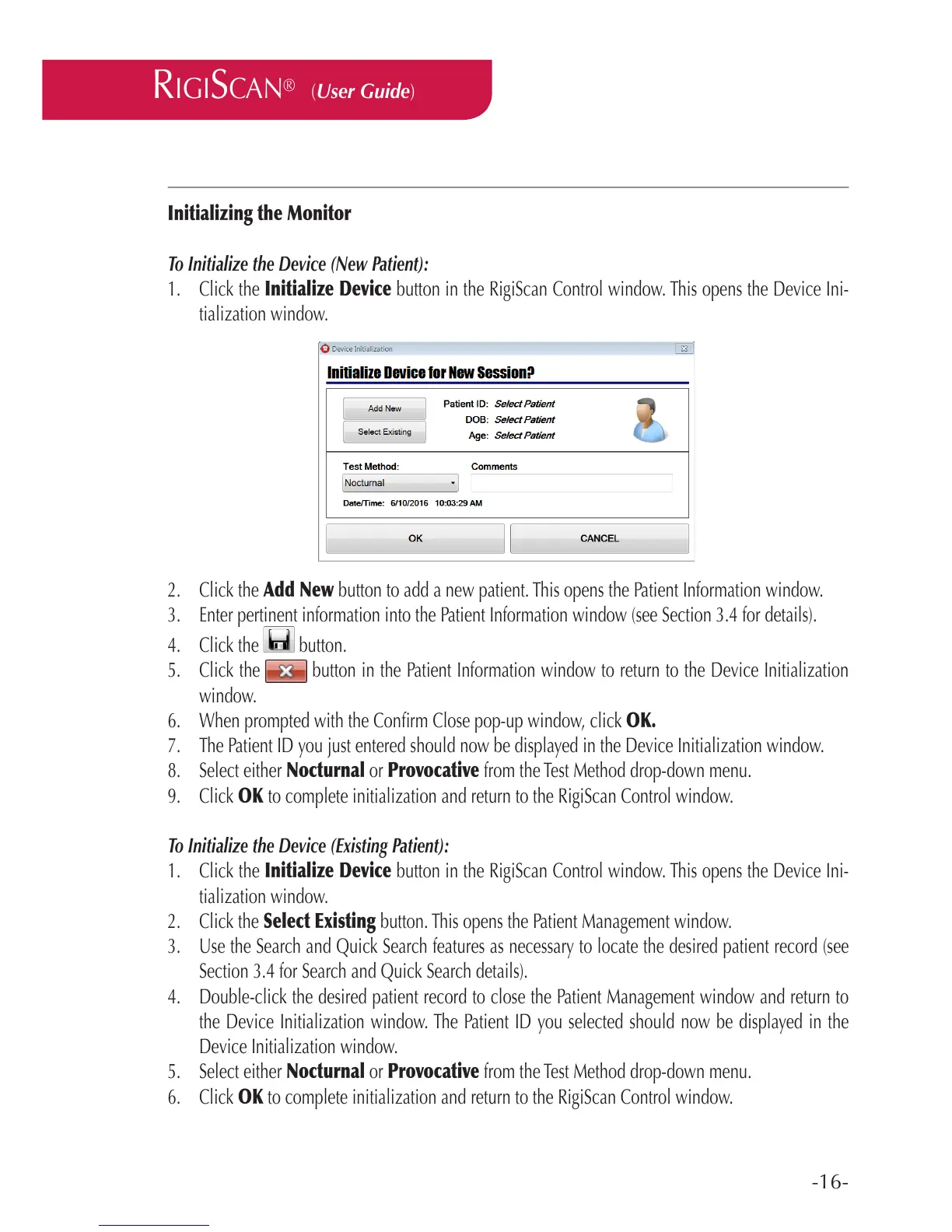
1. Click the Initialize Device button in the RigiScan Control window. This opens the Device Ini-
tialization window.
2. Click the Add New button to add a new patient. This opens the Patient Information window.
3. Enter pertinent information into the Patient Information window (see Section 3.4 for details).
4. Click the button.
5. Click the button in the Patient Information window to return to the Device Initialization
window.
6. When prompted with the Conrm Close pop-up window, click OK.
7. The Patient ID you just entered should now be displayed in the Device Initialization window.
8. Select either Nocturnal or Provocative from the Test Method drop-down menu.
9. Click OK to complete initialization and return to the RigiScan Control window.
To Initialize the Device (Existing Patient):
1. Click the Initialize Device button in the RigiScan Control window. This opens the Device Ini-
tialization window.
2. Click the Select Existing button. This opens the Patient Management window.
3. Use the Search and Quick Search features as necessary to locate the desired patient record (see
Section 3.4 for Search and Quick Search details).
4. Double-click the desired patient record to close the Patient Management window and return to
the Device Initialization window. The Patient ID you selected should now be displayed in the
Device Initialization window.
5. Select either Nocturnal or Provocative from the Test Method drop-down menu.
6. Click OK to complete initialization and return to the RigiScan Control window.
RIGISCAN
®
(User Guide)



 To Next Page