Operation
16
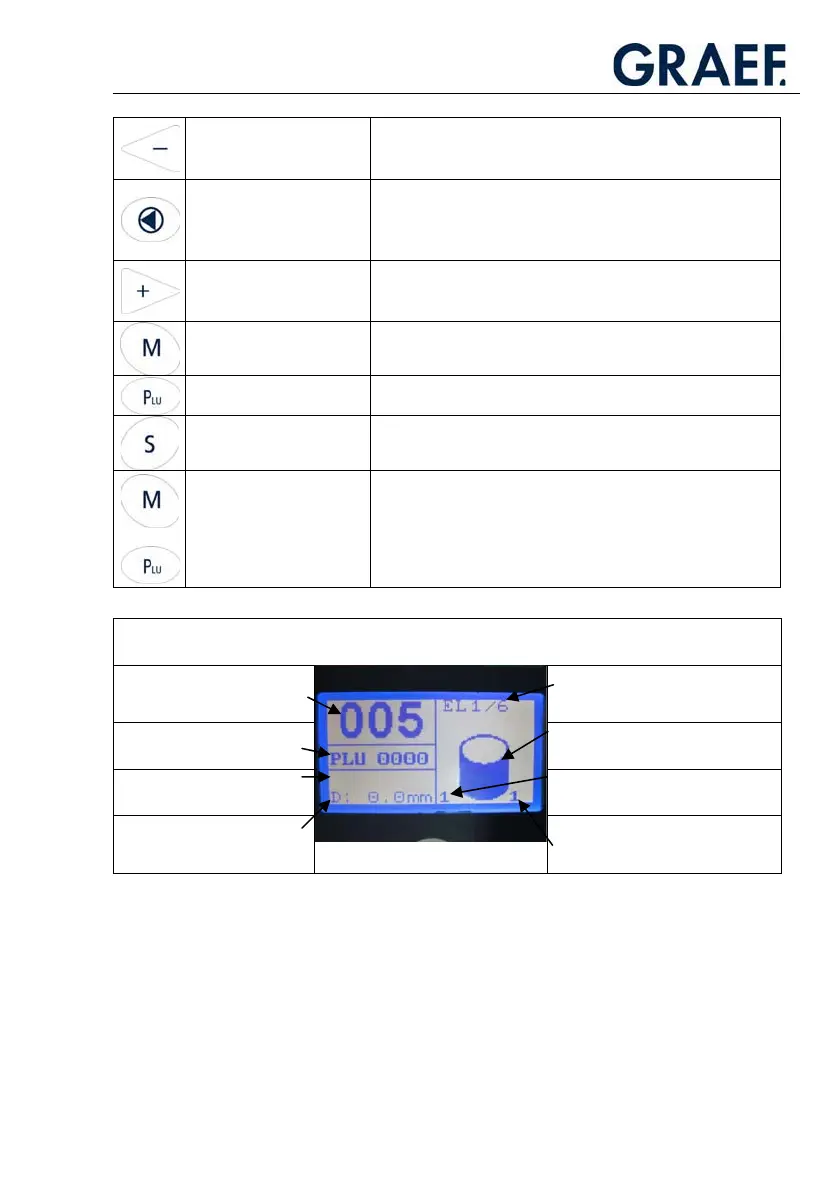
Minus button
x Reduces the edited value
x Moves UP in the selection menu
x Reduces the carriage strokes during operation
Reset button
x Cancels the active cutting programme
x Resets to zero
x Moves up within the menu hierarchy
x Confirms an entry
Plus button
x Increases an edited value
x Moves down in the selection menu
x Increases the carriage strokes during operation
Menu button
x Activates sub-programmes (customer service)
PLU button
x Switches on PLU mode, the plus/minus buttons can then be
used to select the PLUs
Carriage stroke button
x On pressing this button, the carriage speed (lifting speed) can
be controlled using the plus/minus buttons.
+
Button combination M +
PLU
x Programmes PLUs (new/change/delete)
x Changes the standard placing programme (PLU 0000)
Explanation of the values and symbols in the display
Slice count Portion specifications in continuous
mode “EL”
(No display in normal mode)
PLU
(0000= Standard programme)
Placing function
(stacking, fanning, ...)
T: Set value slicing thickness
(Display only in PLU mode)
Current value of the stack/row
D: Current slicing thickness Number of stacks/rows placed in
one layer
(can be set using the “X“ button)



 To Next Page