DATALOCK
■Programming■
SETUP
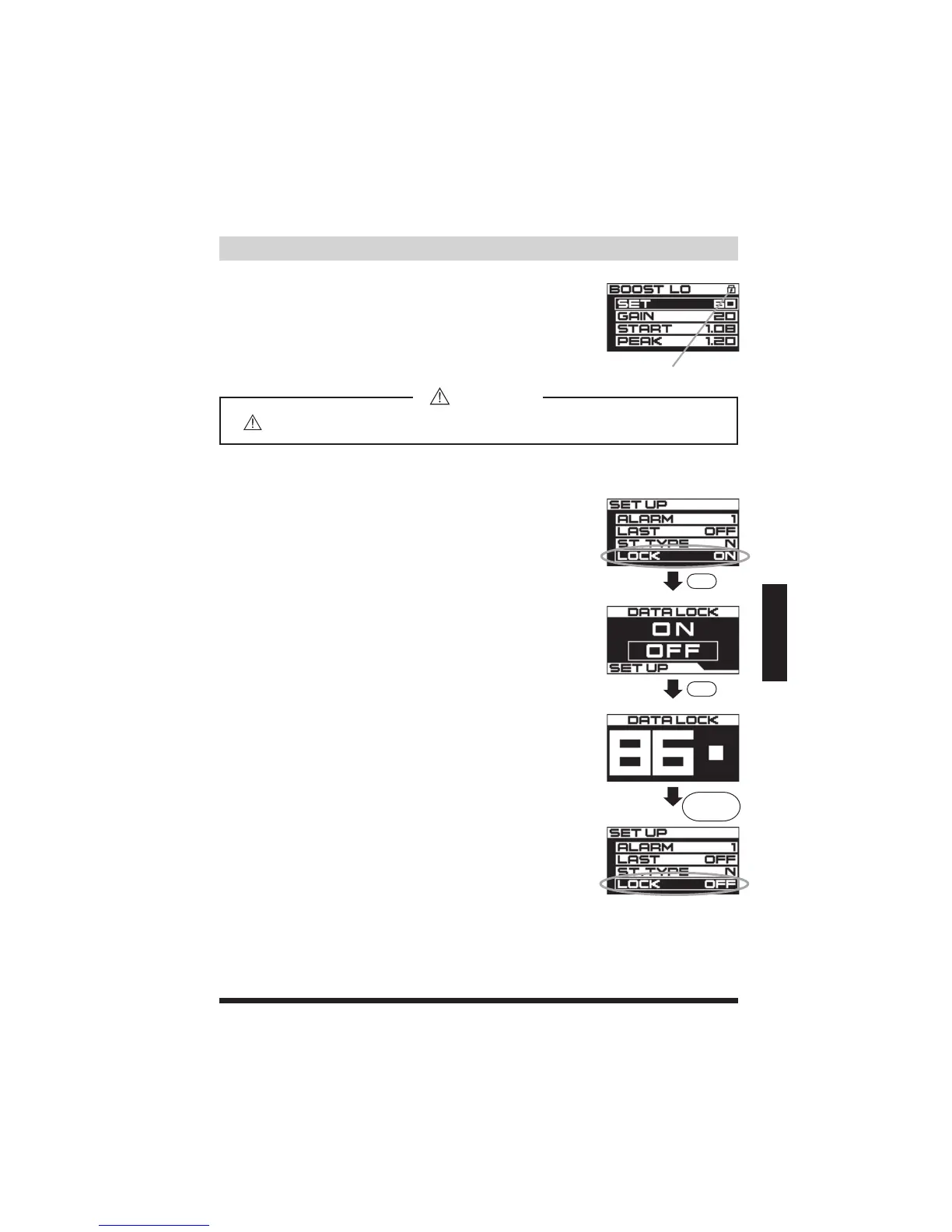
DATALOCKscreen
SET
SET
Entryofthe3-digitpassword
SETUPscreen
DATALOCK
DATALOCKICON
Configurations
WhentheDATALOCKisON,thelockiconwillappearonthe
upperrightcornerofthescreen.WithDATALOCKON,the
presetvaluescanbedisplayedbutcannotbechanged.
Important
Pleasemakenoteofyourpassword.Itcannotberecalled.
Holddown
SETDIAL
(1)InthemainSETUPscreen,rotatetheSETDIALto
highlightLOCK.ThenpresstheSETDIALtoconfirm.
(2)RotatetheSETDIALtohighlightandselectOFF.Press
theSETDIALtoconfirm.
(3)InputpasswordontheDATALOCKdisplayusingtheSET
DIAL.
(4)Afterenteringthepassword,holddownSETDIALfor3
secondstoconfirm.Oncethepasswordisaccepted,there
willbechimeandthescreenwillreturntothemainSETUP
screen.Torestorepassword,refertopage39.


 To Next Page