SCRAMBLE
・SELECT
・SET
・GAIN
・START
(STARTBOOST)
・SW.MODE
(SWITCHMODE)
・TIME
・PEAK
・WARNING
・LIMITER
・・・・
・・・・・・
・・・・・
・・・・
・・・
・・・・・
・・・・・
・・・
・・・・
Recall&ResetthehighestrecordedPEAKboostvalue.
■ProgrammingtheSCRAMBLEfeature■
SELECT
SET
SET
Boostsettings
SCRAMBLEisanENHANCEDBOOSTfeaturethatcanbeactivatedbypressingtheSET
DIAL.SCRAMBLEcanbemomentarilyoradjustedtoapresetlengthoftimethatcan
beactivatedfromtheReal-timeBOOSTLOorBOOSTHImode.
ThefollowingitemscanbeprogrammedfromtheSCRAMBLEset-upscreen.
ThereisonlyoneSCRAMBLEfeatureforbothBOOSTLO&BOOSTHImode.
Modeʼssetupscreen
SELECTOFF
Modeʼssetupscreen
SELECTON
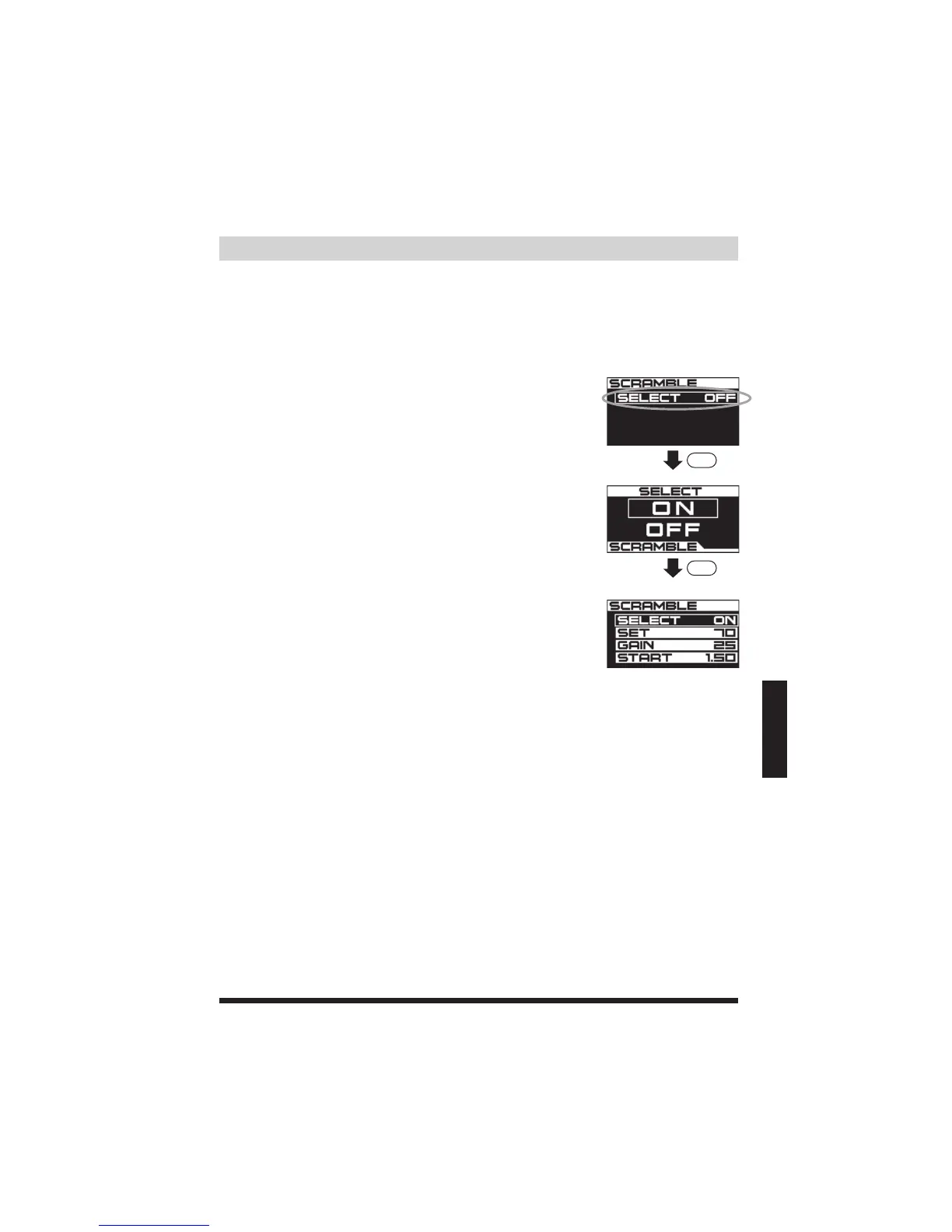
(1)IntheBOOSTHIset-upscreen,presstheMODEbutton,
thenpresstheSELECTbutton.Thiswillbringyoutothe
SCRAMBLEset-upscreen.TurntheSETDIALtoSELECT(on
thescreen)tochoosetoturnONorOFFtheSCRAMBLE
feature.Refertopage29.ThefactorydefaultissettoOFF.
(2)TurntheSETDIALtoONandthenpresstheSETDIALto
confirm.*Tocancelandreturntotheprevioussettingand
theBOOSTHImodeset-upscreen,pressMODE.
(3)WhenSCRAMBLESELECT(onthescreen)isON,this
allowsyoutoviewandchangetheSCRAMBLEset-up
screen.
TurnsON/OFFtheSCRAMBLEboostmode.
ProgramaSET%value.Refertopage30.
ProgramaGAIN%value.Refertopage31.
ProgramaSTARTBOOSTpressurevalue.Refertopage32.
ConfigureshowtheSCRAMBLEmodeisactivated.Refertopage37.
ProgramthedurationoftimetheSCRAMBLEmodeisinuseonceactivated.
Refertopage37.
ProgramaLIMITER%toreduceboostonceovertheWARNINGvalue.
Refertopage35.
ProgramaboostvaluewhentheWARNINGalarmisactivated.
Refertopage34.


 To Next Page