Troubleshooting
■Operationprocedure■
Checks:VALVEoperation,DISPLAYtest,unitRESETandSoftwareVersion.
Testmode
Testmode
VALVE
RESET
PressSET,andSELECT
andMODE
atthesametime.
Currentsoftwareversion
Whentheboostdoesnʼtincreaseorthereissomethingwrong,pleaserefertothe
following:Testmode‒(below),BoostSettingTips/Guidelines‒page40and
FactoryDefaultSettings/Guidelines‒page41.
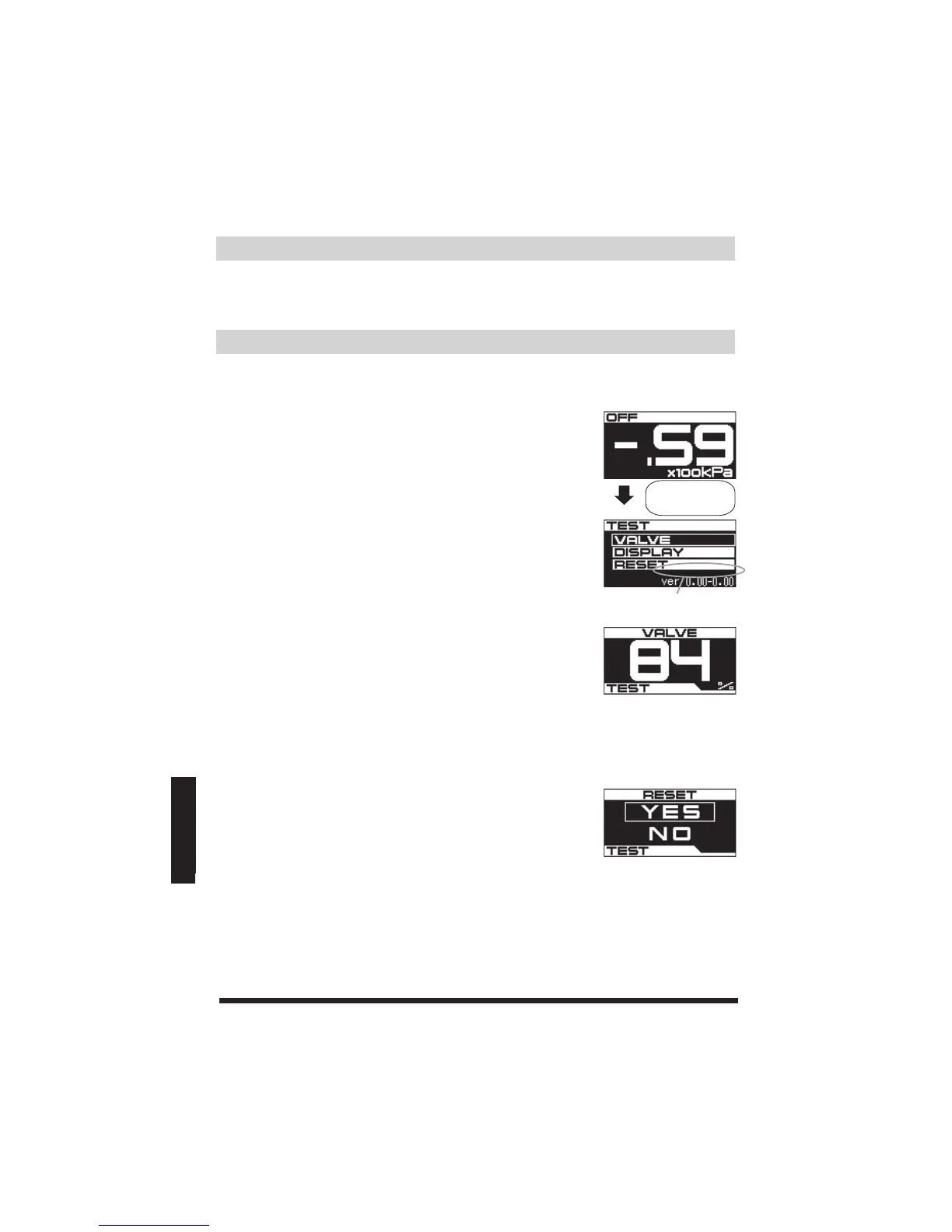
(1)WhileintheOFFmodeʼ sReal-time(boostgauge)
display,pressSELECT,MODEandSETDIALatthesame
timetoinitiatetheTESTmode.
(2)IntheTESTmodescreen,usetheSETDIALtoselectand
confirmanitemtobetested.(VALVE/DISPLAY/RESET)
OFFReal-time
(boostgauge)display
■VALVE■
ManualtesttheBoostControlSolenoidValve.
Testifthevalveunitisoperating.TurntheSETDIALto
manualoperatetheBoostControlSolenoidValvefrom
0-100%.*TocancelandreturntotheTESTmodescreen,
pressMODE.
TesttheOLEDscreenfordeadpixels.TurnSETDIALtolightuporturnoffthe
OLEDs.*TocancelandreturntotheTESTmodescreen,pressMODE.
■DISPLAY■
Troubleshooting
■RESET■
UsetheSETDIALtoselect&confirmYEStoresetall
programstothefactorydefaultsettings.IftheLOCKisset
toONandthepasswordisforgotten,youwillhaveto
RESETtheunittoaccessallthesettings.Ifyoudoknow
yourpasswordandstillwanttoRESETtheunit,please
noteyourpasswordbeforetheRESET.


 To Next Page