DATALOCK
■Programming■
DATALOCK
SET
SET
Entryofthe3-digitpassword
Entryofthe3-digitpassword
SET
Holddown
SETDIAL
SETUP
Confirmationscreen
Configurations
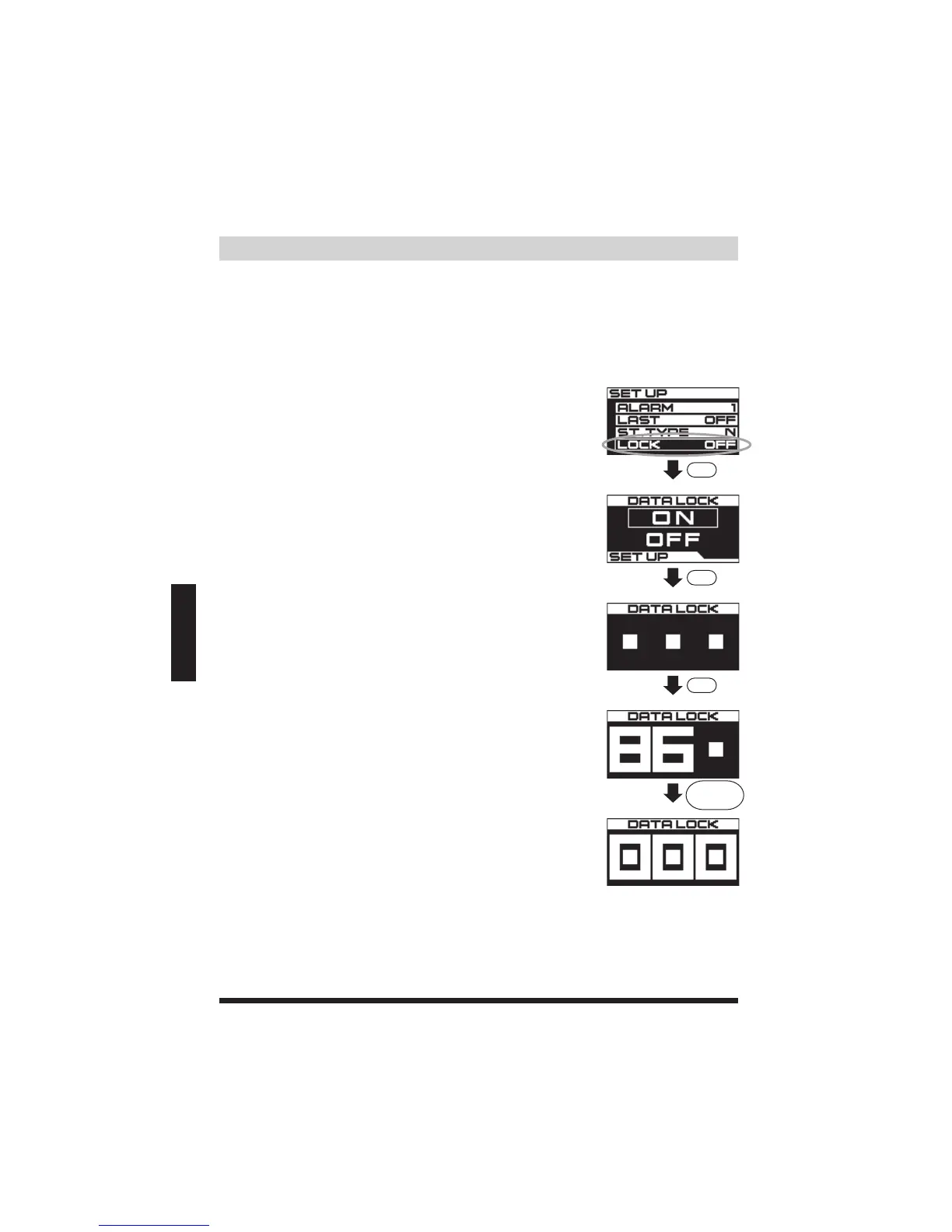
Topreventunwantedchangesorlossofdata,DATALOCKcanpasswordprotectthe
programsettingforLO/HI/SCRAMBLE/START(BOOST),butwillnotlockthe
PATTERNandALARMfromchanges.
(1)InthemainSETUPscreen,rotatetheSETDIALto
highlightLOCK.ThenpresstheSETDIALtoconfirm.
(2)RotatetheSETDIALtohighlightandselectON.Then
presstheSETDIALtoconfirm.
(3)OnceDATALOCKisconfirmedtoON,anewscreenwill
appearandallowyoutoprograma3digitpasswordfor
theDATALOCK.*TocancelandreturntothemainSET
UPscreen,pressMODE.
(4)PresstheSETDIALtoconfirmandmovetothenext
square.Repeatandmovetothethirdsquare.Afterthe
thirdsquare,pressSETDIALtoreturntothefirstsquare.
(5)Afterenteringthe3digitpassword,holddownSETDIAL
for3secondstosave.Oncesaved,therewillbeachime
andthescreenwillreturntothemainSETUPscreen.



 To Next Page