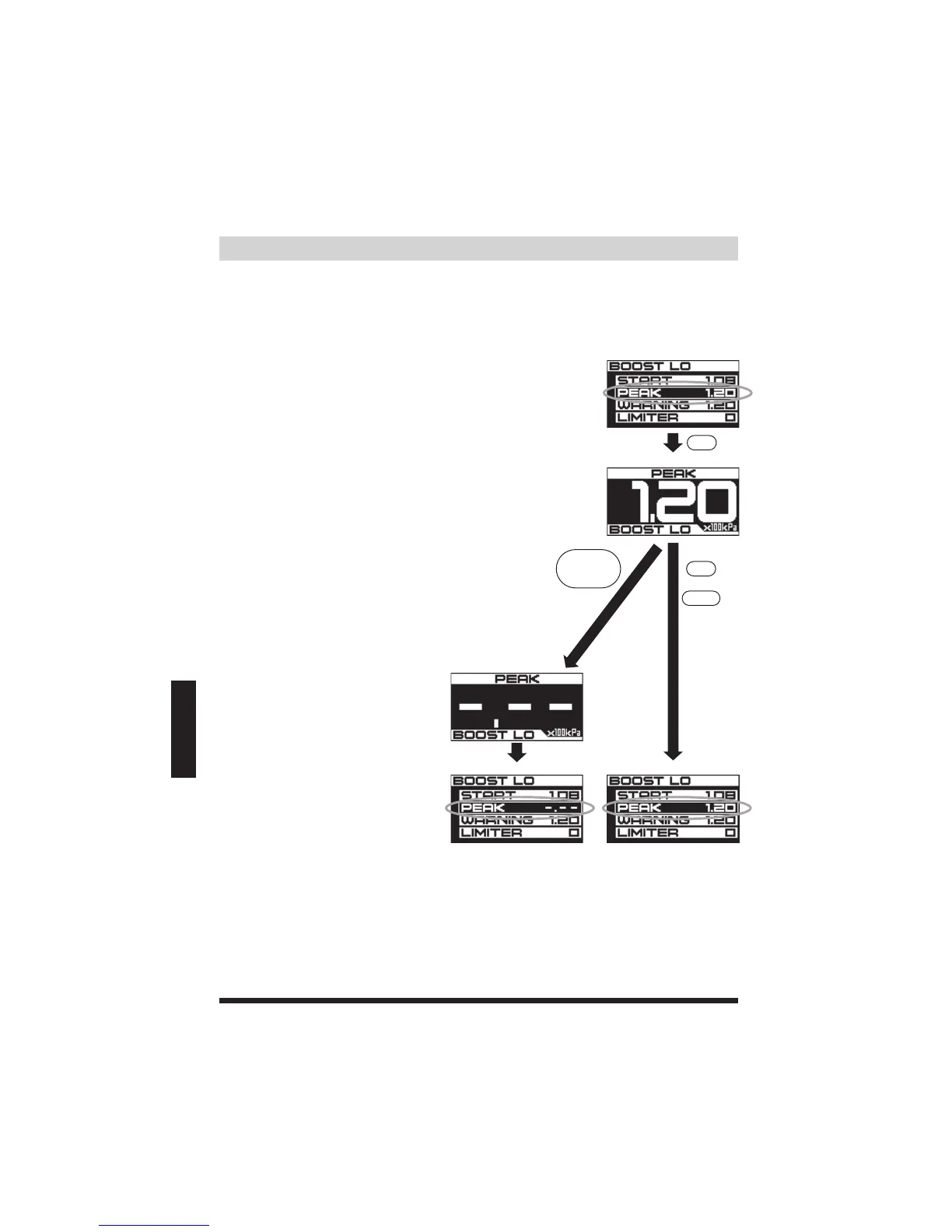
■ProgrammingandResettingPEAK■
Modeʼssetupscreen
Modeʼssetupscreen Modeʼssetupscreen
PEAK
SET
SET
PEAKreset
Holddown
SETDIAL
MODE
OR
PEAK
Displaysthepeakboostvalueinmemory(Onlypositivepressure).
Thepeakvaluewonʼtbedeleteduntilitisreset.
Boostsettings
(1)InaBOOSTmodeset-upscreen,highlight
PEAKandpresstheSETDIALtoconfirm.
(2)ThePeakboostpressurevaluesincethelast
resetwillberecorded.
PressandholddowntheSETDIALforover
1sec,toresetthePeakvalue.Achimewill
soundandresetthePeakdisplay.
*Tocancelandreturntotheprevioussetting
andtheBOOSTmodeset-upscreen,press
MODE.
*RefertoPage38forRESETshortcuts.


 To Next Page