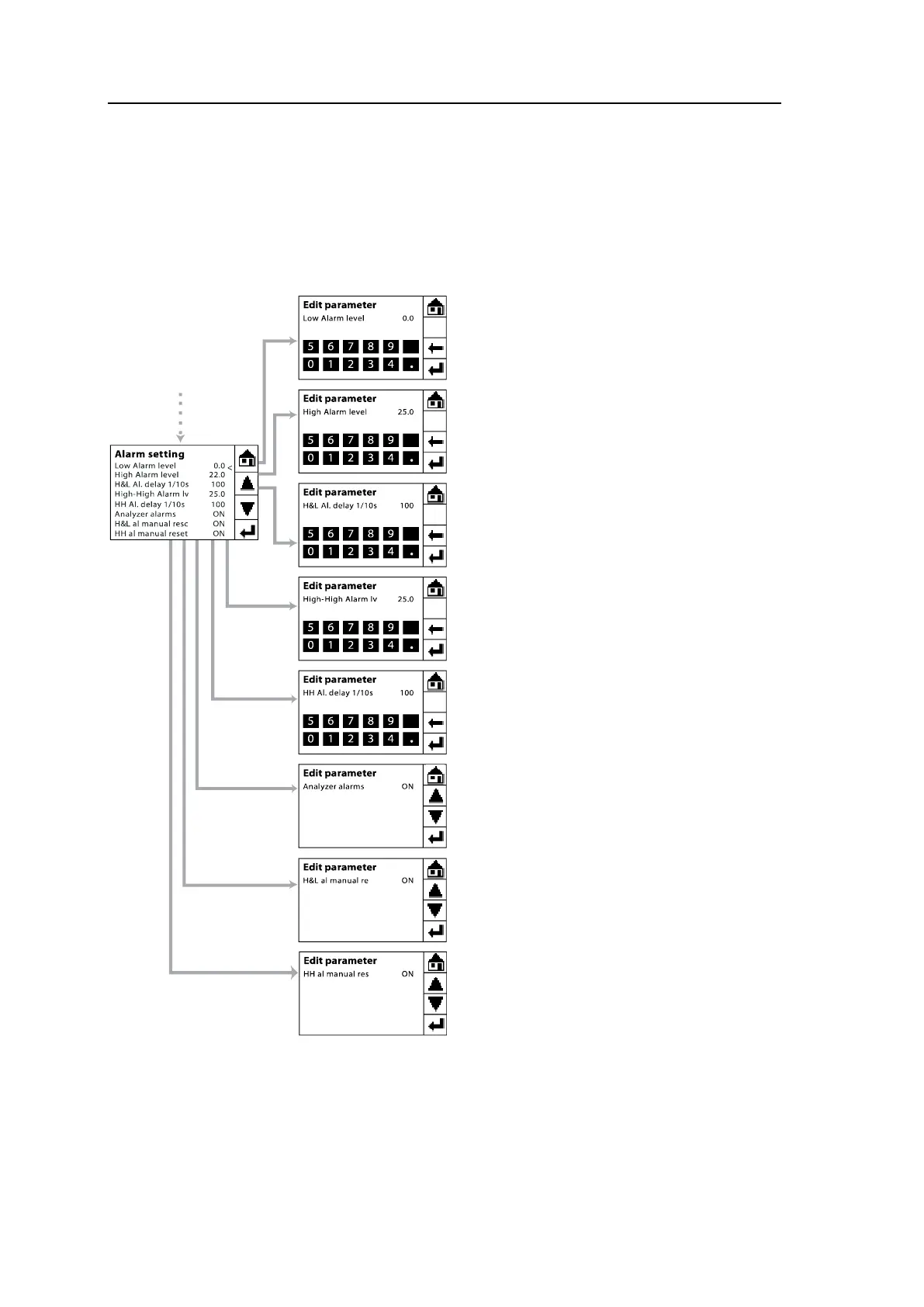
The G36p has three alarms for oxygen
level:
Low Alarm level sets the low O
2
level
alarm – default set to 0.0 %.
High Alarm level sets the high O
2
level
alarm – default set to 22.0 %.
High-High Alarm lv sets the high O
2
level alarm – default set to 25.0 %.
Besides, there are other settings for
alarms as follows:
H&L Al. delay 1/10s sets the alarm de-
lay for both Low and High O
2
level
alarms. Default set to 100 (equal to 10
seconds).
HH Al. delay 1/10s sets the delay for
High-High O
2
alarm. Default set to 100
(equal to 10 seconds).
Analyzer alarms is used to turn
ON/OFF the alarm function of the ana-
lyzer including analyzer failure alarm
and oxygen level alarms.
When the Analyzer alarms is ON and
one of the alarm conditions is present,
the Main Menu will display the alarm
message (e.g. Alarm: Low O
2
) in the bot-
tom left corner of the screen. Then, the
alarm relay will be triggered after the de-
lay period is over. For alarm relay output
function and connection, please follow-
ing the instruction in section 3.4.3.



 To Next Page