G36p
Oxygen Analyzer
Version 2.11 – Revision March 2022 31
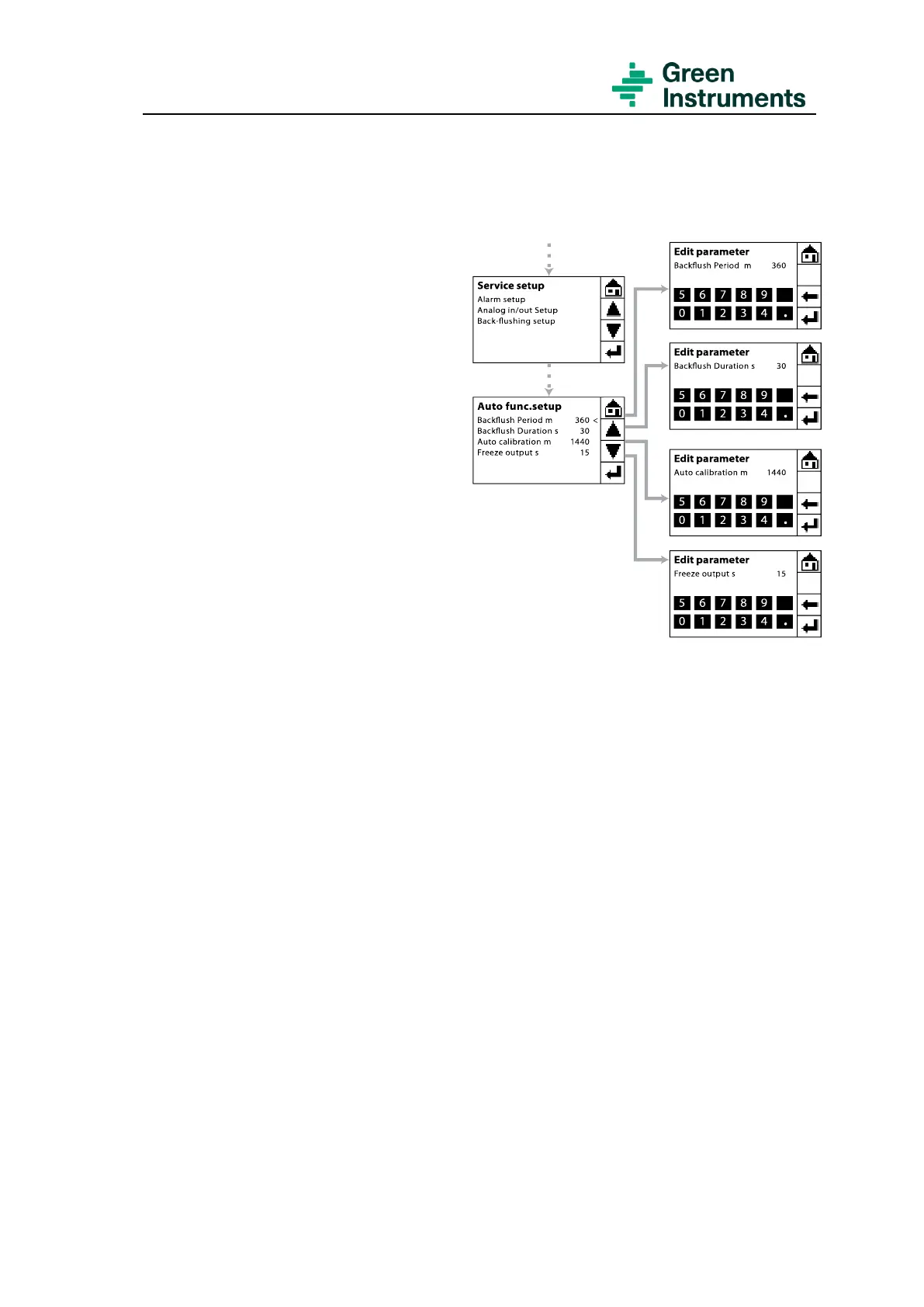
The route for setting of back-flushing and auto calibration is Tools setting\Services
(password level 1: 9490)\Back-flushing setup.
Back-flush period is used to set the
interval between two backflushing.
The default setting for auto back-
flushing interval is 6 hours (360
minutes). There will be no back-
flushing if the Back-flush period is set
to 0.
Back-flush duration is per default set
to 30 seconds.
Auto calibration is used to set the in-
terval between two auto calibrations.
By default, the analyzer is set for auto
calibration every 24 hours (1440
minutes). There will be no auto cali-
bration if the Auto Calibration is set to
0.
Freeze output is the freezing time of
output signals after calibration or
back-flushing. Default setup is 15
seconds. This parameter can be set ei-
ther here or in the setting of the Freeze
output under Analog in/out setup. See
section 5.4.
5.6 Loading Default Settings & Factory Settings
The route for these two functions is Tools setting\Services (password level 2 – see con-
figuration sheet for password).
Load default settings
This function makes is possible to return to the standard settings. After loading the de-
fault settings, the analyzer will restart automatically loading the default settings from the
SD card to the analyzer. After reload default settings, please calibrate the touch panel and
reset the analyzer using the Testing & Configuration Sheet attached to each analyzer or
following the instruction in chapter 5.
In case the g1parm.bin at the SD card has been deleted accidentally, please contact Green
Instruments for resending the standard setting file.


 To Next Page