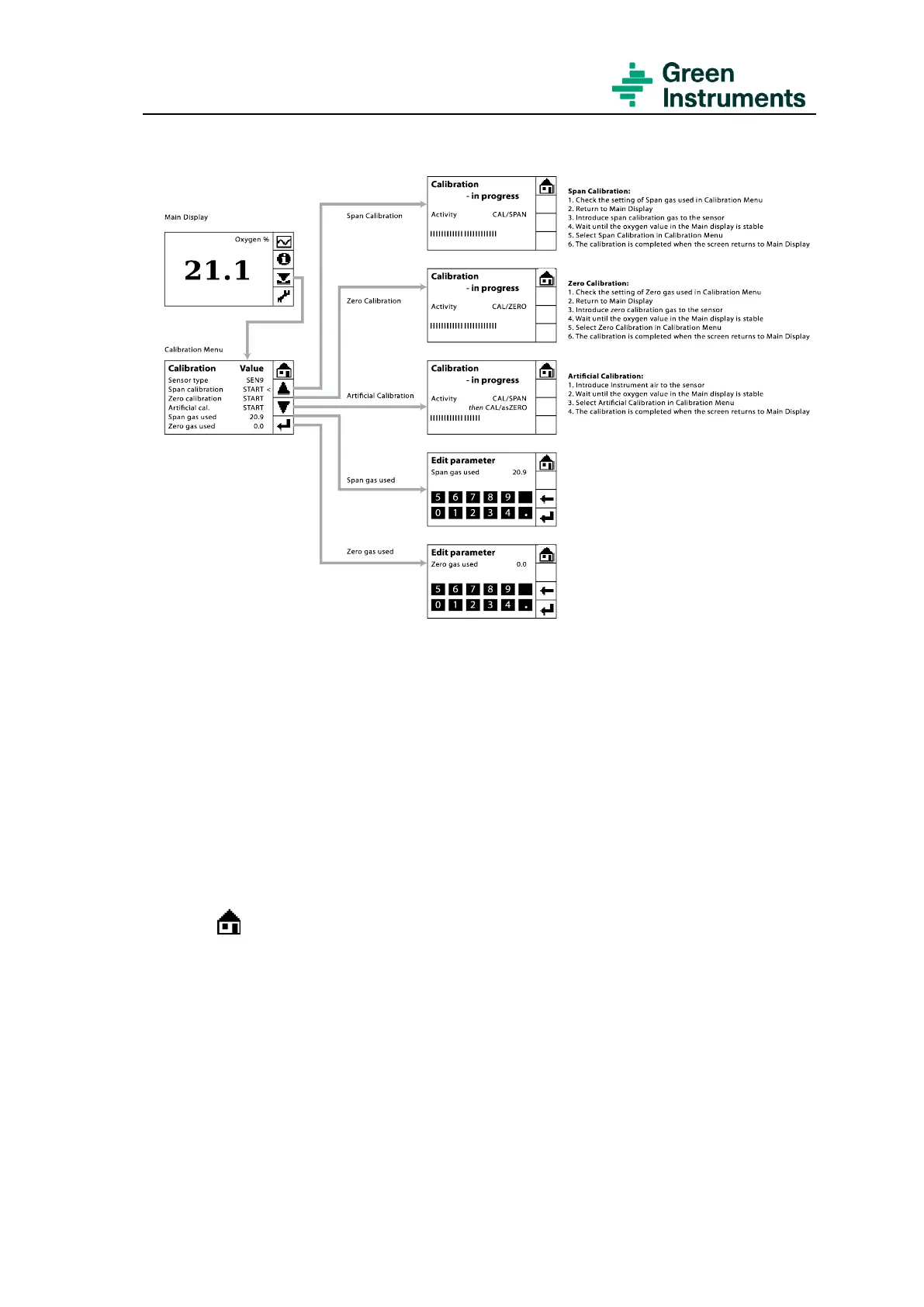
Figure 6-1: Calibration menu structure and quick guide
For the span calibration gas, clean dry instrument air with oxygen content of 20.9 % is
recommended.
Before starting to calibrate the analyzer, check the settings of zero and span gas used in
the Calibration Menu.
• If the value of zero gas used is not correct, select Zero gas used and enter the value of
the zero gas used.
• If the value of span gas used is not correct, select Span gas used, and enter the value
of the span gas used.
• Press to go back to the Main Menu
• To calibrate the oxygen signal, do the following steps:
• Introduce zero calibration gas to the sensor and wait for the zero-value reading to sta-
bilize, e.g. 1.8 %. Then enter Calibration Menu and select Zero calibration. The zero
calibration is completed when the analyzer returns to the Main Menu. The new cali-
bration value will be displayed after 15 seconds (as per default setting of freeze out-
put).
• Introduce the span calibration gas to the sensor, and wait for the span value reading to
stabilize, e.g. 21.1 %. Enter Calibration Menu and select Span calibration. The span


 To Next Page