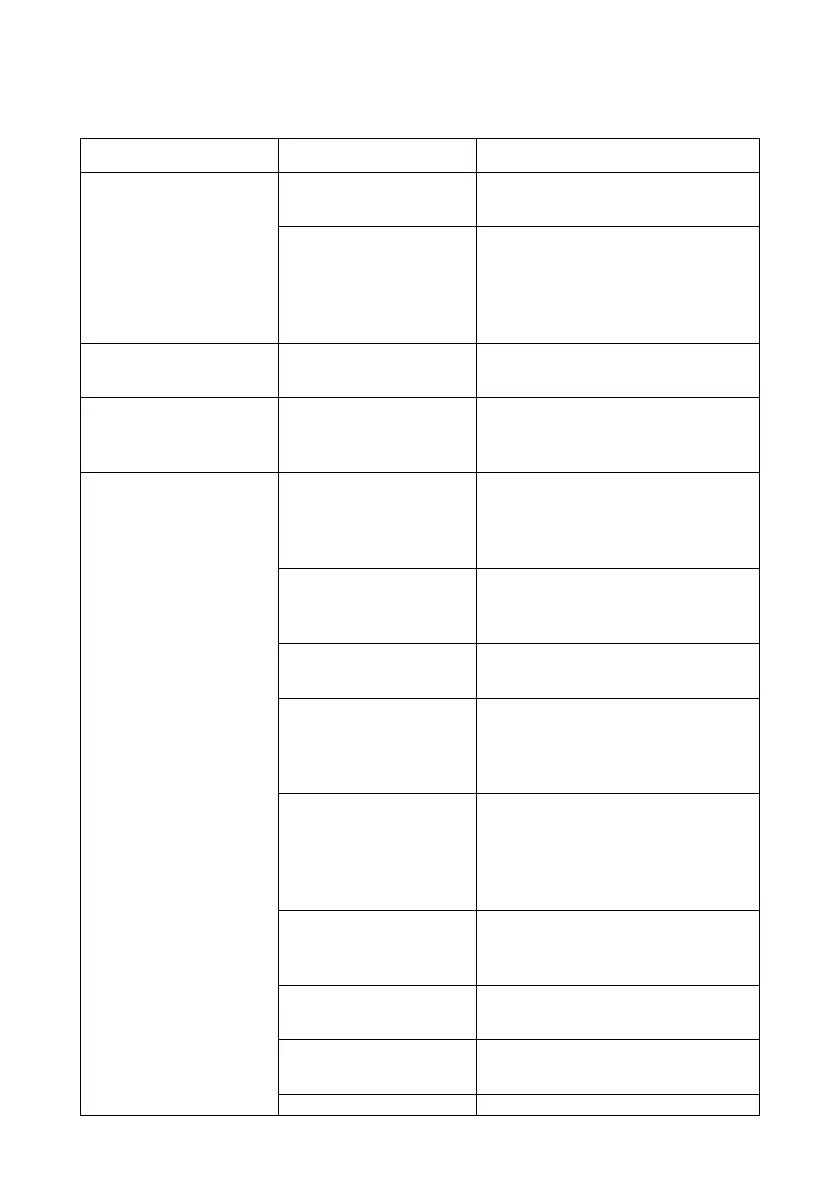
13. Troubleshooting
AC contactor not
contacting
Emergency stop
button was pressed
Rotate and reset the emergency
stop button
The monitoring
system detected there
was a fault in the
system and forced it
to be disconnected
Find out the system fault
Ambient light board
failure
Replace the ambient light board
SOC Display does not
display or displays
abnormally
The input and output
terminals of the
charging module are
not plugged in
Insert the charging module into
place
The charging gun not
connected to the
vehicle
Connect the charge cable to the
vehicle and then start
Restart after closing the cabinet
door
Please confirm whether the
battery charging demand voltage
matches the maximum output
voltage of the charging station
BMS auxiliary source
voltage mismatch
Confirm that the BMS demand
voltage of the charging
equipment is consistent with the
output BMS voltage of the
charging station
Please check the fault code
information and try again after
troubleshooting
Replace the charging module
No charging modules
in the charging station
Install the charging module
Check the communication cable


 To Next Page