EasyManua.ls Logo

GRESGYING F2-EU - User Manual

GRESGYING F2-EU
52 pages
Print Icon
To Next Page IconTo Next Page
Loading...
Gresgying
F2-EU
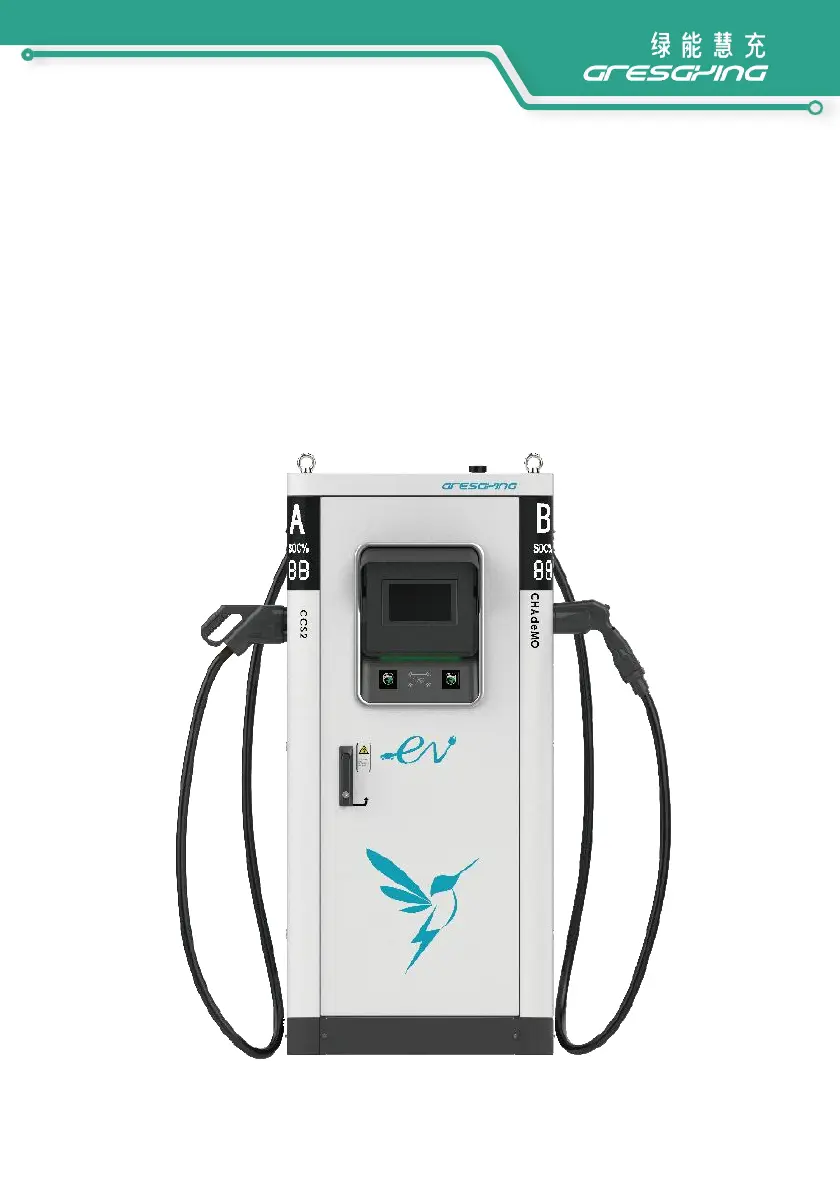
60kW DC Charging Station
Installation Manual

Questions and Answers

  • L
    Lisa HullAug 20, 2025
    Why is the AC contactor not contacting on my GRESGYING Battery Charger?
    • J
      Julie StewartAug 20, 2025
      If the AC contactor is not contacting in your GRESGYING Battery Charger, it could be due to a couple of reasons. First, check if the emergency stop button has been pressed. If so, rotate and reset the emergency stop button. Alternatively, the monitoring system may have detected a fault, causing a disconnection. In this case, you'll need to identify and resolve the system fault.
  • G
    Gabriela NewmanAug 23, 2025
    What to do if the DC fuse blows in my GRESGYING F2-EU?
    • N
      Nathaniel KellyAug 23, 2025
      If the DC fuse blows in your GRESGYING Battery Charger, replace the DC fuse and then check the DC output for a short circuit fault.
  • T
    Todd HarrisAug 26, 2025
    How to check the communication cable on my GRESGYING F2-EU?
    • A
      Angela BrownAug 26, 2025
      If you receive a 'Faulty Check the communication cable' error with your GRESGYING Battery Charger, the communication cable between the master and slave monitoring units might be faulty. You should check whether the communication cable connection between the two monitoring units is normal.
  • C
    Cody RossAug 28, 2025
    What causes system over temperature protection in my GRESGYING F2-EU Battery Charger?
    • H
      harveytraceyAug 28, 2025
      If your GRESGYING Battery Charger is experiencing system over temperature protection, check whether the air inlet and outlet of the system are blocked.
  • K
    Kevin ContrerasAug 30, 2025
    How to fix a damaged output DC contactor in my GRESGYING F2-EU Battery Charger?
    • N
      Nicole JenkinsAug 31, 2025
      If the output DC contactor is damaged in your GRESGYING Battery Charger, you should replace it.
  • N
    nicoleperezSep 2, 2025
    What to do when the system cooling fan fails in my GRESGYING F2-EU?
    • J
      Jennifer MooreSep 2, 2025
      If the system cooling fan fails in your GRESGYING Battery Charger, you should either maintain or replace it.
  • J
    Janice AyalaSep 5, 2025
    How to repair lightning arrester damage in my GRESGYING F2-EU Battery Charger?
    • E
      Eric MooreSep 5, 2025
      If the lightning arrester is damaged in your GRESGYING Battery Charger, replace the SPD (Surge Protection Device).
  • C
    Calvin RamirezSep 8, 2025
    What should I do if the monitoring unit fails in my GRESGYING F2-EU?
    • K
      Keith SmithSep 8, 2025
      If the monitoring unit fails in your GRESGYING Battery Charger, replace it.
  • A
    amydavidsonSep 12, 2025
    How to troubleshoot reduced insulation in my GRESGYING F2-EU's charge gun output?
    • C
      Charles WilsonSep 12, 2025
      If the insulation of the positive or negative output of the charge gun and the ground is reduced in your GRESGYING Battery Charger, use a multimeter to measure whether the impedance between the positive and negative poles of the DC output to PE is greater than 40K. If it is lower than this value, troubleshoot or replace the charge cable.
  • J
    Jillian OliverSep 14, 2025
    Why is the ambient light off on my GRESGYING Battery Charger?
    • M
      Michael HoltSep 14, 2025
      If the ambient light is off on your GRESGYING Battery Charger, it is likely due to an ambient light board failure. Replace the ambient light board to resolve this issue.

Summary

Safety Instructions

1.1 Symbols used in this manual

Explains symbols like DANGER, WARNING, CAUTION, and Notes used in the manual.

1.2 Save these instructions

Emphasizes the importance of following manual instructions for installation, operation, and maintenance.

1.3 WARNING: Risk of electric shock

Details precautions against electric shock, including powering off and professional handling.

1.4 WARNING: Accumulation of gases

Advises checking vehicle manual for gas accumulation risks during charging.

1.5 CAUTION

Lists general cautions for usage, compatibility, user-serviceable parts, and environmental factors.

1.6 Charging station safety precautions

Provides specific safety rules for operating the charging station doors and handling ESD.

1.7 Safety Labels on the packaging

Describes safety labels found on the packaging, such as upward direction and fragility.

Introduction

2.1 Important information

States document purpose, warranty disclaimer, and specification change policy by Gresgying.

2.2 Scope of the Document

Instructs to keep the manual for the lifetime of the charging station and its intended audience.

2.3 Product Introduction

Introduces the Gresgying DC 60kW EV charging station's features and design.

2.4 Product Specification

Details technical specifications including model, power, input/output parameters, and electrical/mechanical data.

2.5 List of Tools

Lists essential tools required for installation, noting they are not included.

Transport and Storage

3.1 Storage

Provides guidelines for storing the charging station, emphasizing dry environments and original packaging.

3.2 Transport

Advises on visual inspection after transport and procedures for handling damaged products.

3.3 Packed Product Handling

Explains how to handle the packed product using a forklift.

3.4 Packaging Removal

Details steps for safely removing packaging, including metal clips and covers.

3.5 Supplied Components

Lists the main components included in the packaging: charging station and accessories.

Product Handling

4.1 Handling with a forklift

Demonstrates the correct method for handling the unit with a forklift.

4.2 Handling by crane

Outlines procedures for lifting the charging station using a crane, including hook and sling usage.

Product Features

5.1 Product Parts

Identifies and illustrates the key components of the charging station, such as displays and connectors.

5.2 Nameplate

Indicates the location of the nameplate and lists the information it contains.

Preparation for Installation

6.1 Safety precautions

Reiterates the importance of following safety instructions before installation.

6.2 Plan installation

Covers crucial planning steps like electrical load calculation, distance, permits, and tools.

6.3 Select location

Provides guidance on choosing an appropriate indoor or outdoor location for the charger.

6.4 Parking space placement

Recommends optimal placement for cable length and user interaction.

6.5 Cooling

Describes the air inlet and outlet locations and ventilation requirements for the cabinet.

6.6 Clearance

Specifies required space around the unit for user interaction and maintenance.

6.7 Foundations

Outlines rules for foundation construction, emphasizing local regulations and concrete characteristics.

6.8 Implantation plan

Presents diagrams and dimensions for preparing the foundation and anchoring the unit.

6.9 Route power supply cables

Suggests specific cable types and routing for power supply.

6.10 Protection against electric shock and short circuits

Details the built-in and upstream protection devices for electrical safety.

6.11.1 Upstream requirements

Specifies electrical network characteristics and upstream connection requirements.

6.11.2 Grounding Instructions

Provides rules and requirements for proper grounding of the charging station.

Install the Gresgying F2-EU

7.1 Handling

Provides critical warnings for handling the charger during installation, emphasizing upright position and stability.

7.2 Open the door of the Gresgying F2-EU

Details the procedure for opening the charging station door using the provided key.

7.3 Remove the lower plastic cover

Explains how to remove the lower plastic cover using a Phillips screwdriver.

7.4 Remove the left and right plinth and the wooden pallet

Guides the removal of plinths and the wooden pallet securing the unit.

7.5 Placing

Describes how to place the charging station onto the prepared foundation using a crane.

7.6 Electrical Connections

Outlines the steps for making electrical connections, including cable routing and terminal connection.

7.7 Check after Installation

Lists final checks including sealing, cleaning, and verifying connections and appearance.

Commissioning

8.1 Preparation for Power on

Details pre-power on checks, including disconnecting power and verifying connections.

8.2 Power on the charging station

Explains the sequence for safely powering up the charging station after installation.

Use of the Gresgying F2-EU

9.1 Start Charging

Guides users through the process of connecting the vehicle and initiating a charging session.

9.2 Stop charging

Describes how to safely stop an ongoing charging session.

9.3 Charging by online or offline

Explains how to configure and use the charging station's online and offline modes.

SOC Display

Decommissioning

Preventive Maintenance

Troubleshooting

GRESGYING F2-EU Specifications

General IconGeneral
BrandGRESGYING
ModelF2-EU
CategoryBattery Charger
LanguageEnglish