-32-
Model T31739 (Mfd. Since 11/19)
V-Belt Tension &
Replacement
The V-belt transfers power from the motor to the
spindle. If the V-belt does not have the proper
tension or is damaged or contaminated with oil/
grease, the drill press will not operate with full
power. Regularly check V-belt tension and replace
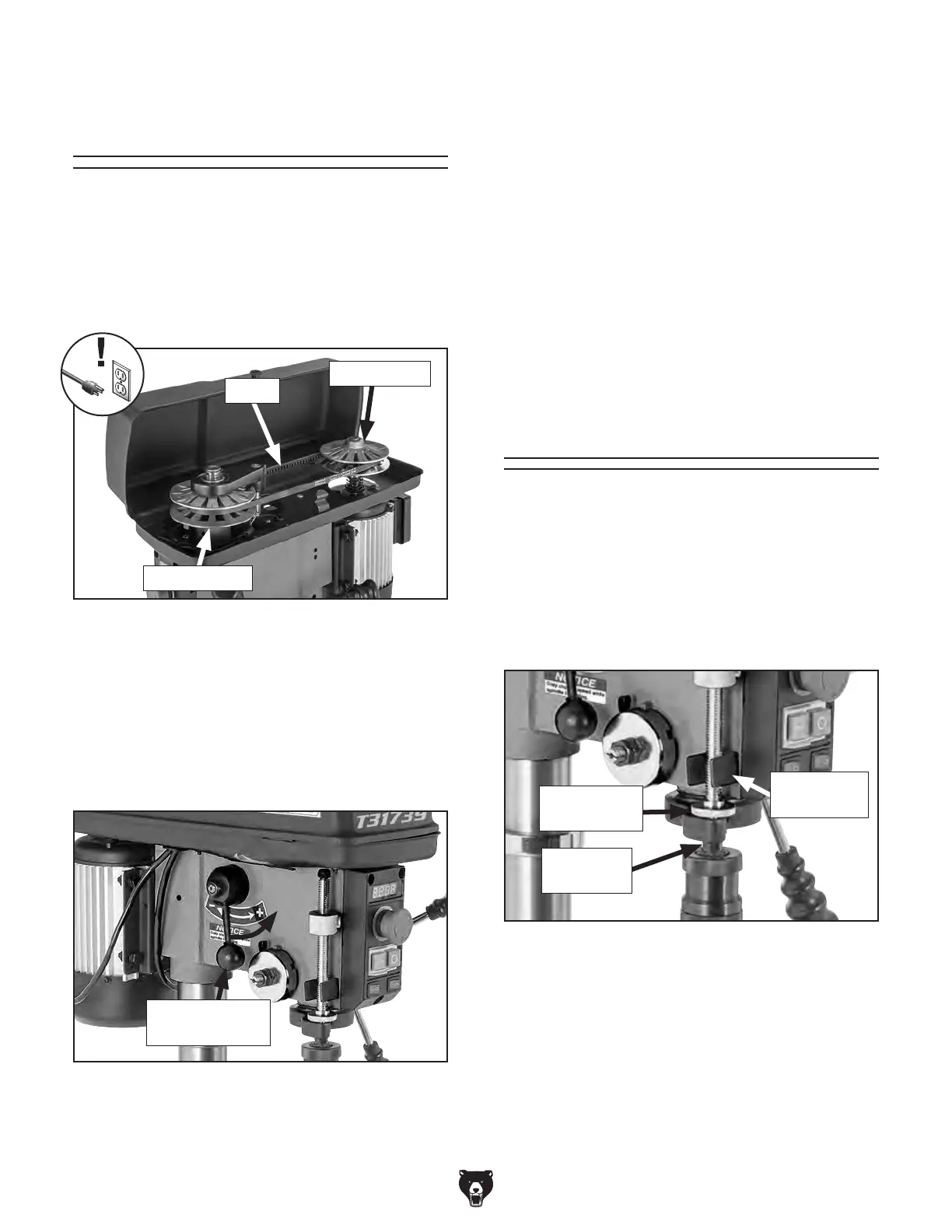
the belt when necessary. Figure 45 shows the
V-belt tension components.
To replace V-belt:
1.
DISCONNECT MACHINE FROM POWER!
Figure 45. V-belt tension components.
V-Belt
Fixed Pulley
Speed Pulley
Figure 46. Spindle speed lever location.
4. Remove old belt and install a new one.
5. Close belt cover and connect machine to
power.
6.
To re-tension belt, turn spindle rotation ON,
and adjust spindle speed lever to lowest
speed setting.
Note: Belt tension cannot be reapplied with-
out spindle turning.
3.
Open belt cover.
2. Adjust spindle speed lever fully for-
ward to highest speed setting (see
Figure 46) to release belt tension.
Spindle Speed
Lever
Calibrating
Depth Stop
The depth stop allows you to drill multiple holes at
the same depth. The scale on this depth stop can
be calibrated if it ever becomes incorrect.
To calibrate depth stop:
1.
Loosen return stop nut and calibration nut
shown in Figure 47.
2. Use calibration nut to zero depth stop scale
with depth stop bracket.
3.
Hold depth stop at zero, and tighten return
stop nut to hold depth stop in position.
4.
Test depth stop by measuring how far spindle
moves with respect to where you set depth
stop.
Figure 47. Calibration components.
Return Stop
Nut
Depth Stop
Bracket
Calibration
Nut


 To Next Page