DA98A AC Servo Drive Unit
User Manual
CHAPTER 6 DISPLAY AND OPERATION
6.1 Keyboard operation
z The drive unit panel is comprised by 6 LED nixie tube displayer and 4 keys of ↑, ↓, ←,
Enter, which is used for displaying system modes and parameters setting etc. And the
functions for keys are as followings:
↑ :Sequence number, numerical number increment or forward item
↓ :Sequence number, numerical number reduction or backward item
← :Back to upper menu or cancellation of operation
Enter :Enter into next menu or confirmation of input
〖Note〗 Holding ↑ or ↓ key down, the operation is executed repetitively, the longer the
holding time is, and the faster the repetitive speed is.
z The 6-digit LED nixie tube can display mode and data of system, flashing of all nixie tubes
or the decimal point of rightmost nixie tube means alarm.
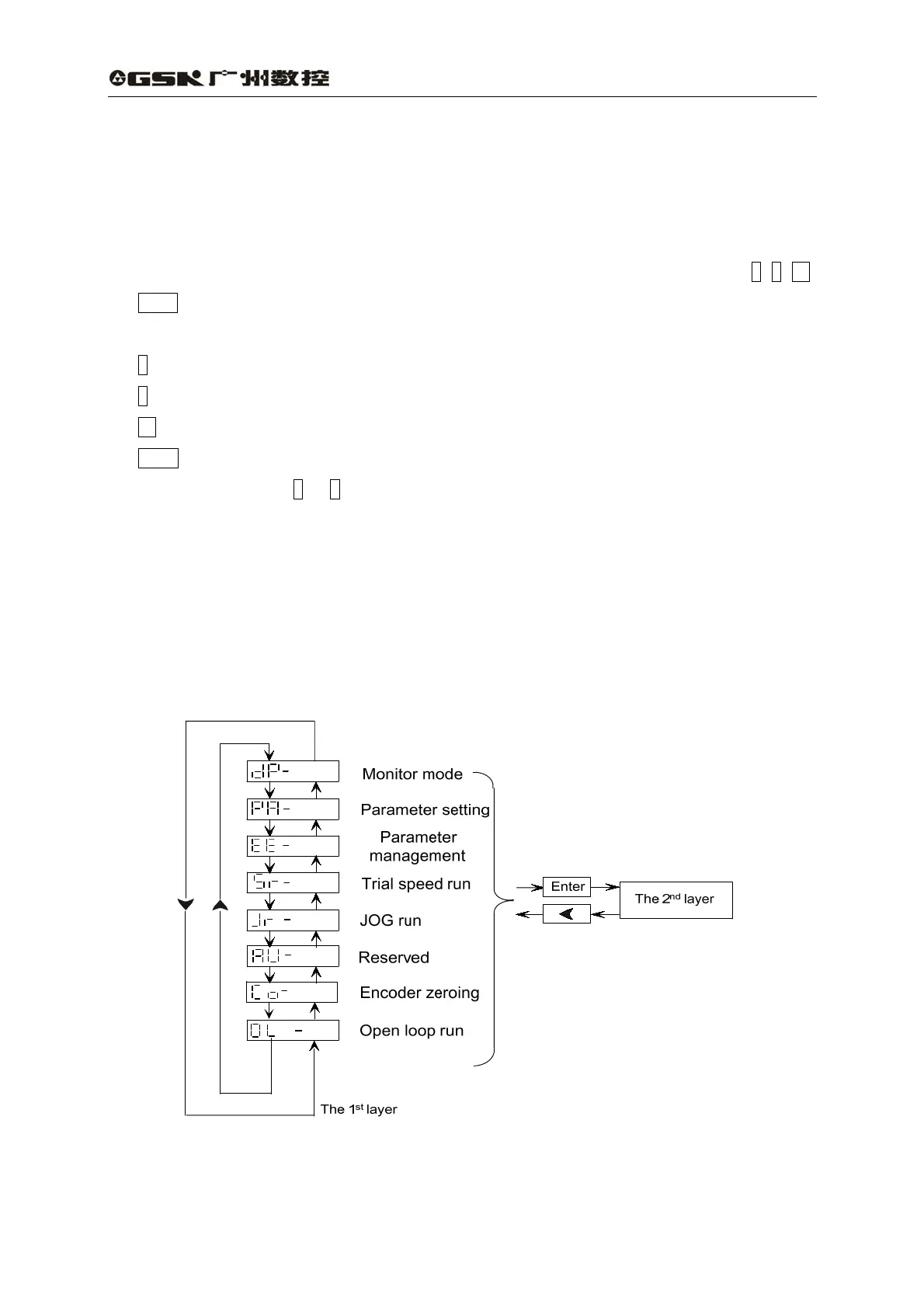
z Operation is performed by multilayer operating menus. The first level is the main menu
that includes 8 operating modes and the second is the functional menu of operating mode.
Fig.6.1 is block diagram of main menu operation:
Fig. 6.1 Operation block diagram of mode selection
42



 To Next Page