26
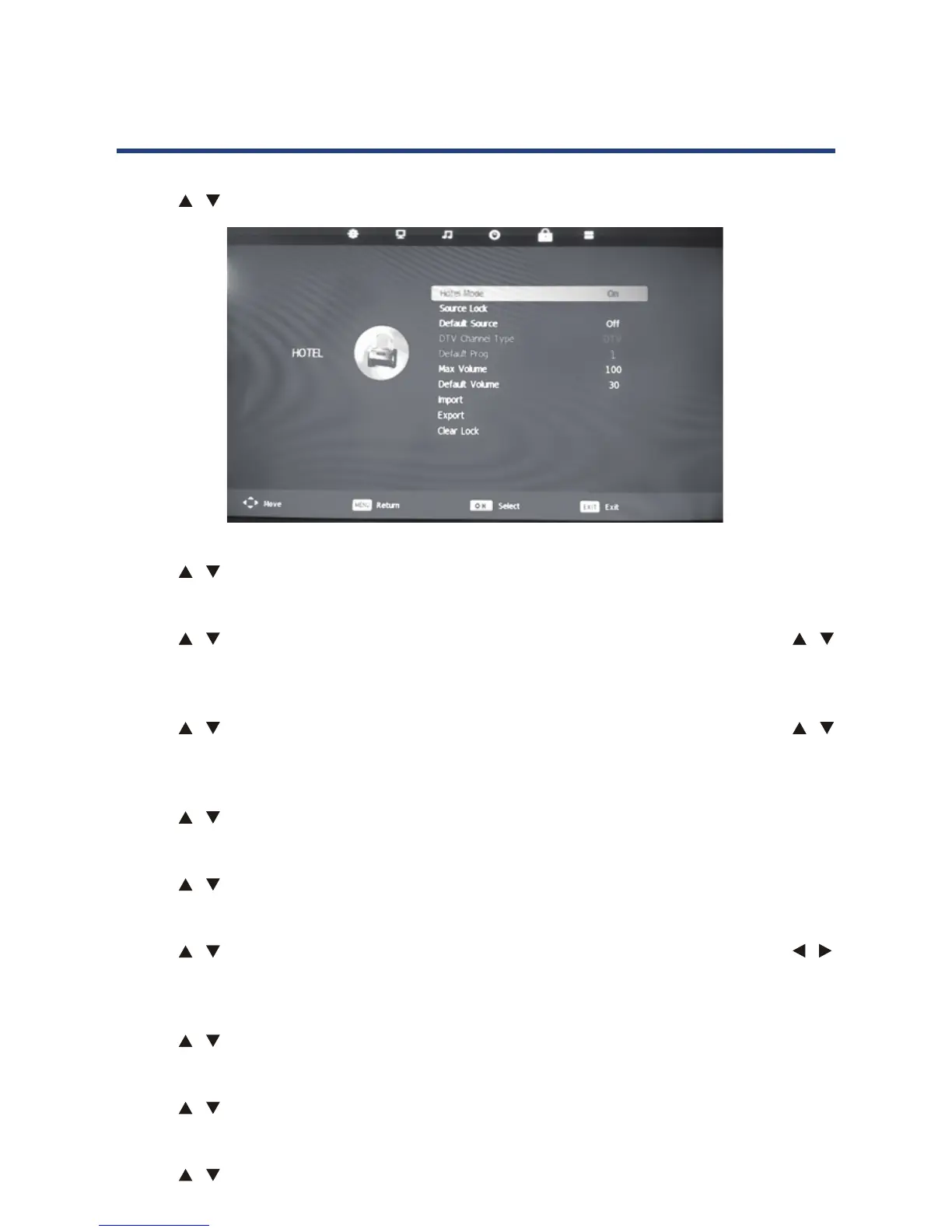
Hotel Mode
Use the / keys to select this option, then press OK button to enter sub-menu .
26
Hotel Mode
Use the /
Use the
/ keys to select this option, then press OK button to enter sub-menu .
Use the
/ keys to select the source you like to lock signal, then press OK
Source Lock
Use the / keys to select this option, then press OK key to enter sub-menu.
Use the
/ keys to select the default signal, then press OK key to save.
Default Source
Use the / keys to select this option, then press OK key to enter sub-menu.
DTV Channel Type
Use the / keys to select this option, then press OK key to select the channel type.
Default Prog
Use the / keys to select this option, then press OK key to select the default channel.
Default Volume
Use the / keys to select this option, then press OK key to select the default volume.
Use the
/
keys to adjust.
Max Volume
Use the / keys to select this option, then press OK key to enter sub-menu.
Import
Use the / keys to select this option, then press OK key to copy the import set.
Export
Use the / keys to select this option, then press OK key to copy the export set.
Clear Lock
Use the / keys to select this option, then press OK key to clear the Hotel set.
Hotel Mode
HOTEL
Hotel Mode
Use the / button to select this option, then press OK to select On or O.
Source Lock
Use the
/ button to select this option, then press OK to enter the submenu. Use the /
button to select the source you lie to lock the signal, then press OK to select On or O.
Default Source
Use the / button to select this option, then press OK to enter the submenu. Use the /
button to select default signal, then press OK to save.
DTV Channel Type
Use the / button to select this option, then press OK to select the channel type.
Default Prog
Use the / button to select this option, then press OK to select the default channel.
Max Volume
Use the / button to select this option, then press OK to enter the submenu. Use the /
button to adjust.
Import
Use the / button to select this option, then press OK to copy the import set.
Export
Use the / button to select this option, then press OK to copy the export set.
Clear Lock
Use the / button to select this option, then press OK to clear the hotel set.
Operating the Menus (DTV)



 To Next Page