27
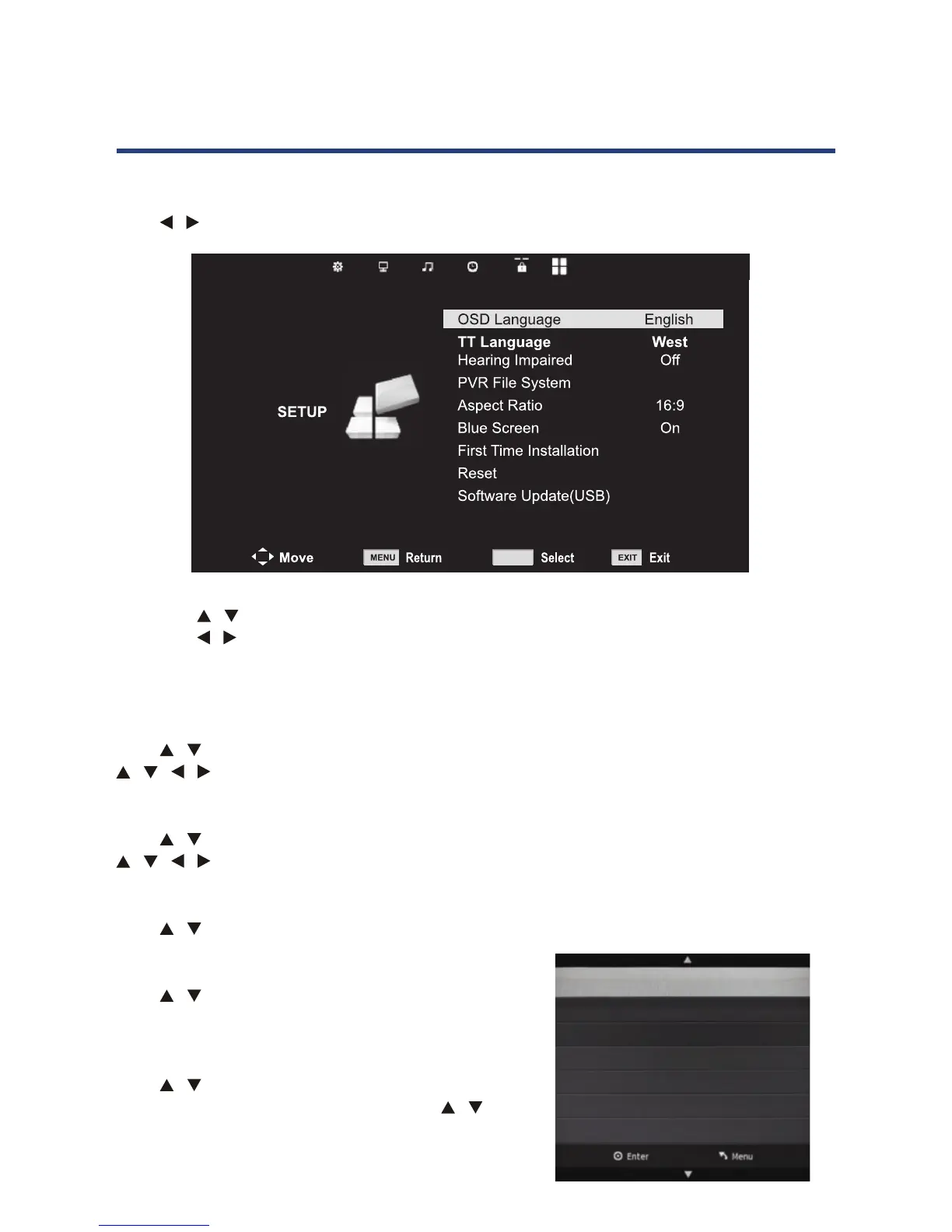
Setup menu
Press MENU button to display the main menu.
Press / button to select SETUP in the main menu.
27
1. Press button to select the option that you want to adjust in the OPTION menu.
2. Press
button to adjust.
3.
MENU button to save and return back to the
previous menu.
OSD Language
Press button to select OSD Language, then press OK button to enter sub menu. Press
button to select OSD Language, default setting is English.
Teletext Language
Press button to select TT Language, then press OK button to enter sub menu. Press
button to select TT Language. (Teletext is no longer available in Australia)
Hearing Impaired
Press button to select Hearing impaired, then press OK button to select ON/OFF.
PVR File System
Press button to select PVR File System, then
press OK button to enter sub menu. (See page 37)
Aspect Ratio
Press button to select Aspect Ratio, then
press OK button to enter sub menu. Press
button to select aspect ratio (Auto, 4:3, 16:9
Zoom1, Zoom2).
Setup menu
Press MENU button to display the main menu.
Press button to select SETUP in the main menu.
Select Disk C:
Check PVR File System Start
USB Disk
Format
Time Shift Size
Speed
Free Record Limit 6 Hr.
1. Press / button to select the option that you want to adjust in the OPTION menu.
2. Press / button to adjust.
3. After nishing your adjustment, press MENU button to save and return back to the
previous menu.
OSD Language
Press / button to select OSD Language, then press OK button to enter sub menu. Press
/ / / button to select OSD Language, default setting is English.
Teletext Language
Press / button to select TT Language, then press OK button to enter sub menu. Press
/ / / button to select TT Language. (Teletext is no longer available in Australia)
Hearing Impaired
Press / button to select Hearing impaired, then press OK button to select ON/OFF.
PVR File System
Press / button to select PVR File System, then
press OK button to enter sub menu. (See page 37).
Aspect Ratio
Press / button to select Aspect Ratio, then
press OK button to enter sub menu. Press /
button to select aspect ratio (Auto, 4:3, 16:9,
Zoom1, Zoom2).
27
1. Press button to select the option that you want to adjust in the OPTION menu.
2. Press
button to adjust.
3.
MENU button to save and return back to the
previous menu.
OSD Language
Press button to select OSD Language, then press OK button to enter sub menu. Press
button to select OSD Language, default setting is English.
Teletext Language
Press button to select TT Language, then press OK button to enter sub menu. Press
button to select TT Language. (Teletext is no longer available in Australia)
Hearing Impaired
Press button to select Hearing impaired, then press OK button to select ON/OFF.
PVR File System
Press button to select PVR File System, then
press OK button to enter sub menu. (See page 37)
Aspect Ratio
Press button to select Aspect Ratio, then
press OK button to enter sub menu. Press
button to select aspect ratio (Auto, 4:3, 16:9
Zoom1, Zoom2).
Setup menu
Press MENU button to display the main menu.
Press button to select SETUP in the main menu.
OK
Select Disk C:
Check PVR File System Start
USB Disk
Format
Time Shift Size
Speed
Free Record Limit 6 Hr.
Operating the Menus (DTV)



 To Next Page