Troubleshooting
42
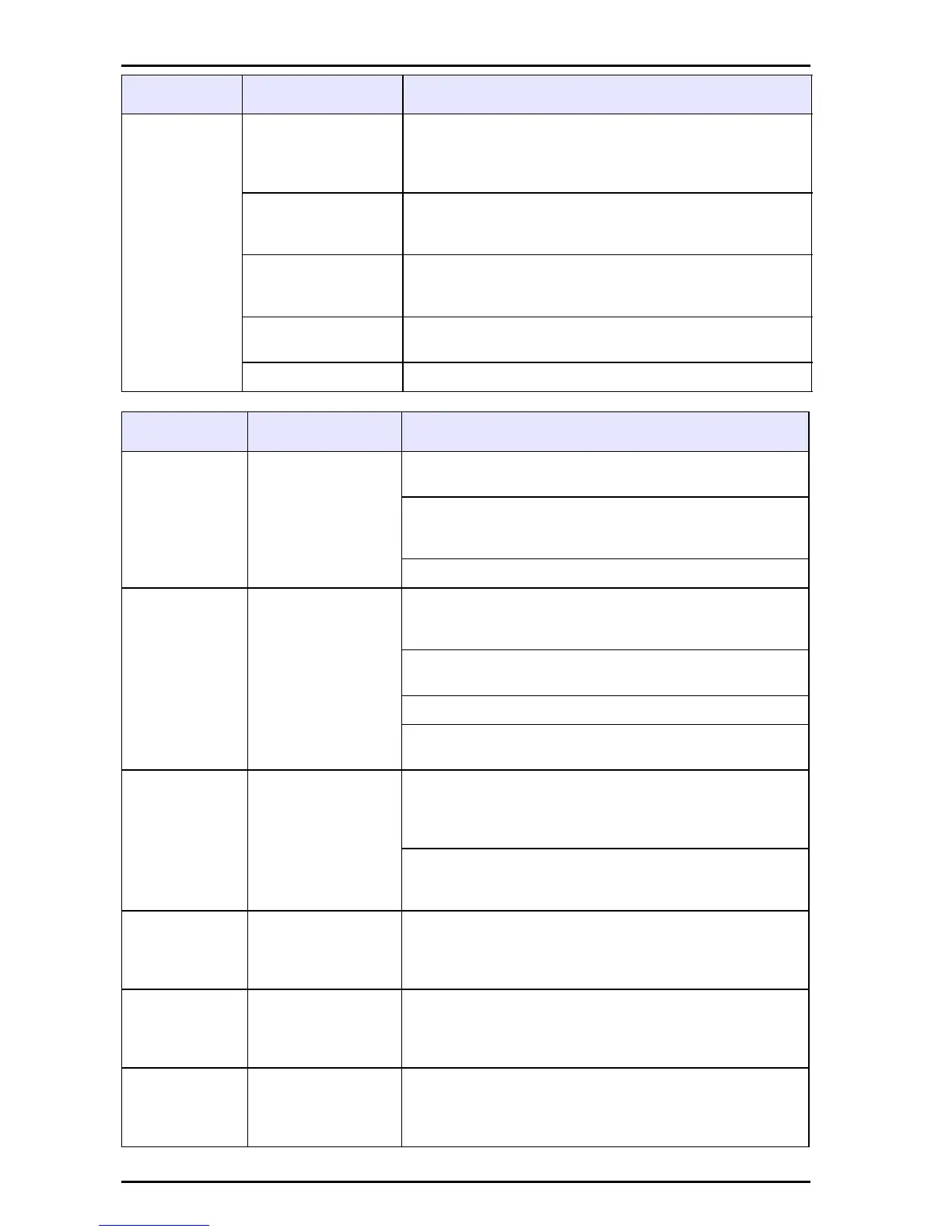
The meter
continually
displays
14.00 or 0.00
with the
electrode
attached. The
ISFET icon
not displayed
when the
ISFET probe
is attached.
Presence of the
ISFET probe is not
detected by the
meter or the probe.
Turn on the meter. If the ISFET icon is not displayed,
replace the ISFET probe.
Out of calibration.
Carefully follow the two point calibration instructions.
Refer to Section 3 Installation on page 7for the two
point calibration instructions
The probe is not in
the solution.
Place the probe in the liquid. Gently shake the probe
to be sure no air bubbles are trapped on the sensor
surface.
Dirty probe.
Follow the cleaning instructions found in Section 7
Maintenance on page 37.
Damaged probe. If the problem persists, replace the probe.
Indication Cause User Action
E03
Glass electrode
offset error.
The E03 error is displayed if the mV reading in the
pH 7.00 buffer is greater than 0.000mV ±30 mV.
An offset error indicates poor pH electrode
condition.Follow the cleaning instructions in Section
7 Maintenance on page 37.
If the E03 error persists, replace the electrode.
E04
Glass electrode
slope error.
The E04 error is displayed if the glass electrode
slope is less than 85‰ or over 102‰ of the 59.16
mV per pH unit.
A slope error indicates a poor pH electrode condition.
Follow the cleaning instructions.
If the E04 error persists, replace the electrode.
The user can override the E04 error by pressing the
pH key for temporary use of a damaged electrode.
E06
ISFET electrode
slope error
E06 error is displayed if the ISFET slope is out of the
specification and indicates a poor electrode condition
or damaged probe. Follow the cleaning instructions
in Section 7 Maintenance on page 37
If the E06 error indicator persists, replace the
electrode. Refer to contact the manufacturer for
replacement parts.
E08
Too long to
calibrate.
Calibration is taking over 4 minutes. Follow the
cleaning instructions. Refer to Section 7
Maintenance on page 37 for information about
cleaning the probe and connections.
E13
The ISFET probe
temperature
sensor out of
range.
Replace the electrode. See Replacement parts and
accessories on page 45 for information about
replacement parts and accessories.
E20
The conductivity
probe temperature
sensor is out of
range.
Replace the electrode. See Replacement parts and
accessories on page 45 for information about
replacement parts and accessories.
Indication Cause User Actions


 To Next Page