EasyManua.ls Logo

Hach LANGE LICO 500 - User Manual

Hach LANGE LICO 500
102 pages
Print Icon
To Next Page IconTo Next Page
Loading...
DOC027.53.00792
LICO 500
USER MANUAL
March 2007 Edition 1
©Hach Lange GmbH, 2007. All rights reserved. Printed in Germany.
sd/sk

Table of Contents

Questions and Answers

  • D
    Dawn WyattAug 15, 2025
    What to do if Hach Measuring Instruments shows 'Too much ambient light!'?
    • D
      Debbie PageAug 15, 2025
      If the Hach Measuring Instruments indicates 'Too much ambient light!', it means the sensors are detecting excessive ambient light. To resolve this, reduce the ambient light by avoiding direct sunlight and ensure the lid is closed.
  • C
    collin81Aug 18, 2025
    What to do if Hach Measuring Instruments displays 'Absorbance > 3.5!'?
    • H
      hjacobsAug 18, 2025
      If the Hach Measuring Instruments shows 'Absorbance > 3.5!', it means the measured absorbance exceeds 3.5. The solution is to dilute the sample and repeat the measurement.
  • C
    Cody YoungAug 21, 2025
    What to do if Hach Measuring Instruments displays 'Concentration too high!'?
    • H
      Heather YoungAug 21, 2025
      If the Hach Measuring Instruments indicates 'Concentration too high!', it means the calculated concentration is higher than 999999. You should dilute the sample and repeat the measurement.
  • B
    benjamin03Aug 25, 2025
    What to do if Hach Measuring Instruments says 'Over measuring range'?
    • J
      Joseph MyersAug 25, 2025
      If the Hach Measuring Instruments displays 'Over measuring range', it means the measured absorbance is above the calibration range of the test. Dilute the sample and repeat the measurement to resolve this.
  • B
    Brandy HubbardAug 27, 2025
    How to fix self-check error on Hach Measuring Instruments with lamp issue?
    • D
      Donna TaylorAug 27, 2025
      If the Hach Measuring Instruments displays 'Error Selfcheck stopped' with a lamp issue, it means the self-check test stopped while starting. Check the lamp and replace it if necessary. Also, ensure the lid is closed, then press 'Start Again'.
  • D
    David LaneAug 30, 2025
    What to do if Hach Measuring Instruments displays 'Color = ***'?
    • N
      Nicholas RuizAug 30, 2025
      If the Hach Measuring Instruments displays 'Color = ***', it means the spectrum locus is outside the measuring range. Dilute the sample or select an appropriate color scale.
  • A
    Amy StewartSep 2, 2025
    What to do if Hach Measuring Instruments displays 'Error Selfcheck stopped. Please remove the cuvette Please close the lid.'?
    • L
      laurabellSep 2, 2025
      If the Hach Measuring Instruments displays 'Error Selfcheck stopped. Please remove the cuvette Please close the lid.', it means the self-check test stopped while starting. Remove the cuvette/sample cell from the cell compartment and press OK.
  • J
    John WhitakerSep 5, 2025
    Why does Hach Measuring Instruments show 'Negative result!'?
    • K
      kellytraceySep 5, 2025
      If the Hach Measuring Instruments shows 'Negative result!', it means the calculated result is negative. Check the concentration of the sample.
  • R
    Robert RichSep 8, 2025
    How to use adapter Z with Hach Measuring Instruments?
    • E
      eric11Sep 9, 2025
      Adapter Z is required for measurements with 11mm round cells. Insert the adapter Z into cell compartment #2 and press OK.
  • J
    Joseph HatfieldSep 12, 2025
    What to do if Hach Measuring Instruments says 'Under measuring range'?
    • J
      joseph63Sep 12, 2025
      If the Hach Measuring Instruments displays 'Under measuring range', it means the measured absorbance is below the calibration range of the test. If possible, select a test with a lower measurement range or use a cuvette/sample cell with a longer path length.

Summary

Section 1 Specifications

Section 2 General Information

Safety Information

General safety guidelines, hazard information, and precautionary labels.

Product Overview

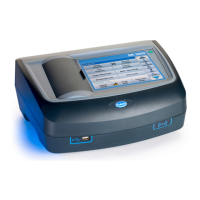
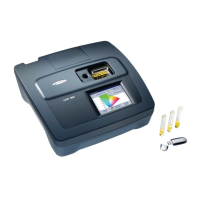
Description of the LICO 500 VIS spectrophotometer and its capabilities.

Section 3 Installation

Unpack and Environment

Instructions for unpacking and environmental considerations for instrument operation.

Power Connections

Details on connecting the instrument to a power source using the external power supply.

Interfaces

Description of the instrument's USB interfaces for data output and connectivity.

Cell Compartments and Adapters

Information on the instrument's cell compartments and the use of cell adapters for different cuvette types.

Beam Path

Diagram and explanation of the light beam path within the LICO 500 spectrophotometer.

Section 4 Start Up

Powering On and Language Selection

Procedure for powering the instrument on and selecting the user interface language.

Self-Check and Continuous Operation

Description of the automatic self-check procedure and considerations for continuous instrument operation.

Section 5 Standard Operations

Operations Overview

Introduction to standard operations, touch screen use, keypad, and main menu options.

Instrument Setup

Configuration options for the instrument, including operator ID, sample ID, date/time, display, lamp, PC/printer, password, and color selection.

Data Management

Procedures for storing, recalling, sending, and deleting measurement data from various logs.

Sampling and Preparation

Guidelines for obtaining representative samples and preparing them for measurement.

Color Measurement

Detailed steps for performing various types of color measurements, including Hazen, Gardner, and Pharmacopoeia standards.

Color Difference Measurement

Procedures for determining quantitative color differences between a sample and a reference.

Photometry Operations

Instructions for performing single wavelength, multi-wavelength, wavelength scan, and time course measurements.

Section 6 Advanced Operations

System Checks

Procedures for instrument information, software updates, optical checks, lamp history, service time, and instrument backup.

Section 7 Maintenance

Cleaning Requirements

Guidelines for cleaning the instrument's housing, display, and sample cells.

Lamp Replacement

Step-by-step instructions for replacing the instrument's lamp.

Filter Pad Maintenance

Procedures for inspecting and replacing the instrument's filter pad.

Section 8 Troubleshooting

Section 9 Replacement Parts

Replacement Parts List

A list of available replacement parts for the LICO 500 instrument with catalog numbers.

Section 10 Contact Information

Section 11 Warranty, Liability, and Complaints

Hach LANGE LICO 500 Specifications

General IconGeneral
BrandHach
ModelLANGE LICO 500
CategoryMeasuring Instruments
LanguageEnglish

Related product manuals