| HD Ready LCDTV | User Manual |
p.11
TUNING MENU OPTIONS
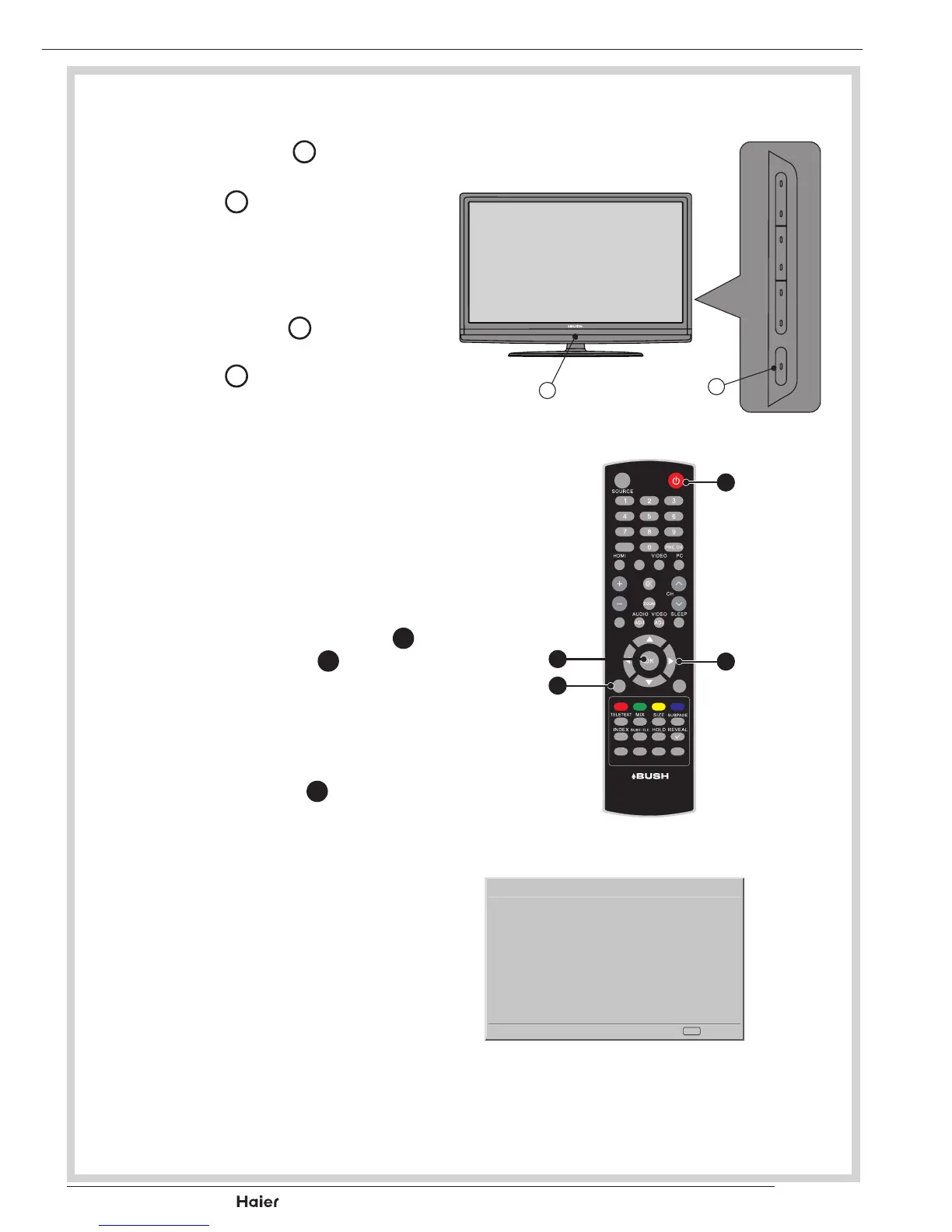
TURN ON THE LCD-TV
1. When the POWER
I
is pressed,
theTVwillbeturnedonandthe
PowerLED
A
on the front of the
TVwillchangefromredtoblue.
See g. 11.
2. When the LCD-TV is turned off,
using the POWER
I
, the LCD-TV
willgointostandbymodeandthe
PowerLED
A
willturntored.
See g. 11.
FIRST TIME INSTALLATION
1. Thisdisplaywillappearonthe
screenwhentheTVisturnedon
forthersttime.
See g. 13.
NOTE: Ifyoucannotndthis
screen, you may press MENU
b
. Then use the Cursor
X
to se-
lect the Reset Default in Features
menu.
See g. 12.
2. Press the OK Button
Y
to proceed
withtheinstallation.
See g. 12.
A
fig. 11
I
FAV
DUAL
EPG
YPbPr
CH-LIST USB FREEZE
MENU
/EXIT
INFO
fig. 12
A
X
b
Y
Vol
Welcome to use the Wizard for
Initial Setup !!
Initial Setup
WELCOME!
Next
OK
Please press [OK] to start the
wizard.
fig. 13



 To Next Page