| HD Ready LCDTV | User Manual |
p.28
MENU OPERATION
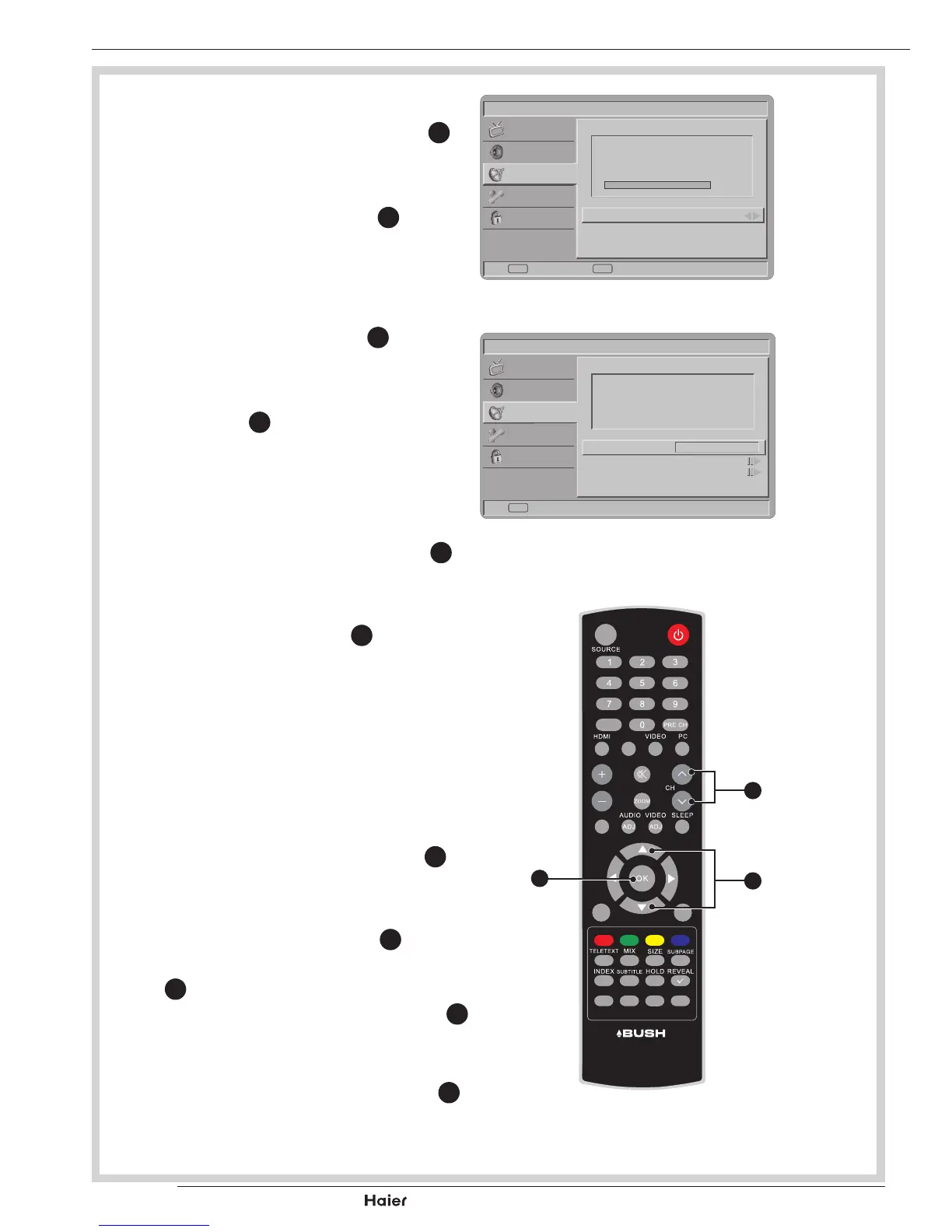
Update Scan
1. UsetheUporDownCursor
X
to
select Update scan in the Chan-
nels submenu.
2. Press the Right Cursor
X
to start
searching the local program auto-
matically.
Single RF Scan (digital only)
1. Use the Right Cursor
X
to enter
single RF Scan in the channels
submenu.See g. 45.
2. Press ok
Y
to start scan digital
channel.See g. 45.
Analog Manual Scan
1. UsetheUporDownCursor
X
to
select Analog manual scan in the
Channels submenu.
2. Press Right Cursor
X
to enter.
Using number buttons 0~9 to
enter the Start Frequency. Use
UporDowntoselectScanUpor
ScanDownandpressRightCur-
sor to start scan.
See g. 46 and 47.
Channel Skip
1. UsetheUporDownCursor
Y
to
select Channel skip in the Chan-
nels menu.
2. Press the Right Cursor
Y
to enter
itandusetheUporDownCursor
Y
to highlight the program you
wanttoskipandpresstheOK
X
to set.
Tip: The skipped program may not
be found by pressing CH Λ / V
K
but can be accessed by pressing
number buttons directly.
0%
Picture
Scan single RF channel.(Digital Only)
Sound
TV
Features
Parental
RF Channel 7
Signal Strength 60
Signal Quality Good
Scan Back
EXITOK
fig. 45
Picture
Search for analog channels.
Sound
TV
Features
Parental
Start Frequency (MHz)
45.00
Scan Up
Scan Down
Back
Exit
fig. 46
FAV
DUAL
EPG
YPbPr
CH-LIST USB FREEZE
MENU
/EXIT
INFO
fig. 47
X
K
Y
Vol



 To Next Page