| HD Ready LCDTV | User Manual |
p.29
MENU OPERATION
Channel Sort
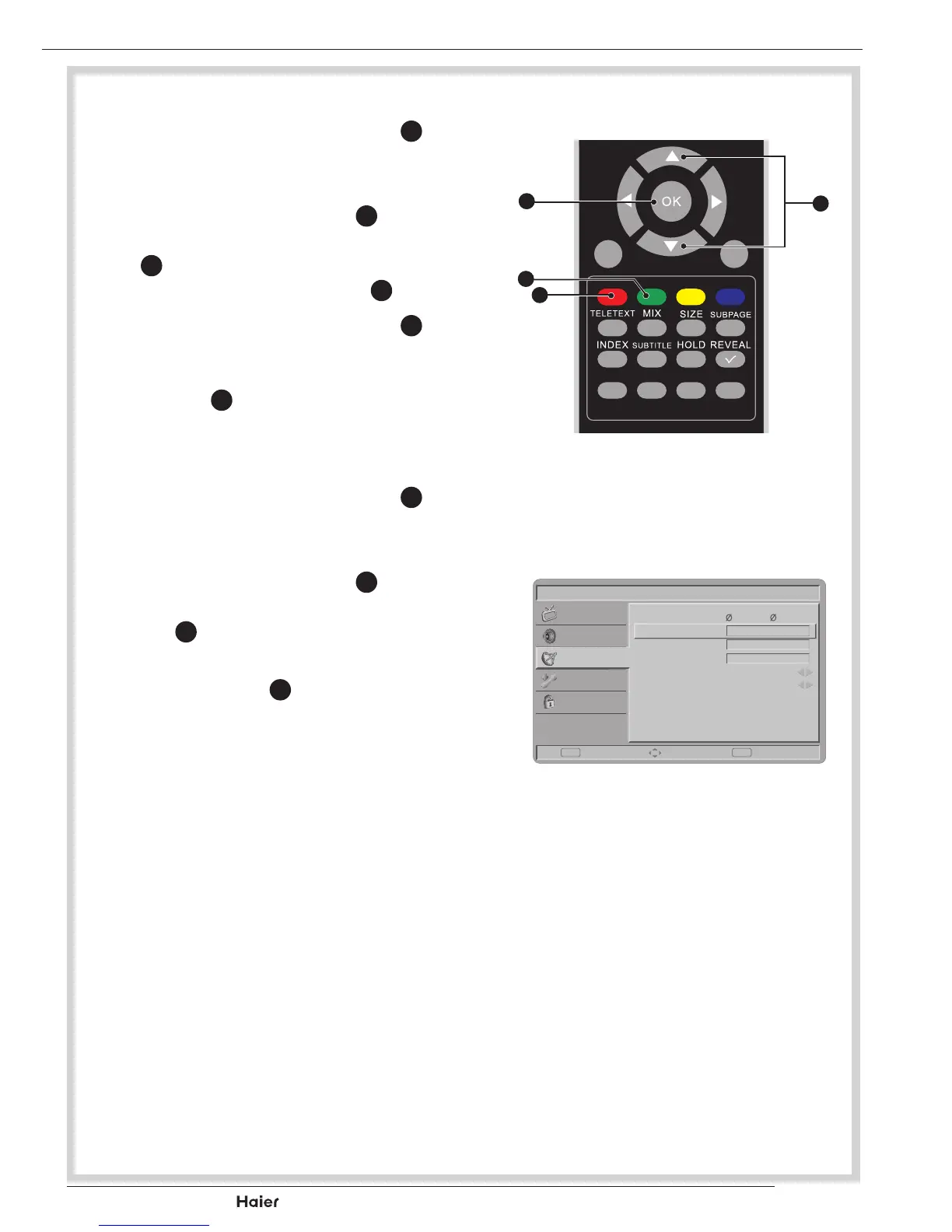
1. UsetheUporDownCursor
Y
to
select Channel sort in the Chan-
nels menu.
2. Press the Right Cursor
Y
to enter
itandusetheUporDownCursor
Y
tohighlightaprogramyouwant
to sort and press the OK
X
to set.
3. UsetheUporDownCursor
Y
to
highlight the second program you
wanttoexchangewithandpress
the OK
X
toswitchthechannel
position.
Channel Edit
1. UsetheUporDownCursor
Y
to
select Channel edit in the Chan-
nels menu.
2. Press the Right Cursor
Y
to enter
itandpresstheUporDownCur-
sor
Y
to highlight the program
youwanttoedit.
3. Press the OK
Y
to start editing
program name.
4. Change the Channel Number by
using the number buttons 0~9.
Change the Channel Name by
pressing the number buttons 0~9
to enter numbers and letters
See g. 48 and 49.
FAV CH-LIST USB FREEZE
MENU
/EXIT
INFO
fig. 48
X
Y
d
f
Picture
Transmitter
Channel Number:
Channel Name:
Frequency:
Colour System
Sound System
r seau num rique te...
3
W9
842
Auto
B/G
Set Select Back
EXITOK
Sound
TV
Features
Parental
fig. 49



 To Next Page