| HD Ready LCDTV | User Manual |
p.18
BASIC OPERATION
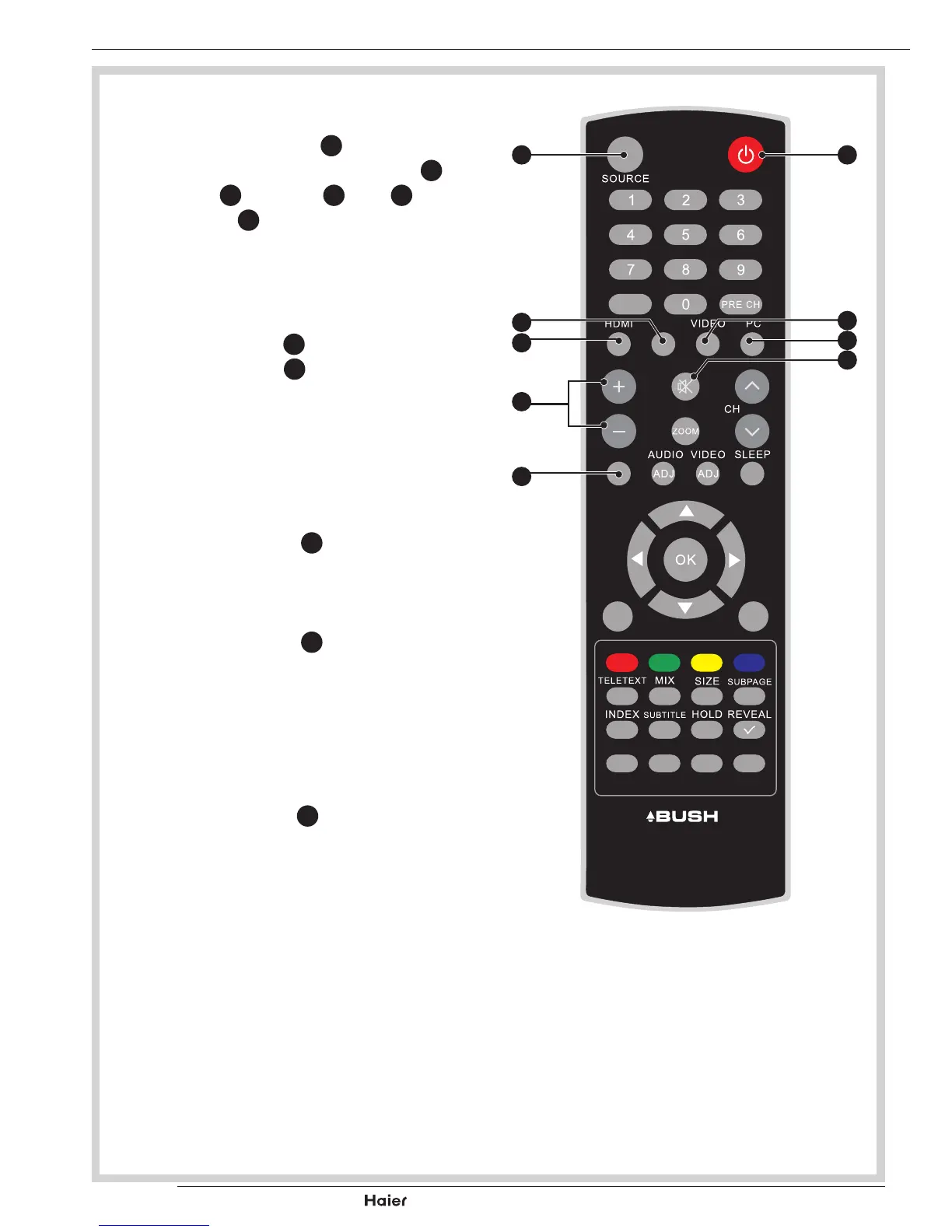
SELECT SOURCE
• Press the POWER
A
to turn on
the LCD-TV. Then press HDMI
I
, YPbPr
G
, VIDEO
F
, PC
H
or
SOURCE
B
to select the source.
See g. 29.
AUDIO CONTROL
• Press the Vol+
L
to increase the
Volume or Vol-
L
to decrease the
Volume.Anumberwillappearon
screen indicating the Volume level.
See g. 29.
MUTE
• Press the MUTE
J
to mute the
soundtemporarily.Amuteiconwill
appear on the screen.
See g. 29.
• Press the MUTE
J
again or Vol+/
Vol- to restore the sound.
Themuteiconwilldisappear.
See g. 29.
DUAL
• Press the DUAL
P
to select MONO,
STEREO, DUAL 1 and DUAL 2 for
ATV channel. Select Audio language
for DTV channel.
See g. 29.
FAV
DUAL
EPG
YPbPr
CH-LIST USB FREEZE
MENU
/EXIT
INFO
fig. 29
A
F
J
H
B
G
L
I
P
Vol



 To Next Page