| HD Ready LCDTV | User Manual |
p.17
OTHER CONNECTIONS
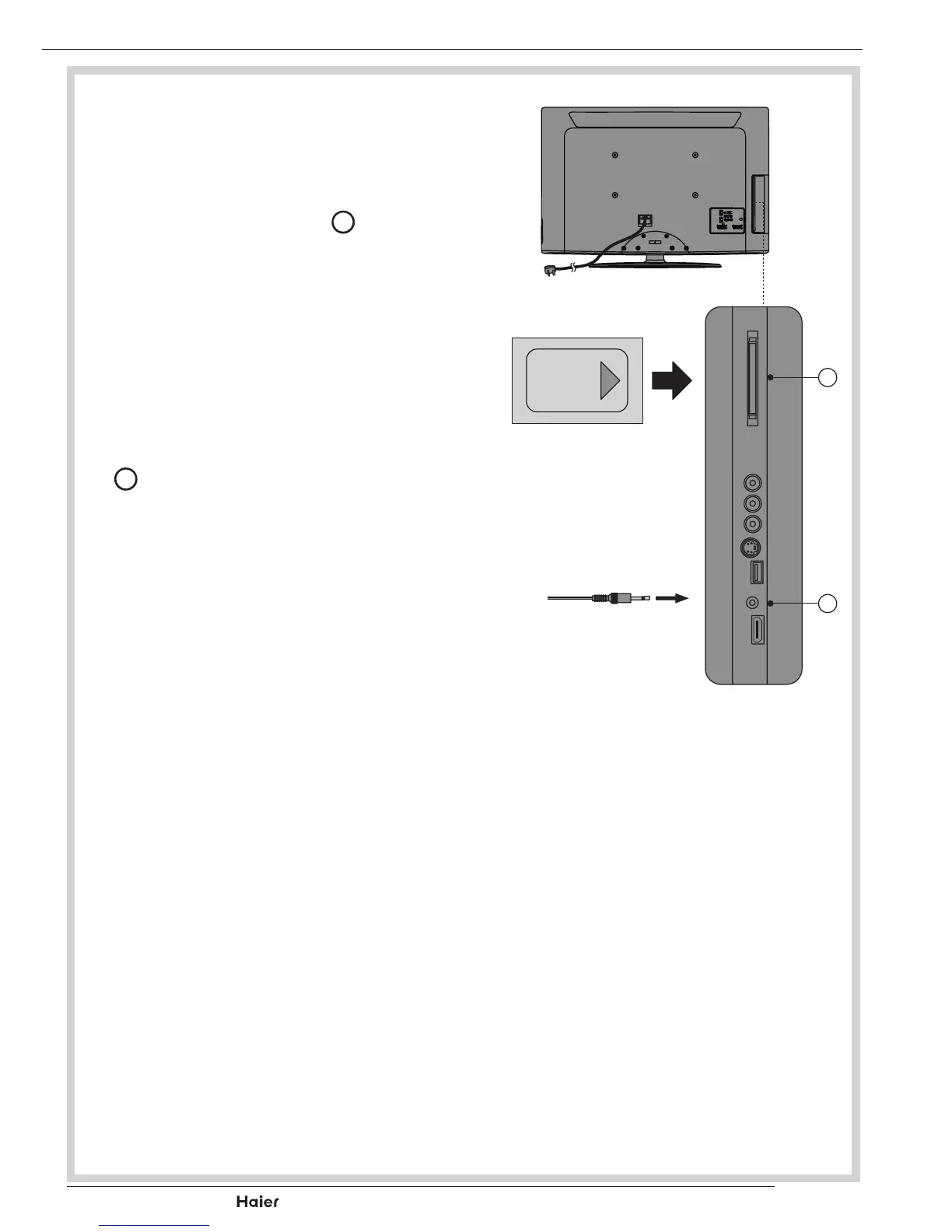
COMMON INTERFACE SLOT
- You can use a Conditional Access Mod-
ule(CAM)cardtoviewaPayTV.
1. InserttheCAMcard(notincluded)in
Common Interface Slot
J
.
See g. 28.
2. Please refer to the COMMON INTER-
FACE section for more detailed informa-
tion.
HEADPHONE OUTPUT
1. Connect a set of stereo headphones
(notincluded)totheHeadphoneOutput
O
for private listening. When head-
phonesareinuse,thespeakerswillbe
automatically mute.
See g. 28.
IMPORTANT: When using headphones
always set the Volume control to a low
level before you put the headphones on,
then put the headphones on and gradu-
ally increase the Volume to a comfort-
able listening level.
fig. 28
J
O



 To Next Page