| HD Ready LCDTV | User Manual |
p.16
OTHER CONNECTIONS
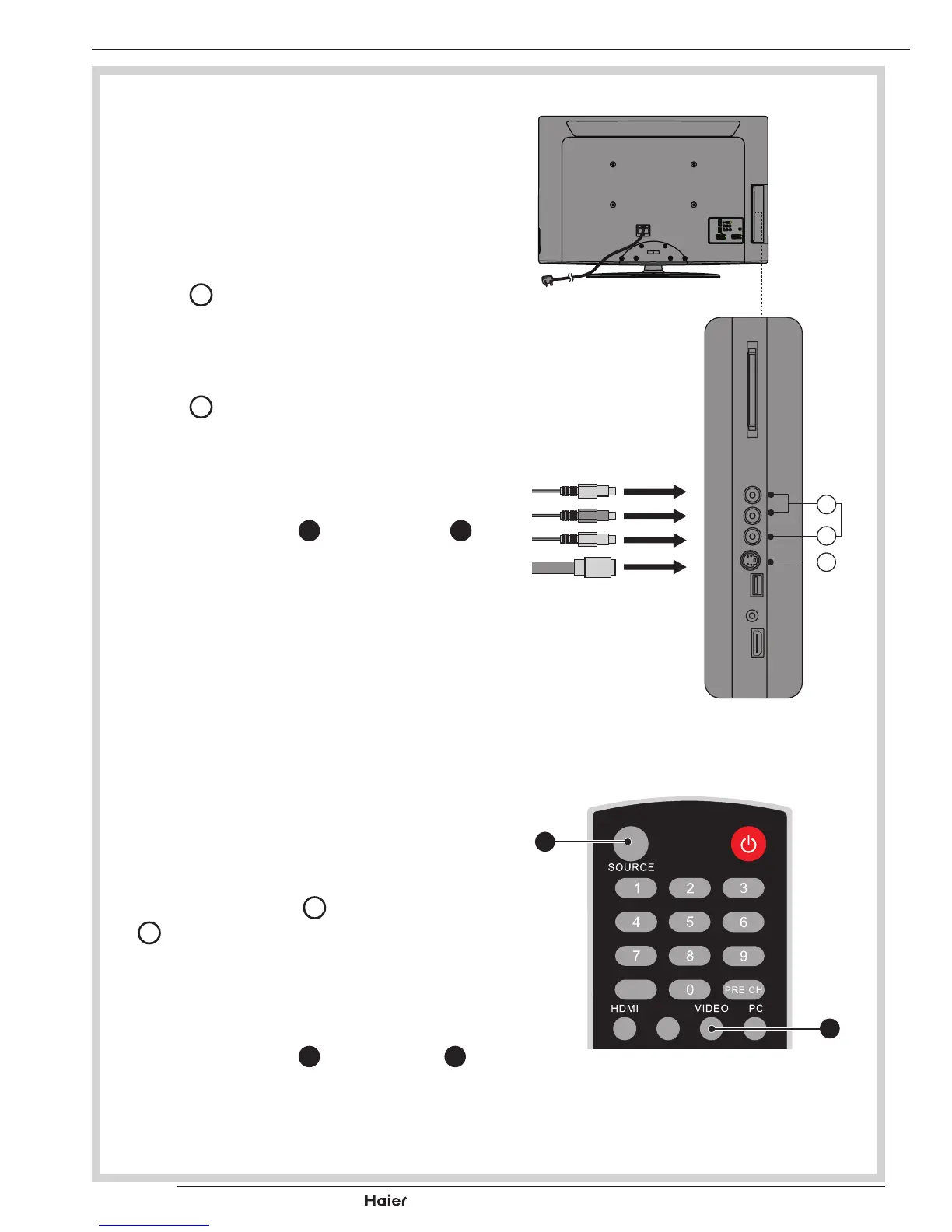
AV INPUT
- For connecting an AV device.
1. Makesurethatthepowerofthe
LCDTV and the AV device are off.
2. Connect the audio cables from the
AVdevice’soutputjackstotheAudio
Input
K
.
See g. 26.
3. Connect the video cables from the
AVdevice’soutputjackstotheVideo
Input
L
.
See g. 26.
3. TurnontheLCD-TVrst;andthen
turn on the AV device.
4. Press the VIDEO
F
or SOURCE
B
to select the AV input.
See g. 27.
fig. 26
S-Video Cable
K
M
S-VIDEO INPUT
- For connecting video recorders.
1. Makesurethatthepowerofthe
LCDTV and the AV device are off.
2. Connect the audio and S-Video
cablesfromtheVCR’soutputjacksto
the S-Video Input
M
and Audio Input
K
.
See g. 26.
3. TurnontheLCD-TVrstandthen
turn on the VCR.
4. Press the VIDEO
F
or SOURCE
B
to select the S-VIDEO input.
See g. 27.
EPG
YPbPr
fig. 27
F
B



 To Next Page