| HD Ready LCDTV | User Manual |
p.15
OTHER CONNECTIONS
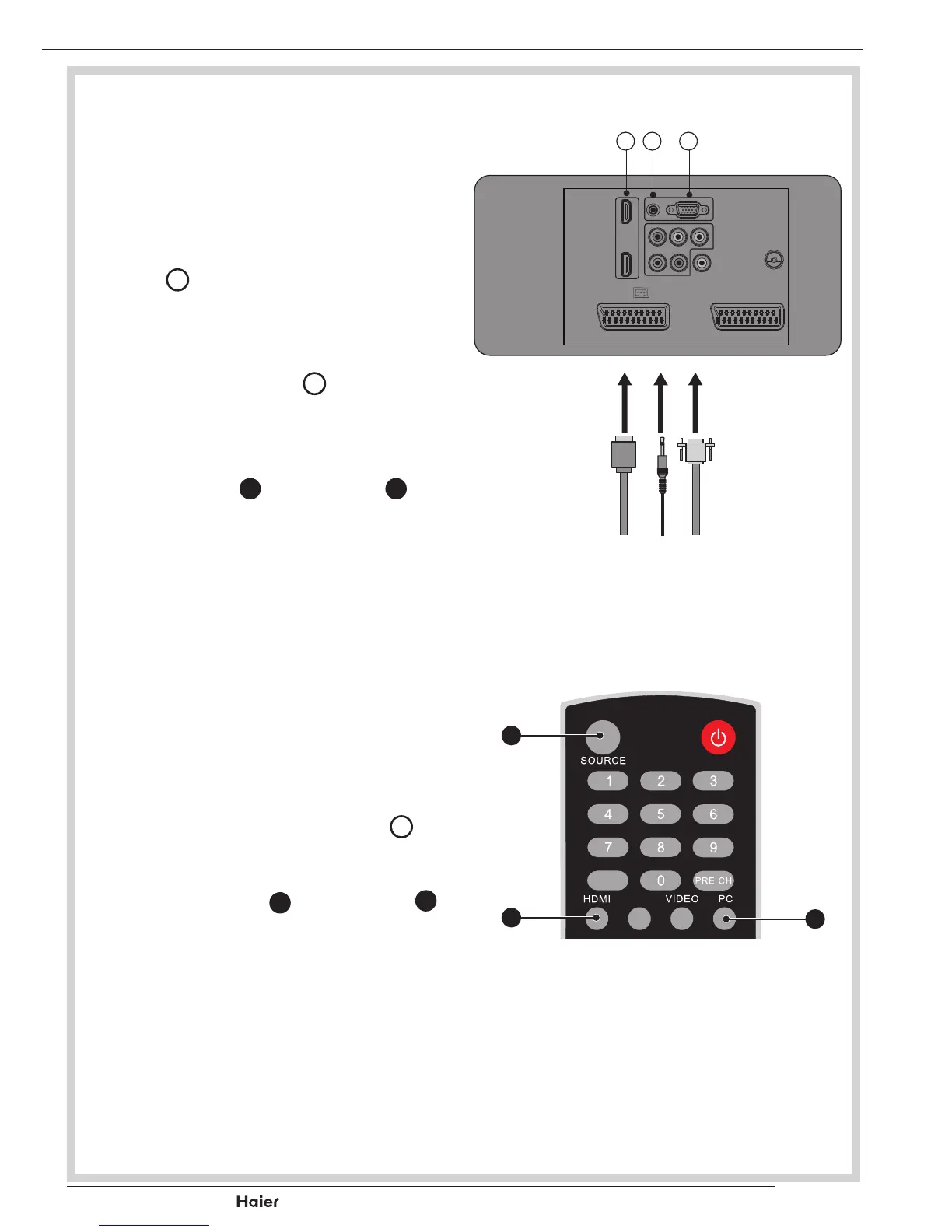
VGA INPUT
- You can use your LCD-TV as a
monitor for your personal computer.
1. ConnecttheDtype15-pinVGA
interfacecable(notsupplied)toVGA
Input
Q
on the LCD-TV.
See g. 24.
2. Connecttheaudiocable(notsup-
plied) to Audio Input
W
on the back
oftheLCD-TV(ifnecessary).
See g. 24.
3. Press the PC
H
or SOURCE
B
to
select the PC input.
See g. 25.
HDMI INPUT
CAUTION: You must ensure both
devices are switched off before con-
nection.
1. Connect the cable from the HDMI
devices to the TV HDMI Input
X
.
See g. 24.
2. Press the HDMI
I
or SOURCE
B
to select the HDMI input.
See g. 25.
3. Operatethecorrespondingexternal
equipment.(Refertoexternalequip-
mentoperatingguide.)
fig. 24
to PCHDMI
Cable
X
W
Q
EPG
YPbPr
fig. 25
B
I
H



 To Next Page