| HD Ready LCDTV | User Manual |
p.37
COMMON INTERFACE MODULE
Common Interface Module
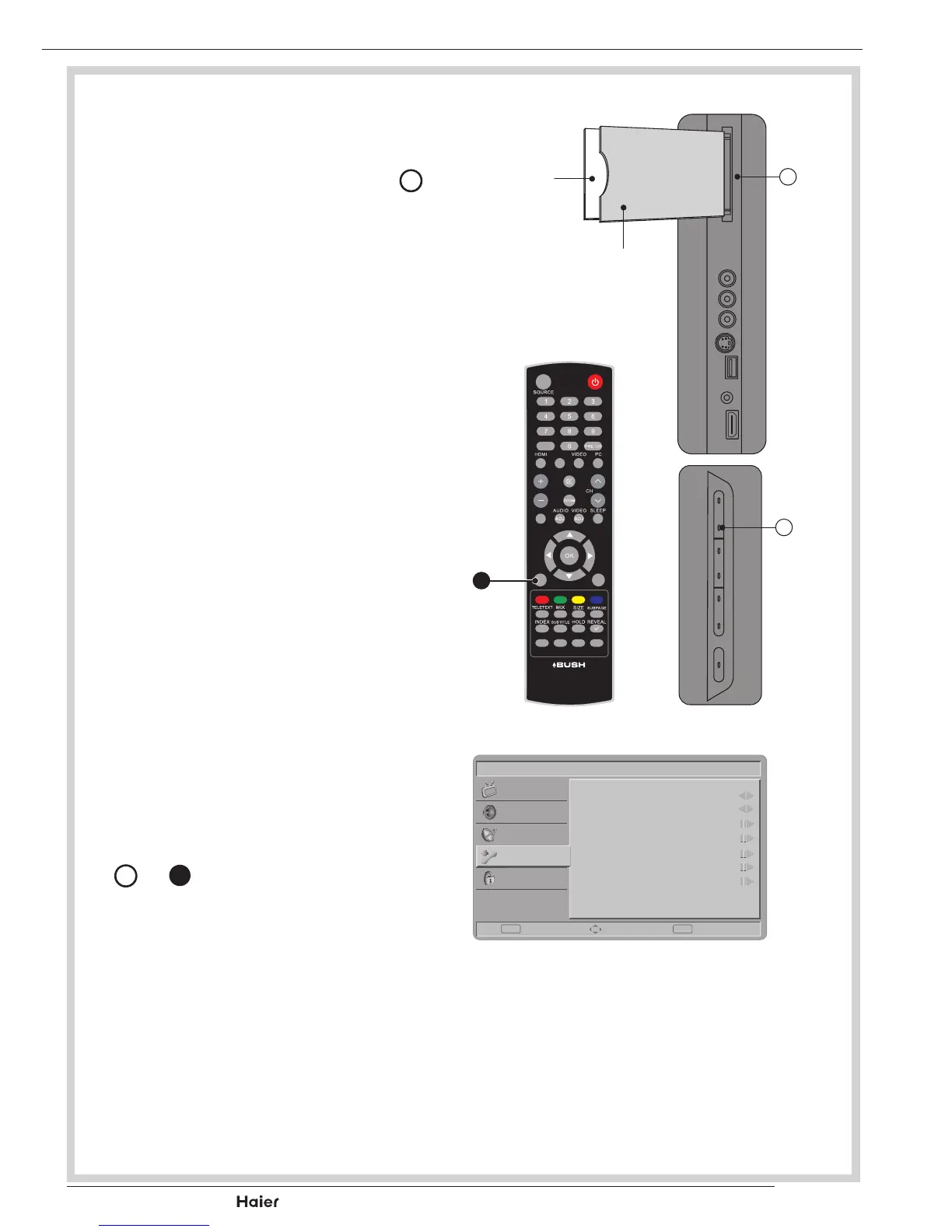
- The Common Interface CI Slot
J
, is designed to accept the Condi-
tional Access CA Module coupled
withaSmartcard,inordertoview
pay TV programmes and additional
services. Contact your Common
Interface service provider for further
information about modules and sub-
scription options. Please note that
CA modules and smart cards are
not included, or supplied as optional
extrasbyus.
See g. 60.
WARNING: Switch off your TV be-
fore any module is inserted into the
Common Interface slot.
1. Correctly insert the CA Module and
then the Smart Card into the CI slot
located at the side of the TV.
See g. 60.
2. Turn on the TV and press MENU
D
or
b
and select the TV sub-
menu.
“Commoninterface”willbedis-
played if the CA module is detected.
Waitforfewmomentsuntilthecard
is activated.
See g. 60 - 63.
FAV
DUAL
EPG
YPbPr
CH-LIST USBF REEZE
MENU
/EXIT
INFO
fig. 60
fig. 61
fig. 62
CA Module
Smart Card
b
Vol
D
J
Picture
Menu Language
Picture Format
Time
Teletext Language
Subtitle
Common Interface
Reset Default
English
Wide
Enter Select Exit
EXITOK
Sound
TV
Features
Parental
fig. 63



 To Next Page