| HD Ready LCDTV | User Manual |
p.38
COMMON INTERFACE MODULE
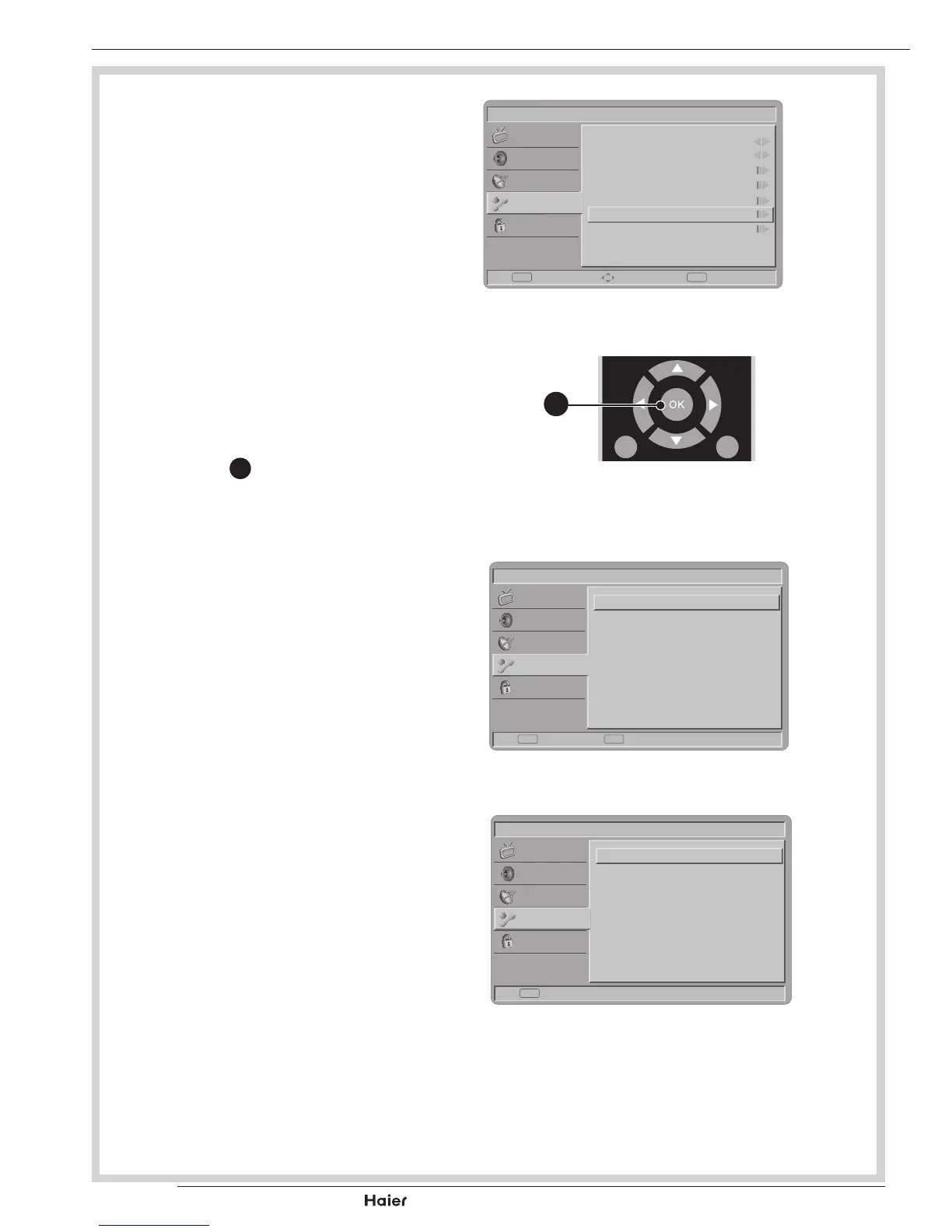
3. SelectCommonInterfacetoview
the menu options and information
on the inserted CI card.
See g. 64.
4. Press OK
Y
to access the card
menu, for more details refer to the
module’s instruction manual.
See g. 64 - 67.
5. When module is removed, the
“CommonInterface”menuwilldis-
appear from the screen.
See g. 67.
Picture
Menu Language
Picture Format
Time
Teletext Language
Subtitle
Common Interface
Reset Default
English
Wide
Enter Select Exit
EXITOK
Sound
TV
Features
Parental
fig. 64
MENU
/EXIT
INFO
fig. 65
Y
Picture
CryptoWorks
Enter Back
EXITOK
Sound
TV
Features
Parental
fig. 66
Picture
No CI card presented.
Back
EXIT
Sound
TV
Features
Parental
fig. 67



 To Next Page