| HD Ready LCDTV | User Manual |
p.04
REMOTE CONTROL
NOTES:
- Please read the important safety
instructions before use.
REMOTE CONTROL
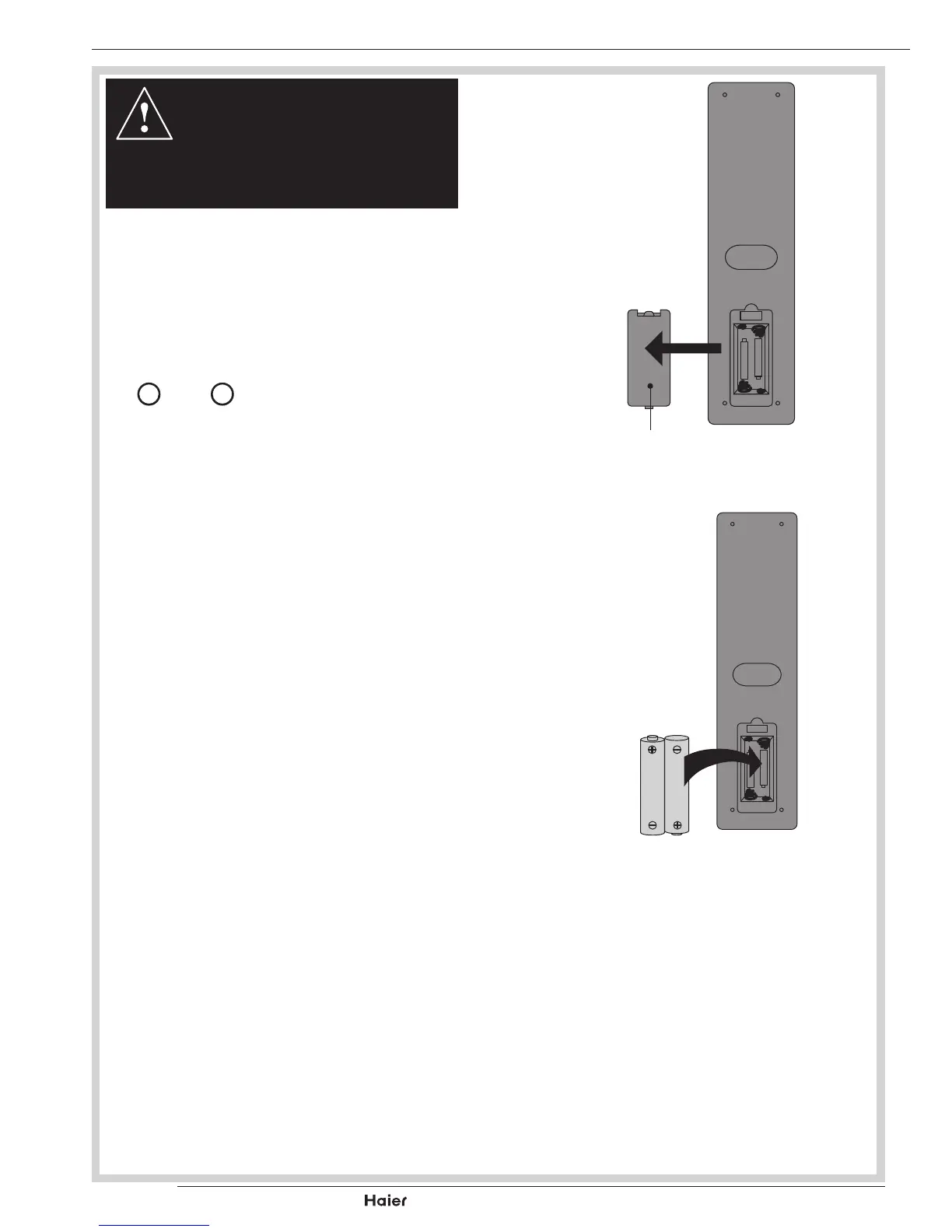
1. Unclip the Battery Cover from the Remote Con-
trol.
See g. 1.
2. Inserttwonew1.5VsizeAAABatterieswiththe
+
and
–
marks correctly aligned.
See g. 2.
HANDLING THE REMOTE CONTROL
Donotusecausticcleaners(porcelain,stainless
steel,toilet,orovencleaneretc.)ontheremote,as
it may suffer damage:
• Nevermixusedandnewbatteriesinthedevice.
• Replace all the batteries in a device at the same
time.
• Remove the batteries if the remote control is not
working.
• Toavoidpossiblefailure,readthefollowing
instructions and handle the remote cont.
• Do not drop or cause impact to the remote con-
trol.
• Donotspillwateroranyliquidontheremote
control.
• Donotplacetheremotecontrolonawetobject.
• Do not place the remote control under the direct
sunlight or near heat sources.
Remove the battery from remote control handset
whenitisnottobeusedforalongperiod.Other-
wiseitcouldcausecorrosionorbatteryleakageand
mayresultinphysicalinjuryand/orpropertydam-
age includingre.
fig. 1
Battery
Compartment



 To Next Page