30
USING THE "HAMA FIT MOVE" APP
9.1.4 Sleep analysis
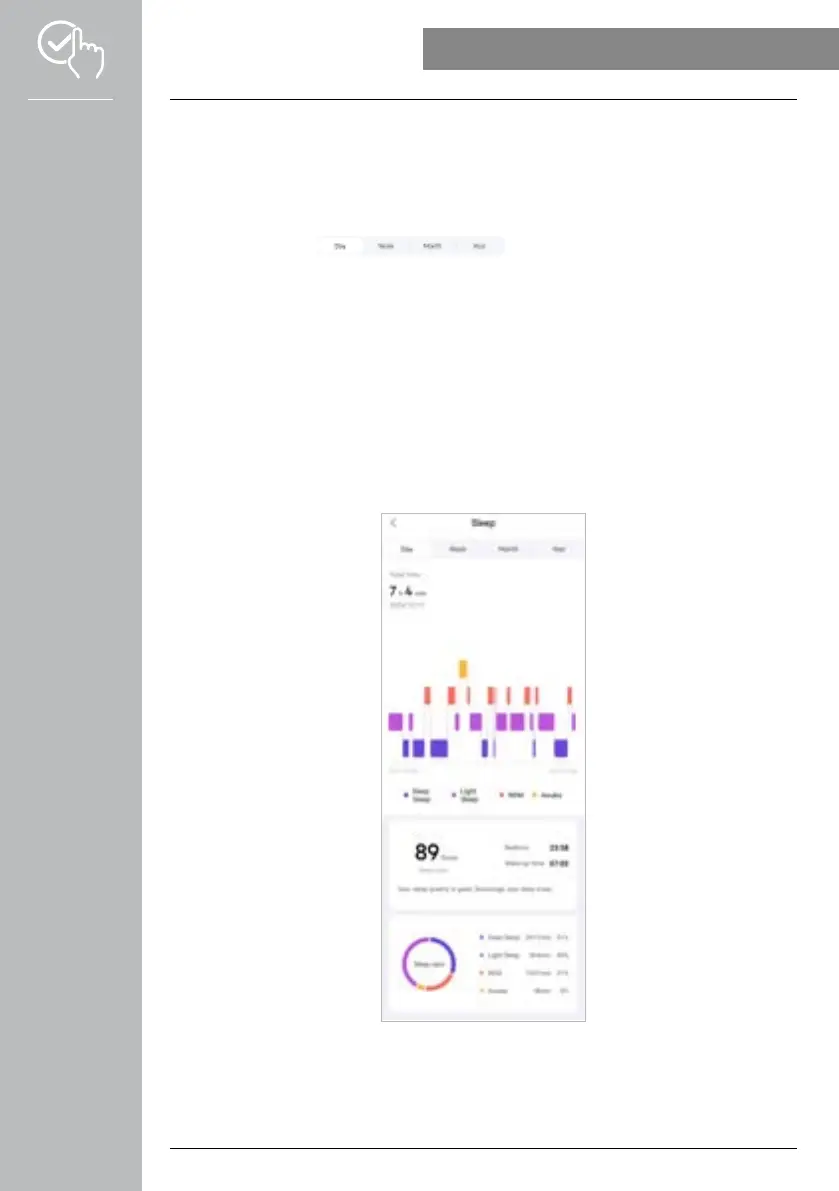
• Tap on the [SLEEP] card to obtain an overview of your sleep analyses.
• Here you can see an overview of the total sleep time as well as the distribution of your sleep time into
deep sleep, light sleep, waking phases and REM phases. In the centre of the screen you can also see
the start and end times of the sleep.
• Normally, the daily view of the sleep analysis is displayed.
Use the top menu bar to select the period displayed. Swiping to the
left and right on the diagram for a longer time enables you to scroll forward and back between the
individual days (or weeks/months/years). Here you can see an overview of your sleep patterns for a
week, a month or a year. At the bottom of the screen you will see the following data related to a week,
a month or a year:
- Average duration of sleep per day
- Average deep sleep phase on one day
- Average light sleep phase on one day
- Average start of sleep phase
- Average end of sleep phase
- Average REM phase
- Average waking phase



 To Next Page