38
USING THE "HAMA FIT MOVE" APP
9.2 Training mode
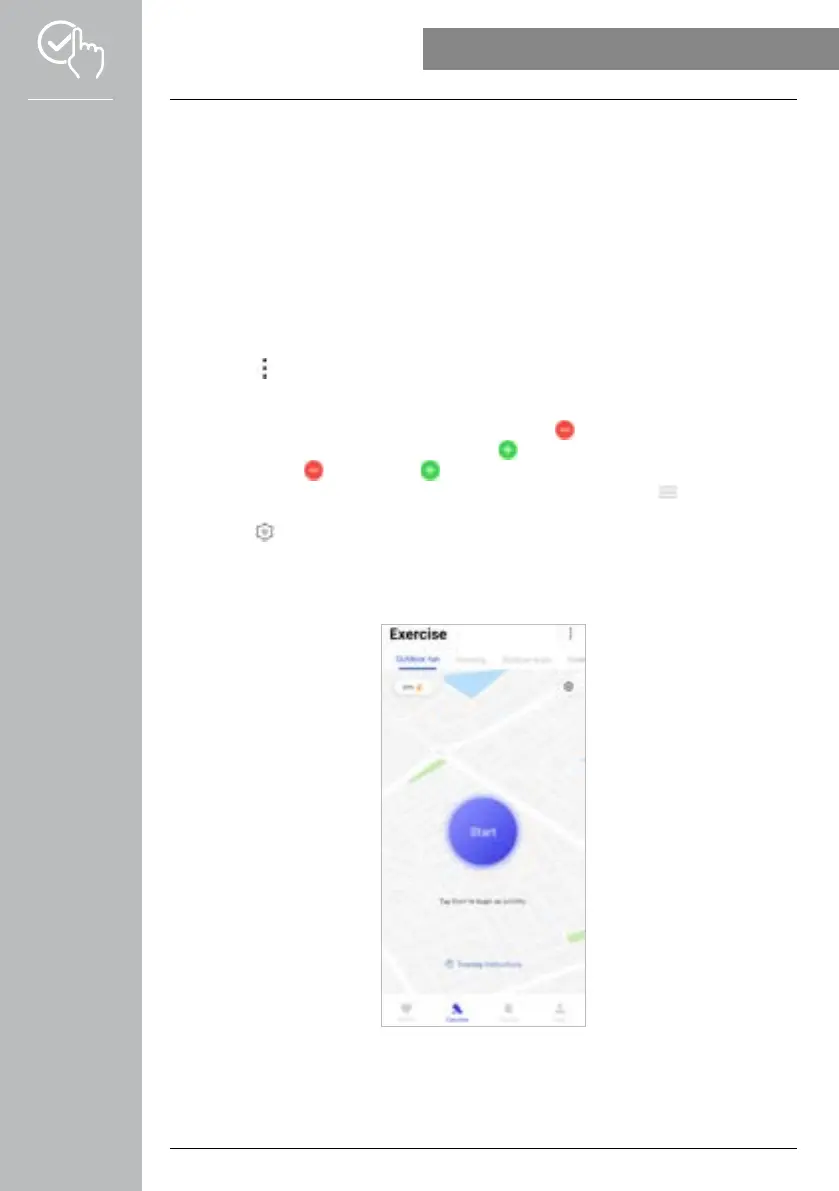
• Use the bottom menu bar to tap on [EXERCISE] to start an activity via the app. Parallel to this, the
activity is also started on your smartwatch. The activity can then be controlled either via the app or
directly on the smartwatch.
• Swipe to the left and right to move forward and back between the individual activities.
• The following activities are activated in the app by default:
- Outdoor running
- Indoor running
- Outdoor walking
- Indoor walking
- Hiking
- Outdoor cycling
• Tap on the [ ] symbol at the top right and then on [EDIT SPORTS MODE] to select the activities
which are displayed. You can choose from a total of 6 different activities. You can hide activities and
alter the sequence of the activities.
• The activities that are at the top of the list and marked by the [ ] symbol are displayed. The activities
that are at the bottom of the list and marked by the [ ] symbol are not displayed.
• You can tap on the [ ] symbol or the [ ] symbol to remove or add an activity, respectively.
• You can also change the sequence of the activities by pressing and holding the [ ] symbol and
moving the corresponding activities to the respective positions.
• Tap on the [ ] symbol to define the following settings:
- Set a training goal (distance, calories, steps, duration).
- Activate an alarm to sound on reaching the goal (1, 3, 5, 10 km).
- Set a heart rate zone and activate an alarm.



 To Next Page