MS1000 Control System
Installation Guide
GD6063-1 Page 18 of 30
hanwell.com
Warning: The Hanwell supplied cable’s individual conductors and plug carry the
following signals:
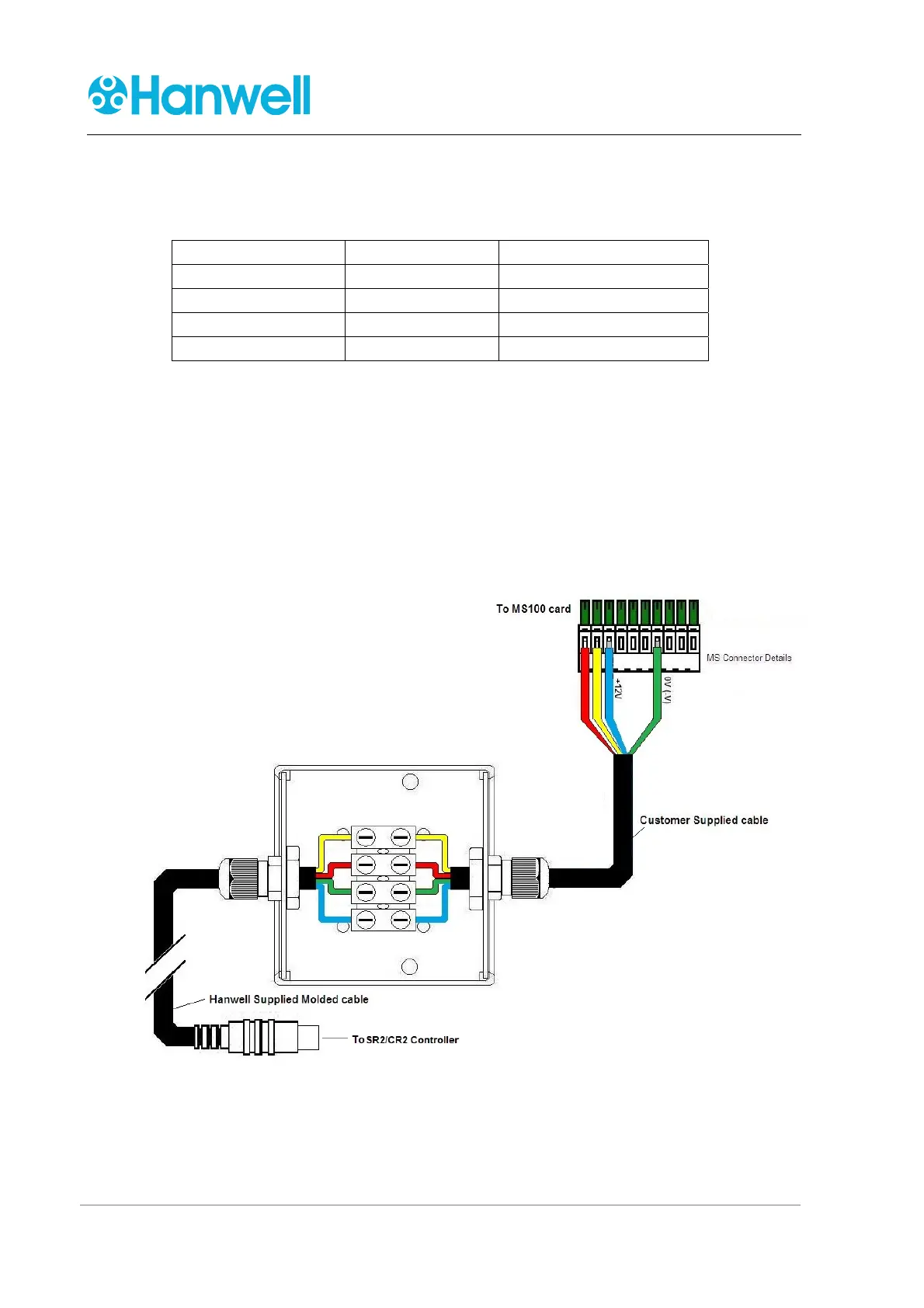
Conductor Colour Signal Line Description
Red TX+ RS485 Tx +
Yellow TX- RS485 Tx -
Blue +12V Power +12V
Green GND Power 0V
The colours of the conductors of the Customer supplied cable may differ from those
of the Hanwell supplied cable.
As a result, it is important to ensure that the correct connections are made between
the CR3/SR2 Controller and the MS1000 Control Unit, via the Hanwell supplied cable
with a moulded mini-DIN plug, the Junction Box and the Customer supplied cable.
Check the connections thoroughly as any incorrect wiring may severely damage the
MS1000 Control Unit and possibly the CR3/SR2 Controller as well.
5. Refit the Junction Box’s lid.
Figure 7 – MS Connector Wiring
6. Feed the opposite end of the Customer supplied cable through the cable gland in the
bottom of the MS1000 Control Unit’s case and tighten the gland nut.



 To Next Page