| www.harmar.com | 800-833-0478
TEC0020 2018JAN3 P/N: 630-00025 Rev D AL600 & AL690 Hybrid Installation & Owner's Manual
26
SECTION 2 : INSTALLER
Installation - AL690
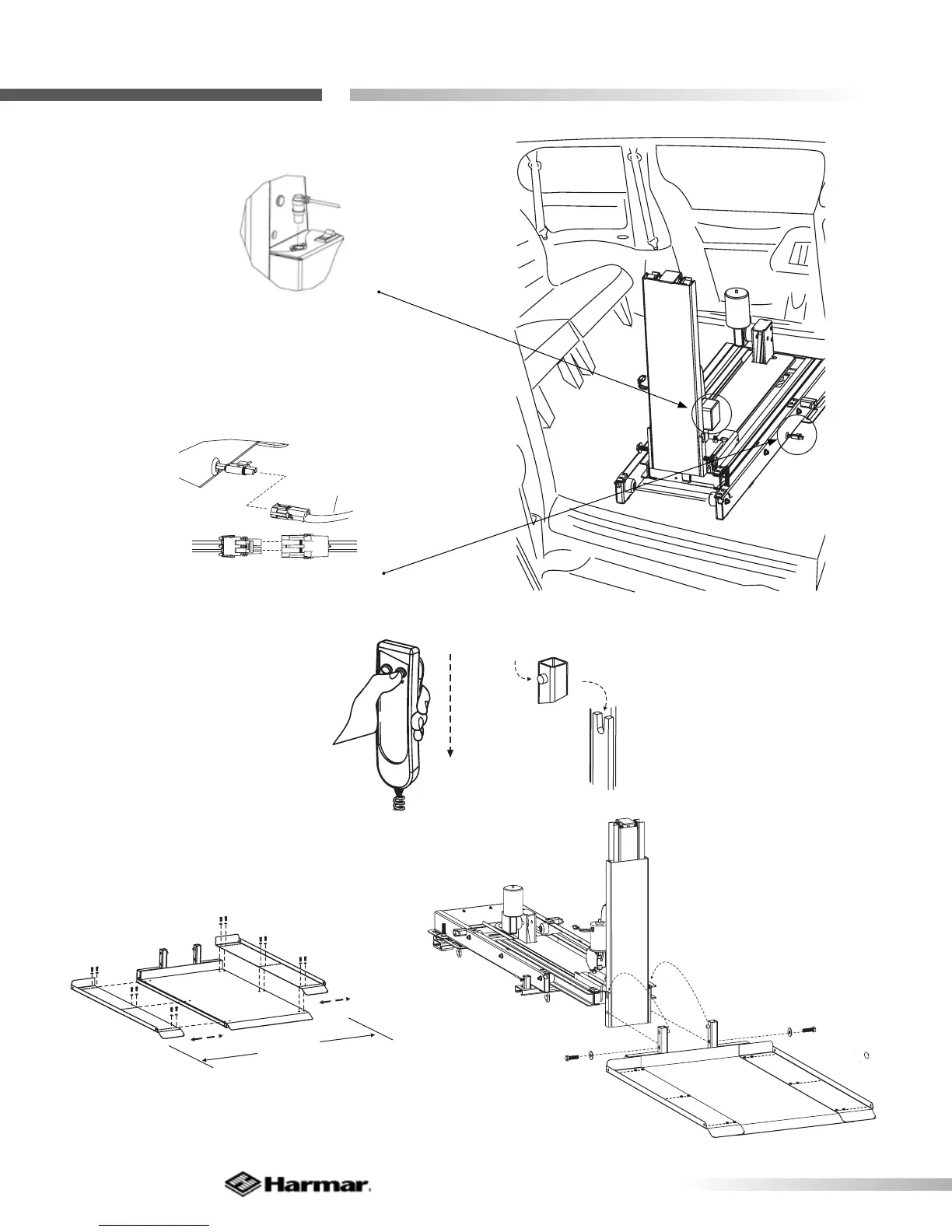
6. Plug Hand
Controller into lift.
[Figure 26-1]
From vehicle harness
(installed on page 12)
A
B
A
B
BLACK
RED
BLACK
RED
LIFT
FROMVEHICLE HARNES
(FROMBATTERY )
7. Connect to vehicle
harness. [Figure 26-2]
8. Press the DOWN button until
the lift’s tower has moved out of
the vehicle. [Figure 26-3]
The platform components may be re-
assembled to match the opening of the
vehicle’s side door. [Figure 26-4]
WIDTH OF
VEHICLE
NG
9. Attach platform by placing platform’s upright
pins into u-shaped bracket on tower. [Figure 26-5]
10. Install ½-13 x 1-3/4”
Hex head Bolts and ½”
at washers into threaded
holes as shown. [Figure 26-6]
Test full motion of lift into
and out of the vehicle. Be
sure lift is level and that no
obstructions interfere with
the travel of the platform.
Tighten ALL fasteners
from ALL steps.
Figure 26-1
Figure 26-2
Figure 26-3
Figure 26-4
Figure 26-5
Figure 26-6









 To Next Page