8). Near Empty alarm
When the syringe is about to be empty, “Near Empty” shall sound and display on the screen.
9). Syringe off alarm
During operation, take out the syringe or pull handle does not compress on syringe, the device shall
display “syringe off” and give alarm sound.
10). Handle off alarm
During operation, move the push handle, the device shall display “Handle off” and give alarm sound.
8.3 Syringe Setting
The syringe pump is built-in 6 brands of syringe, BOON, JR, LX, SG, HD and KDL.
(1) To use syringe mentioned above, select “Syringe” on main menu, Press OK key to enter syringe
setting interface. Press OK key to choose “select syringe”, then select the syringe brand and press OK key
to confirm.
(2) To use the other brand of syringe , user could self-define the syringe name then do calibration.
Calibration method:
a) Enter syringe setting interface and select “Set Syringe Para”.
b) Select a brand and press OK key. Select size of syringe and press OK key, input length and tail
value of the syringe and press OK key to save it, select “confirm” and press OK key. press to exit
after calibration.
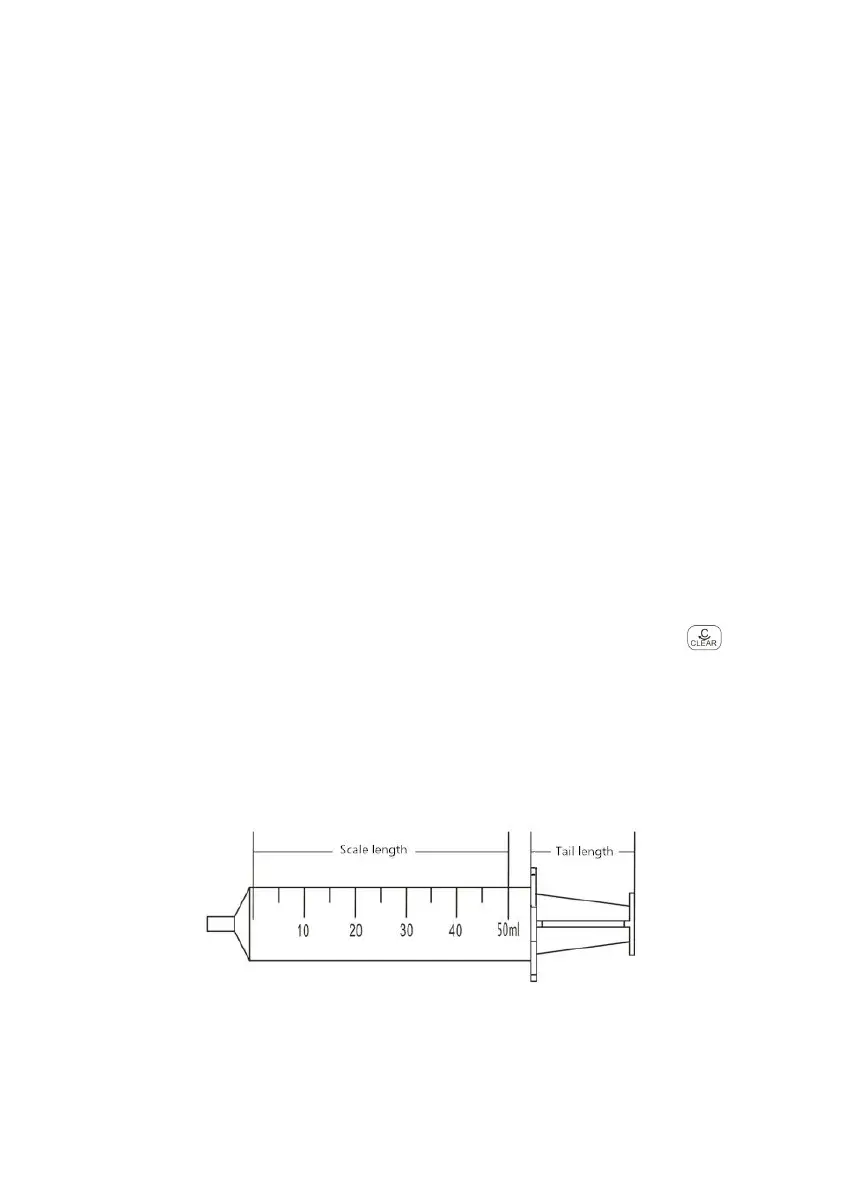
Choose 50ml syringe as an example. Install this syringe to syringe pump as per instruction 8.1.3.
Select “Brand A”–“Set 50ml syringe”, input the actual scale length and tail length of the syringe (the
measurement method as shown in Diagram 83-1), and press OK key to save it, select “confirm” and press
OK key.
(Diagram 832-1)



 To Next Page