41
Timer Override
Touch Series
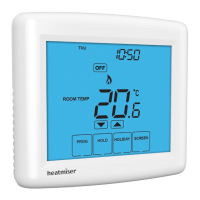
To override the timed output ‘ON/OFF’, follow these steps.
• Press the ‘Hold’ key once ...........................................................................................................
• Use the ‘Up/Down’ keys to set the desired ‘Hold’ time (Hours) then press ‘NEXT’ .
Minutes will now ash.
• Use the ‘Up/Down’ keys to set the desired ‘Hold’ time (Minutes) ................................
• Use the ‘Up/Down’ keys in the center to adjust the output state ...............................
• Press ‘DONE’ to conrm selection ...........................................................................................
You will see the ‘HOLD LEFT’ indication is displayed on screen.
The time will countdown the set duration and then revert to the normal program.
To cancel Timer Override
• Press ‘HOLD’ then press ‘CANCEL’ ...........................................................................................
Countdown Mode (Program Mode Set to 03)
• Press the ‘Hold’ key once ...........................................................................................................
• Use the ‘Up/Down’ keys to set the desired ‘Hold’ time (Hours) then press ‘NEXT’ .
Minutes will now ash.
• Use the ‘Up/Down’ keys to set the desired ‘Hold’ time (Minutes) ................................
• Press ‘DONE’ to conrm selection ...........................................................................................
You will see the ‘HOLD LEFT’ indication is displayed on screen.
To cancel Countdown.
• Press ‘HOLD’ then press ‘CANCEL’ ...........................................................................................



 To Next Page