!!!!!!!!!!!!!!!!!!!!!!!!!!!!!!!!!!!!!!!!!!!!!!!!!!!!!!!!IPCAM User Manual
- 12 -
2.5 For Administrator
When you login as administrator, “
For Administrator
” is enabled.
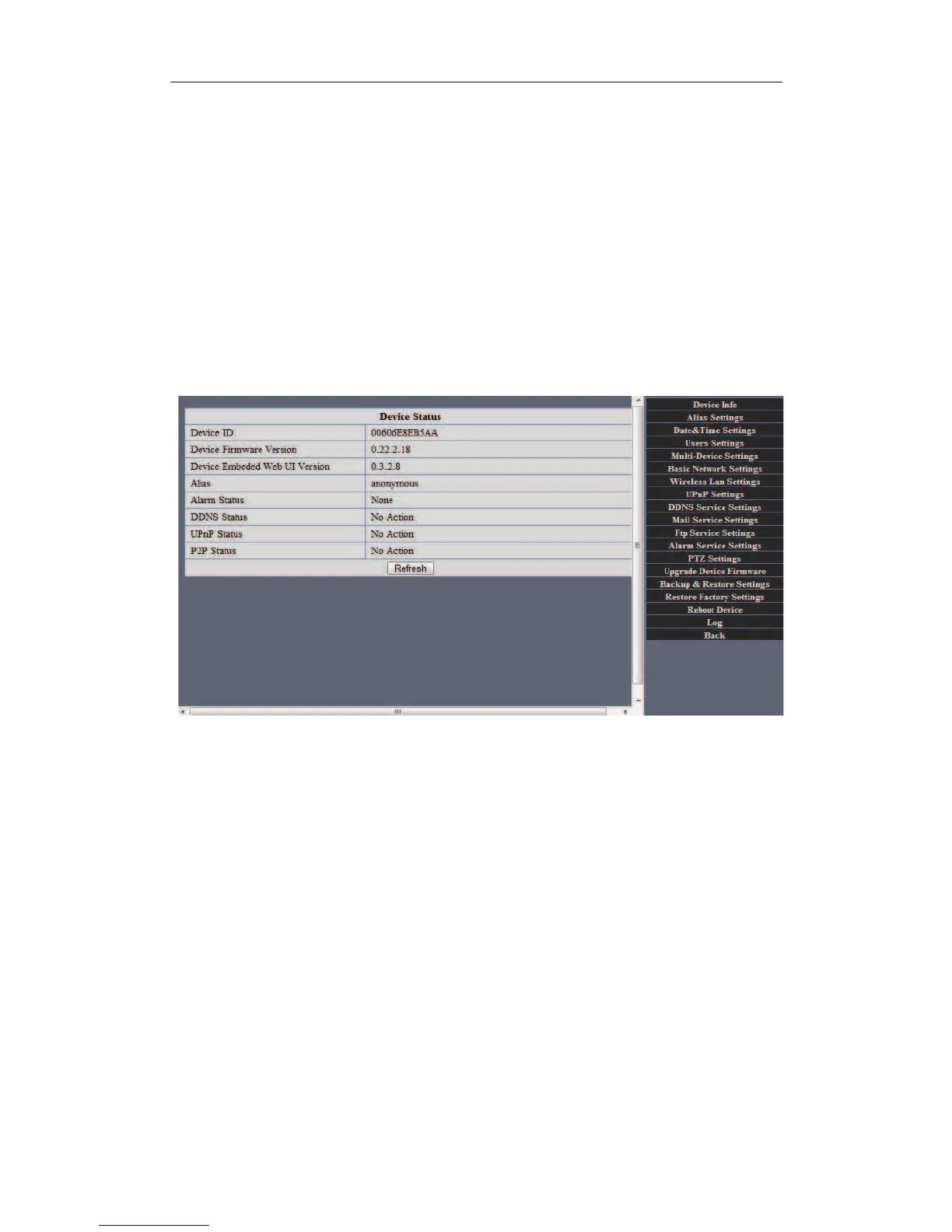
Device Info:You can find the information about Device ID,Firmware Version and
Embeded Web UI Version.
Figure 2.9
Alias Settings: You can Input the new name as you like.
Data&Time Settings: Data&Time Settings page.
Users Settings: Eight accounts are acceptable for this system. Here the eight users can
configure their user names and password as Administrator, Operator or Visitor.
! Visitor: In this mode,you can only view.
! Operator:You can control the direction of IP Camera and set some parameter.
! Administrator:You can setup the advanced configurations of the IP Camera.
UpnP Settings:If you access IP Camera,to be make sure UpnP Status is Succeed.
Upgrade Device Firmware:Upgrade Device Firmware and device embeded web UI
sofeware in this page.
Restore Factory Settings: Restore factory settings of the device.
Reboot Device:Reboot the device.
Back: Back to Monitoring Mode.


 To Next Page