!!!!!!!!!!!!!!!!!!!!!!!!!!!!!!!!!!!!!!!!!!!!!!!!!!!!!!!!IPCAM User Manual
- 7 -
Figure 2.2
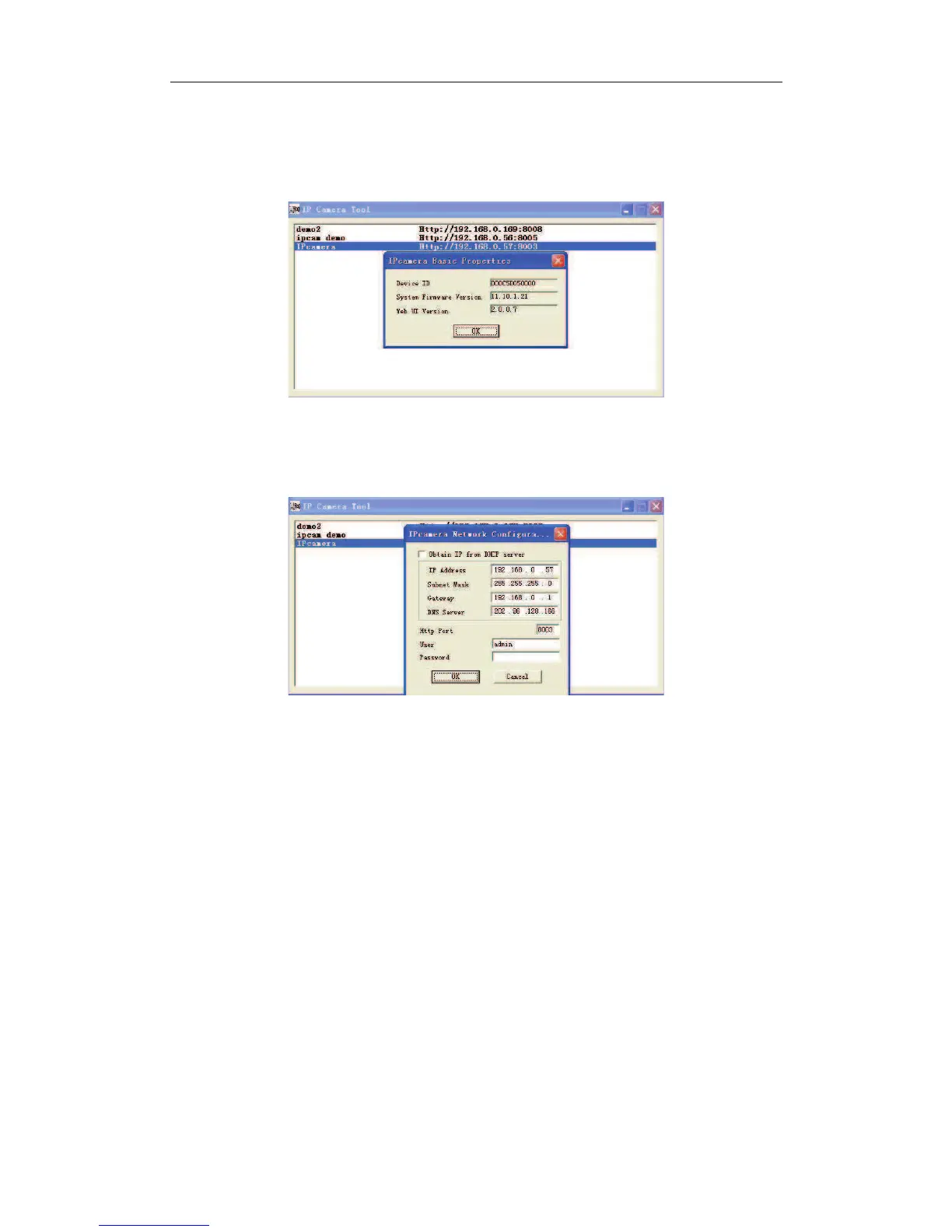
! Basic Properties
There are some device informations in the Basic Properties, such as Device ID, System
Firmware Version, Web UI Version.
Figure 2.3
! Network Configuration
In this page, you can configure the Netwrok parameter.
Figure 2.4
DHCP checkbox:if checked, the device will obtain IP from DHCP server (To be make
sure the Router which the device connect with has DHCP function).
IP address: Fill in the IP address assigned and make sure it is in the same subnet as the
gateway.(i.e. the first three sections are the same)
Mask: The default subnet mask of the equipment is: 255.255.255.0
Gateway: Make sure it is in the same subnet with PC IP address. Default Gateway
address is 192.168.0.1
DNS: IP address of IPS network provider.
Port: LAN port assigned for the equipment, usually 80
User & Password : Default administrator username/password: admin/No password
Enable Using Dhcp the system will assign a reasonable IP address for your equipment
only if your gateway supports DHCP (It is the case with most gateways).
NOTE: when the prompt”ubnet doesn’t match,dbclick to change!”ppeared,please set the
IP Camera IP address once again.


 To Next Page