!!!!!!!!!!!!!!!!!!!!!!!!!!!!!!!!!!!!!!!!!!!!!!!!!!!!!!!!IPCAM User Manual
- 21 -
4) Wait at least 30 seconds to unplug the ethernet cable,then unplug the power supply.
5) Plug the power supply making sure that the ethernet is not connected
6) After around 30 seconds, if the LED blinks ,it indicates it is working in wifi mode
7) Camera login.(details:
2.2)
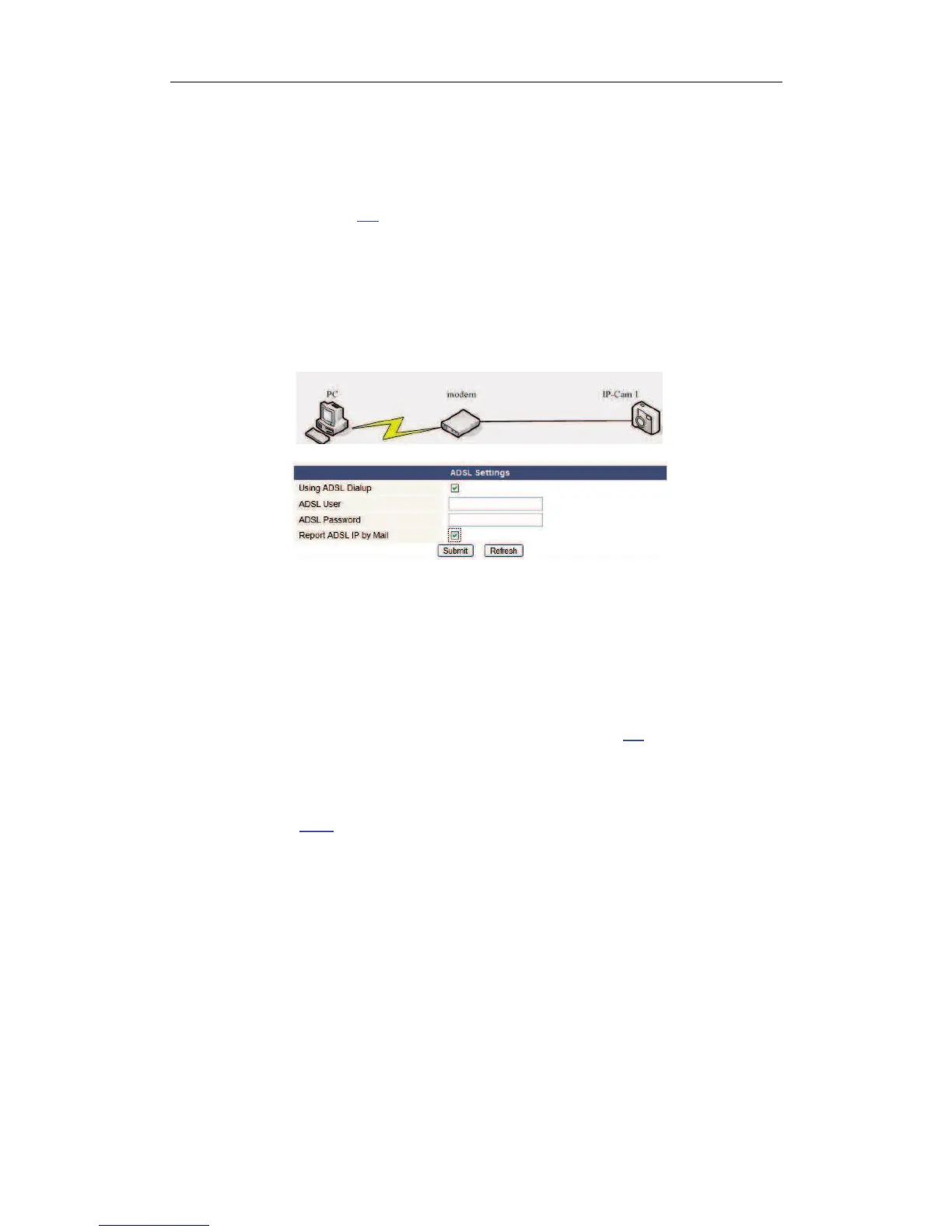
3.3 Connected to the Internet through ADSL directly
!
Figure 3.2
1) Use Network cable connect IP Camera to PC
2) Enter IP Camera Tool to set the basic configuration.(details: 2.1)
3) login the Camera homepage as Administration and enter ADSL Settings page to input
ADSL User name and password.
4) Enable DDNS service at the same time and Click <Submit> and to reboot the
Device.(details:
2.5.3
)
5) Connect IP Camera to the ADSL directly, you can access the Camera from Internet by
domain name.
NOTE:Please choose the option “Report ADSL IP by Mail”,then it will send ADSL IP to


 To Next Page