Users Manual for T4000+ Series 11
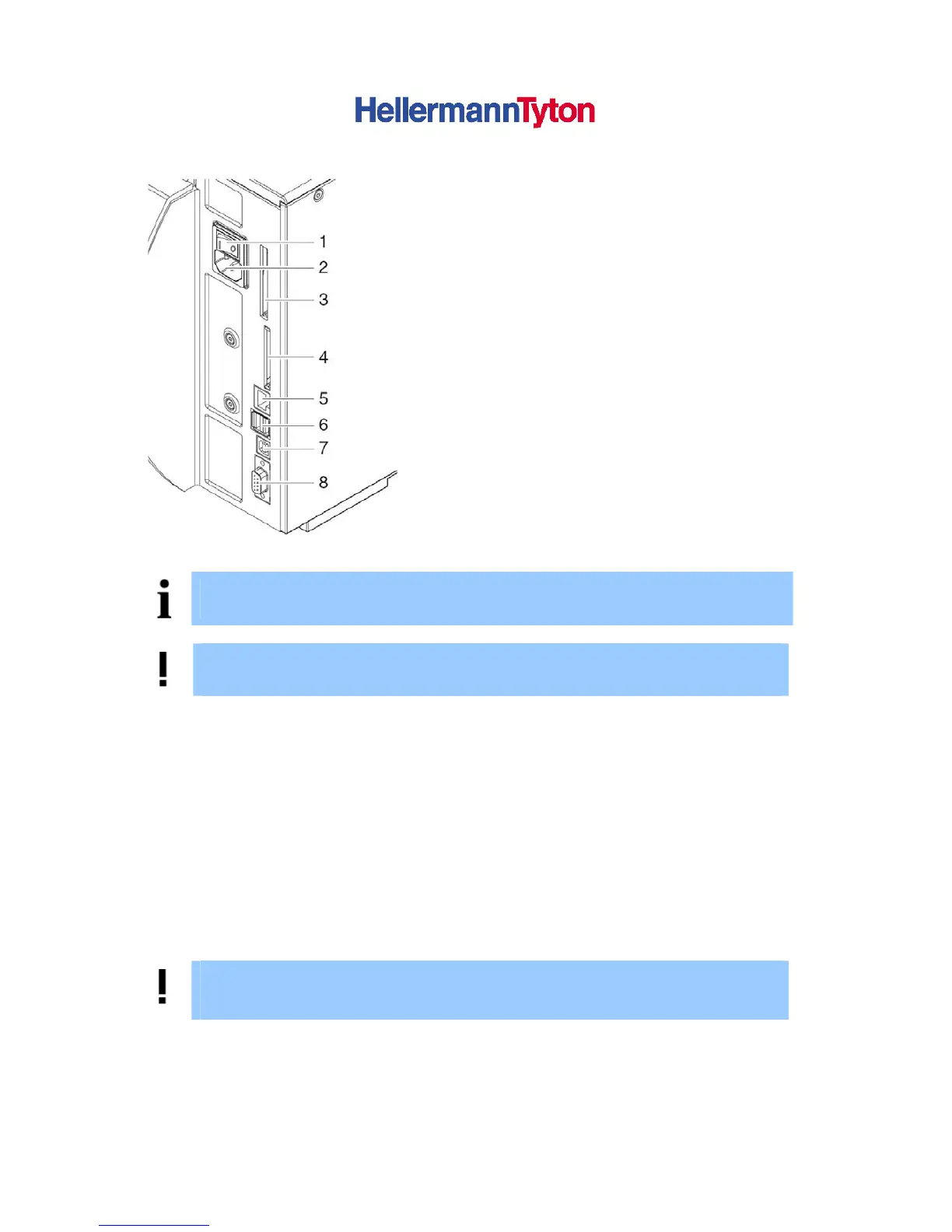
3.2.2. Connecting the device
(1) Power switch
(2) Power connection jack
(3) Slot for PC-Card Type II
(4) Interface for Memory Card
(5) E thernet 10/100 Base-T
(6) 2 USB master ports for keyboard,
scanner or service key
(7) USB-High-Speed slave port
(8) Serial RS232 C port
Figure 4 Connections
NOTICE!
Please keep the original packaging in case the printer must be returned.
DANGER!
The device and printing materials will be damaged by moisture and wetness.
► Set up label printers only in dry locations protected from splash water.
3.2.3. Connection to the Power Supply
The printer is equipped with a wide area power unit. The device can be operated with a supply
voltage of 230 V~/50 Hz or 115 V~/60 Hz without adjustment.
Make sure that the device is switched off!
(1) Plug the power cable into the power connection socket (2)
(2) Plug the power cable into a grounded socket.
3.2.4. Connecting to a Computer or Computer Network
ATTENTION!
Inadequate or no grounding can cause malfunctions during operations.
Ensure that all computers and cables connected to the label printer are grounded.
► Connect the label printer to a computer or network by a suitable cable.
For details of the configuration of the individual interfaces Æ Configuration Manual.



 To Next Page