Users Manual for T4000+ Series 18
5.1.2. Inserting media strip into the print head
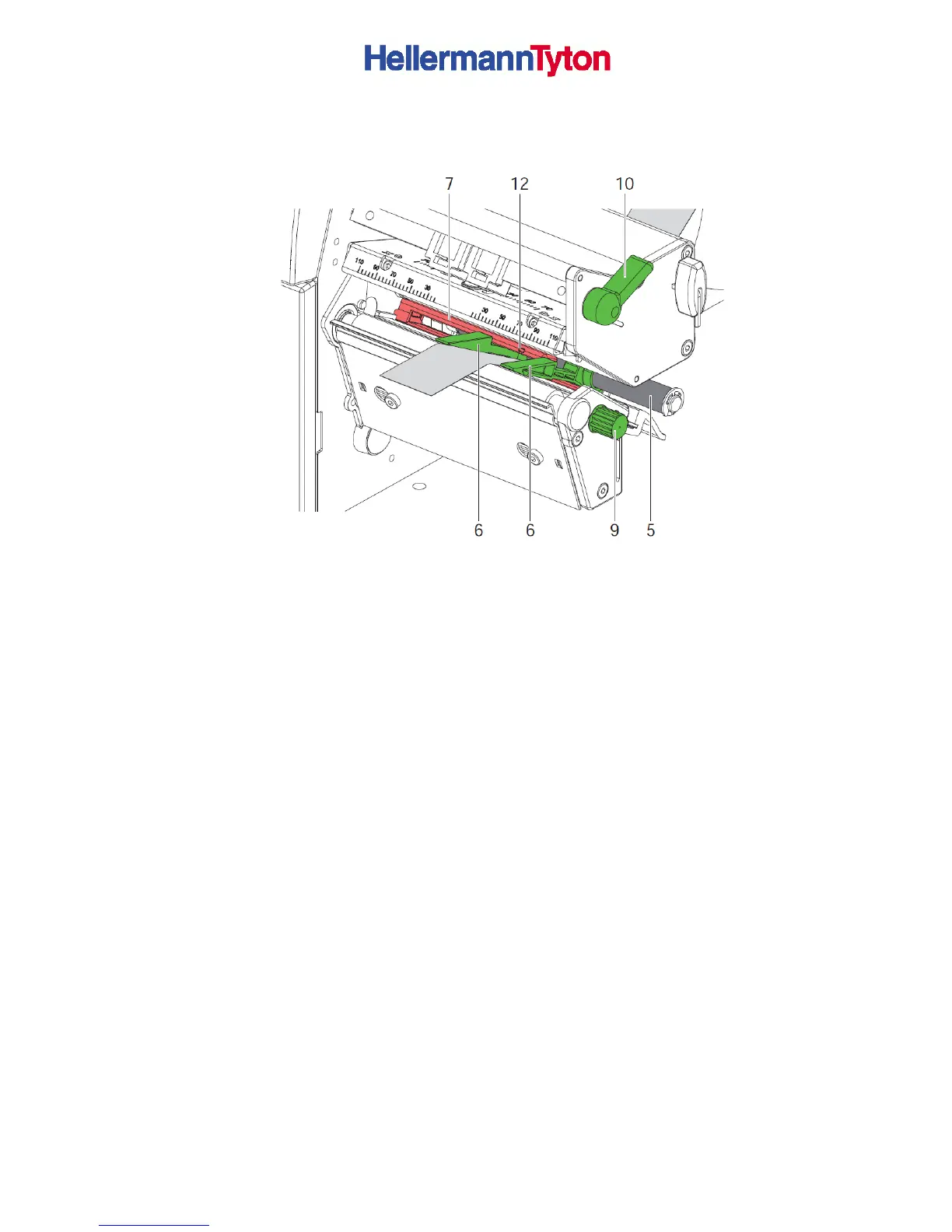
Figure 7 Inserting a media strip into the print head
1. Turn lever (10) counter clockwise to lift the print head.
2. Move guides (6) apart with the knob (9) until the media can pass between them.
3. Push media strip below the guide roller (5) between the guides (6).
4. Guide media strip through the label sensor (12) in such a way that it leaves the print
mechanics between print head (10, fig 3) and the print roller (11, fig 2).
5. Move guides (6) against the edges of the material by turning the knob (9).
5.1.3. Setting the Labels Sensor (Figures 7 & 8)
The label sensor (7, fig. 7) can be shifted perpendicular to the direction of paper flow for
adaptation to the media. The sensor unit of the label sensor is visible from the front through
the print unit and is marked with an indentation (12, fig. 7) in the label sensor retainer. When
the printer is switched on, a yellow LED illuminates the sensor position.
► Loosen the knurled knob (8, fig 6) and position label sensor by moving the knurled knob in
such a way that the sensor can detect the label gap or a reflex or cut-out mark.
► - or, if the labels deviate from a rectangular shape, -
► Align label sensor with the front edge of the label in the direction of paper flow.
► Re-tighten the knurled knob.
► Turn lever (10, fig. 7) clockwise to lock the print head.



 To Next Page