EN
AB1203EN_SA Rev. 02 / 11.2022 25/38
20.2 Acoustic signal
The acoustic signal sounds:
after a malfunction occurs in a 2-second interval.
after ending the centrifugation run and the rotor is at a standstill in a 30-second interval.
The acoustic signal is ended by pressing any key.
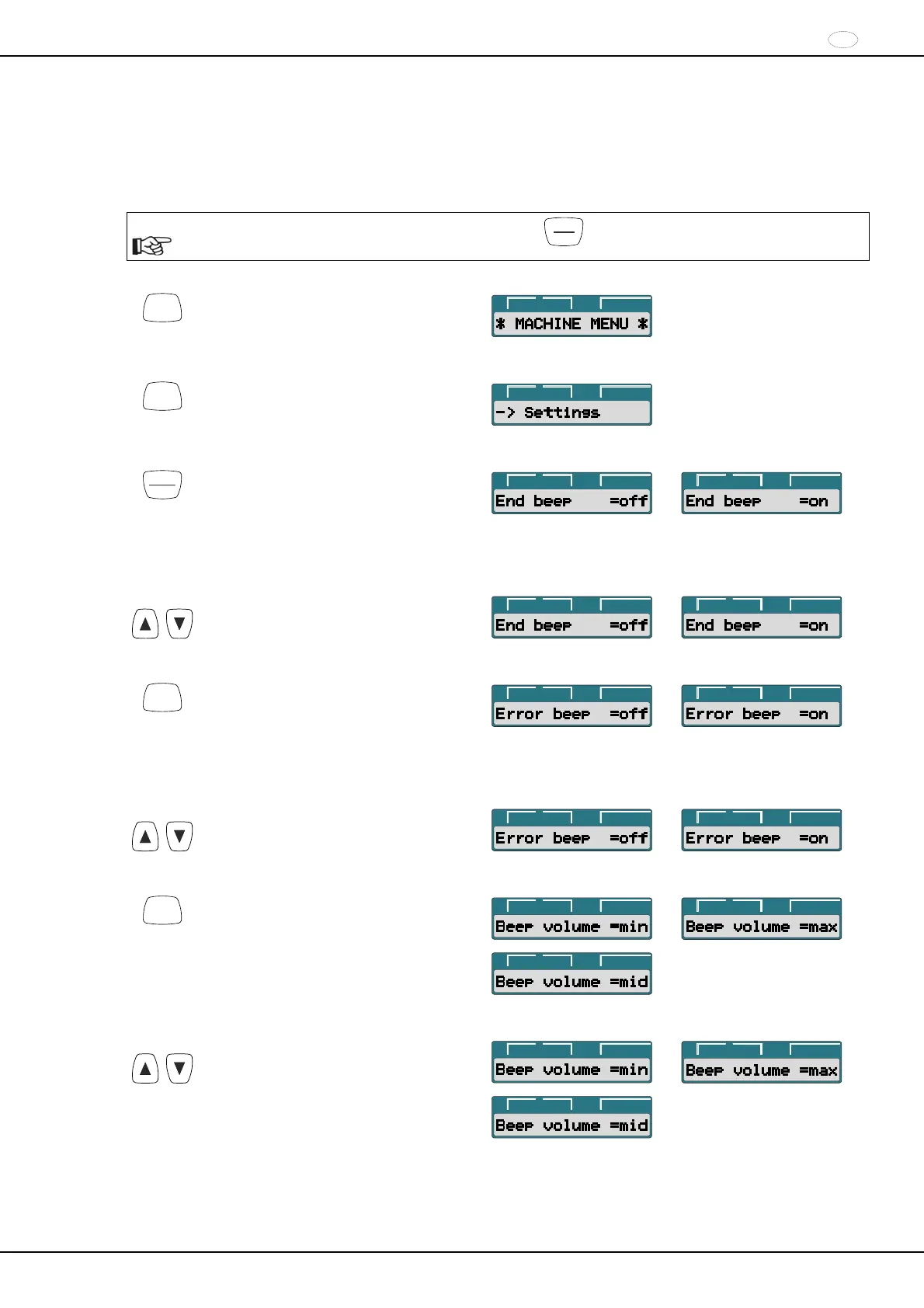
If the rotor is at a standstill, the acoustic signal can be set as follows:
The procedure can be aborted at any time by pressing the
STOP
OPEN
key. In this case, the settings are not stored.
SELECT
Press and hold the button for eight
seconds.
t/min:s
RPM
>RCF<
SELECT
Press the key until the following is
displayed.
t/min:s
RPM
>RCF<
START
PULSE
Press the key.
End beep : Acoustic signal after ending
the centrifugation run.
off : Signal deactivated.
on : Signal activated.
t/min:s
RPM
>RCF<
t/min:s
RPM
>RCF<
t
With the keys, set off or on.
t/min:s
RPM
>RCF<
t/min:s
RPM
>RCF<
SELECT
Press the key.
Error beep : Acoustic signal after a
malfunction occurs.
off : Signal deactivated.
on : Signal activated.
t/min:s
RPM
>RCF<
t/min:s
RPM
>RCF<
t
With the keys, set off or on.
t/min:s
RPM
>RCF<
t/min:s
RPM
>RCF<
SELECT
Press the key.
Beep volume : Volume of the acoustic
signal.
min : soft
mid : medium
max : loud
t/min:s
RPM
>RCF<
t/min:s
RPM
>RCF<
t/min:s
RPM
>RCF<
t
With the keys, set min, mid, or max.
t/min:s
RPM
>RCF<
t/min:s
RPM
>RCF<
t/min:s
RPM
>RCF<
Continued on next page


 To Next Page
 Loading...